Loading
Form preview
  • US Legal Forms
  • Form Library
  • Tax Forms
  • Executive Department Treasury IRS Forms
  • Irs 8879 2015

Get Irs 8879 2015

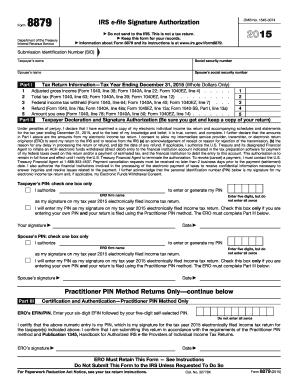
Iled using the Practitioner PIN method. The ERO must complete Part III below. Date Your signature Spouse s PIN: check one box only I authorize to enter or generate my PIN ERO firm name Enter five digits, but do not enter all zeros as my signature on my tax year 2015 electronically filed income tax return. I will enter my PIN as my signature on my tax year 2015 electronically filed income tax return. Check this box only if you are entering your own PIN and your return is filed usin.

This website is not affiliated with IRS

How it works

  1. Open form

    Open form follow the instructions

  2. Easily sign form

    Easily sign the form with your finger

  3. Share form

    Send filled & signed form or save

How to fill out the IRS 8879 online

Form 8879 is crucial for authorizing the electronic filing of your income tax return. This guide provides clear, step-by-step instructions to ensure you correctly complete this form online, facilitating a smooth filing process.

Follow the steps to fill out the IRS 8879 online.

  1. Click ‘Get Form’ button to access the form and open it in a suitable online editor.
  2. Enter the taxpayer’s name and social security number at the top of the form. If applicable, also include the spouse’s name and social security number.
  3. In Part I, fill out the tax return information for the tax year ending December 31, 2015. Include figures such as adjusted gross income, total tax, federal income tax withheld, refund amount, and amount owed. Make sure to use whole dollars only.
  4. Move to Part II to provide the Taxpayer Declaration and Signature Authorization. Carefully read the declaration and check the appropriate box based on whether you authorize the ERO to enter or generate your PIN.
  5. If you choose to authorize the ERO, provide the ERO firm's name and enter a five-digit PIN that is not all zeros in the designated field. If entering your own PIN, ensure you check the relevant box.
  6. Complete the signature lines with your handwritten or electronic signature along with the date of signing. If applicable, also have your spouse complete their section.
  7. If the Practitioner PIN method is being used, continue with Part III, entering the ERO's EFIN and self-selected PIN information.
  8. Finally, review all completed information for accuracy. Save the changes, and you can choose to download, print, or share the completed form as necessary.

Start filling out your IRS 8879 form online today to ensure timely and accurate tax filing.

Get form

Experience a faster way to fill out and sign forms on the web. Access the most extensive library of templates available.

Related content

About Form 8879, IRS e-file Signature...
Mar 21, 2025 — Form 8879 is the declaration document and signature authorization for an...
Learn more
Signing an Electronic Tax Return
The ERO must retain Forms 8879 and 8878 for three years from the return due date or the...
Learn more
2011 Publication 334
Dec 21, 2011 — You will be asked to complete Form 8879, IRS e-file employee, member...
Learn more

Related links form

GA WC-1 2018 OPM SF 2809 2011 IL DSD FR 9 2013 TX VTR-60 2016

Questions & Answers

Get answers to your most pressing questions about US Legal Forms API.

Contact support

You do not send the IRS form 8879 to the IRS as a standalone document. Instead, it is retained by your tax preparer and provided only upon request by the IRS. Be sure to keep communication open with your tax professional to ensure proper handling of this form.

A corporate tax return is filed by C Corporations and S Corporations that meet certain criteria set by the IRS. Typically, business owners or their tax preparers handle this process. Utilizing platforms like US Legal Forms can simplify your filing experience and ensure compliance.

IRS 8879 represents the e-file Signature Authorization, ensuring that the corporation’s tax return can be submitted electronically. The form verifies the identity of both the taxpayer and the preparer, which is crucial for compliance. Having this authorization helps maintain the integrity of the filing process.

The IRS 8879 must be filed by corporations that electronically file their tax returns. This form acts as an authorization for the electronic submission of the company's tax documents. As a business owner, it's essential to engage a qualified tax professional for accurate filing.

The person responsible for filing the IRS 8879-CORP is typically the tax professional who prepares the corporate tax return. This includes certified public accountants or enrolled agents who have prepared the corporation’s Form 1120. If you are a business owner, ensure your tax preparer is equipped to manage this form correctly.

The IRS 8879-CORP did not directly replace the 8879 S; rather, it serves a different purpose. While 8879 S pertains to S Corporations, 8879-CORP is specifically designed for C Corporations. Understanding these distinctions is crucial when filing your corporate tax returns.

IRS Circular E serves as the guide for employers on how to withhold, deposit, and report federal income tax. It outlines the regulations and requirements for payroll tax management. Understanding Circular E can help ensure that businesses comply with tax withholding responsibilities and avoid potential penalties.

The purpose of IRS form 8879 is to provide a secure method for taxpayers to authorize the e-filing of their tax returns. This form serves as a digital signature, affirming that the information is accurate and complete. Using the IRS 8879 helps streamline the tax submission process and supports speedy refunds.

To fill out an IRS withholding form, you begin by providing your personal details, including your name and Social Security number. Next, you'll specify your filing status and claim allowances based on your situation. If you’re unsure, consider using tools or services like USLegalForms to guide you through the process and ensure all information is accurate.

The taxpayer and the tax preparer both play roles in completing IRS form 8879. The taxpayer signs the form to authorize the e-filing, while the tax preparer enters their information. This collaboration ensures the accurate submission of tax returns and adherence to IRS regulations.

Get This Form Now!

Use professional pre-built templates to fill in and sign documents online faster. Get access to thousands of forms.
If you believe that this page should be taken down, please follow our DMCA take down processhere.
Get IRS 8879
  • Adoption
  • Bankruptcy
  • Contractors
  • Divorce
  • Home Sales
  • Employment
  • Identity Theft
  • Incorporation
  • Landlord Tenant
  • Living Trust
  • Name Change
  • Personal Planning
  • Small Business
  • Wills & Estates
  • Packages A-Z
  • Affidavits
  • Bankruptcy
  • Bill of Sale
  • Corporate - LLC
  • Divorce
  • Employment
  • Identity Theft
  • Internet Technology
  • Landlord Tenant
  • Living Wills
  • Name Change
  • Power of Attorney
  • Real Estate
  • Small Estates
  • Wills
  • All Forms
  • Forms A-Z
  • Form Library
  • Legal Hub
  • About Us
  • Help Portal
  • Legal Resources
  • Blog
  • Affiliates
  • Contact Us
  • Delete My Account
  • Site Map
  • Industries
  • Forms in Spanish
  • Localized Forms
  • State-specific Forms
  • Forms Kit
  • Real Estate Handbook
  • All Guides
  • Notarize
  • Incorporation services
  • For Consumers
  • For Small Business
  • For Attorneys
  • USLegal
  • FormsPass
  • pdfFiller
  • signNow
  • altaFlow
  • DocHub
  • Instapage
Form Packages
  • Adoption
  • Bankruptcy
  • Contractors
  • Divorce
  • Home Sales
  • Employment
  • Identity Theft
  • Incorporation
  • Landlord Tenant
  • Living Trust
  • Name Change
  • Personal Planning
  • Small Business
  • Wills & Estates
  • Packages A-Z
Form Categories
  • Affidavits
  • Bankruptcy
  • Bill of Sale
  • Corporate - LLC
  • Divorce
  • Employment
  • Identity Theft
  • Internet Technology
  • Landlord Tenant
  • Living Wills
  • Name Change
  • Power of Attorney
  • Real Estate
  • Small Estates
  • Wills
  • All Forms
  • Forms A-Z
  • Form Library
Customer Service
  • Legal Hub
  • About Us
  • Help Portal
  • Legal Resources
  • Blog
  • Affiliates
  • Contact Us
  • Delete My Account
  • Site Map
  • Industries
  • Forms in Spanish
  • Localized Forms
  • State-specific Forms
  • Forms Kit
Legal Guides
  • Real Estate Handbook
  • All Guides
Prepared for you
  • Notarize
  • Incorporation services
Our Customers
  • For Consumers
  • For Small Business
  • For Attorneys
Our Sites
  • USLegal
  • FormsPass
  • pdfFiller
  • signNow
  • altaFlow
  • DocHub
  • Instapage
Social Media
Call us now toll free:
+1 833 426 79 33
As seen in:
© Copyright 1999-2026 airSlate Legal Forms, Inc. 3720 Flowood Dr, Flowood, Mississippi 39232
  • Your Privacy Choices
  • Terms of Service
  • Privacy Notice
  • Content Takedown Policy
  • Bug Bounty Program
IRS 8879
This form is available in several versions.
Select the version you need from the drop-down list below.
2019 IRS 8879
Select form
  • 2019 IRS 8879
  • 2018 IRS 8879
  • 2017 IRS 8879
  • 2016 IRS 8879
  • 2015 IRS 8879
  • 2014 IRS 8879
  • 2013 IRS 8879
  • 2012 IRS 8879
  • 2011 IRS 8879
Select form