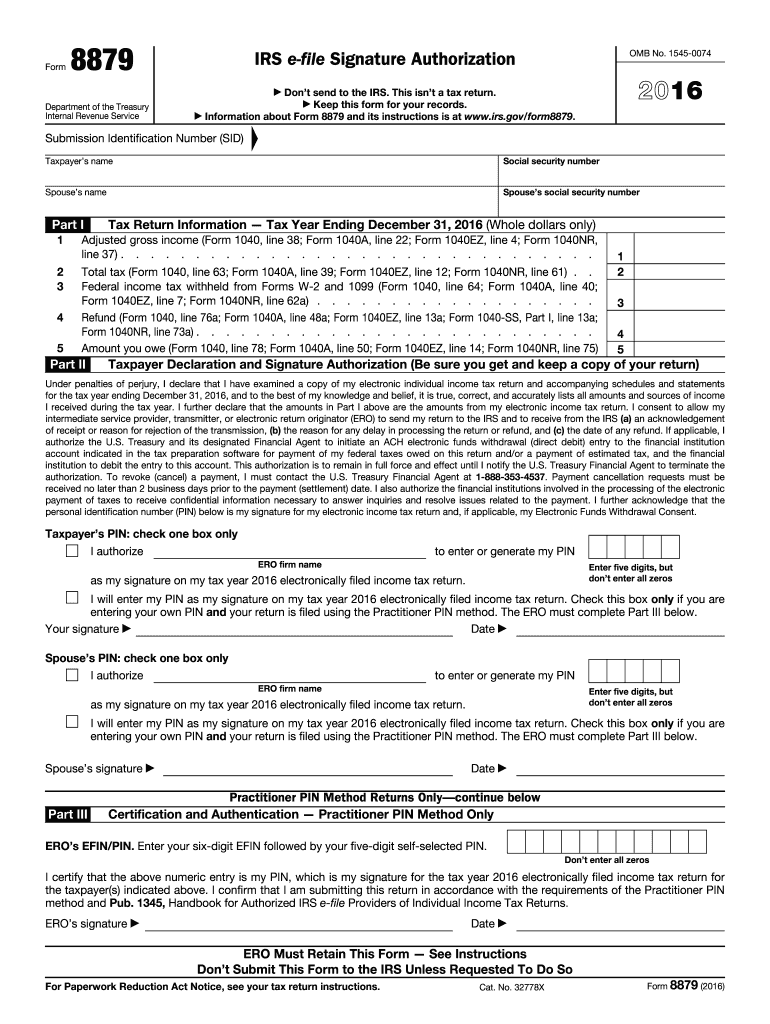
Tronic Funds Withdrawal Consent. Taxpayer s PIN: check one box only I authorize to enter or generate my PIN ERO firm name Enter five digits, but don t enter all zeros as my signature on my tax year 2016 electronically filed income tax return. I will enter my PIN as my signature on my tax year 2016 electronically filed income tax return. Check this box only if you are entering your own PIN and your return is filed using the Practitioner PIN method. The ERO must complete Part III below. Y.

Open form follow the instructions

Easily sign the form with your finger

Send filled & signed form or save
How to fill out the IRS 8879 online
Form 8879 is essential for taxpayers who wish to authorize an electronic return originator (ERO) to file their tax returns electronically. This guide provides a clear, step-by-step approach to filling out the IRS 8879 online, ensuring you understand each component of the form and how to complete it accurately.
Follow the steps to fill out the IRS 8879
- Use the ‘Get Form’ button to access the IRS 8879 form and open it in your preferred editor.
- Enter the taxpayer's name and social security number at the top of the form. If applicable, include the spouse's name and social security number.
- Complete Part I, which includes entering the adjusted gross income, total tax, federal income tax withheld, refund amount, and amount owed, using figures from the appropriate lines of your tax return.
- In Part II, review the taxpayer declaration statement carefully. The taxpayer must declare the accuracy of their income tax return and authorize the ERO to send their return to the IRS.
- Choose whether to authorize the ERO to enter or generate the taxpayer's PIN or enter it themselves. Check the appropriate box accordingly.
- Have the taxpayer sign and date the form, ensuring that the signature is either handwritten or an electronic signature, if supported.
- If applicable, complete Part III for the Practitioner PIN method, including the ERO's EFIN and self-selected PIN.
- Once the form is completed and signed, make sure to save, download, or print the form for your records and return it to the ERO.
Complete your IRS 8879 form online today to ensure a smooth e-filing process.
Experience a faster way to fill out and sign forms on the web. Access the most extensive library of templates available.
Related content
Mar 21, 2025 — Form 8879 is the declaration document and signature authorization for an...
The ERO must retain Forms 8879 and 8878 for three years from the return due date or the...
Dec 21, 2011 — You will be asked to complete Form 8879, IRS e-file employee, member...
Get answers to your most pressing questions about US Legal Forms API.
What is the IRS form 8879?
IRS form 8879 is a crucial document that allows taxpayers to electronically sign their tax returns when filed online. This form grants authorization for e-filing, displaying the taxpayer's commitment to the return's accuracy. It plays a significant role in modern tax filing, making the process more seamless. You can learn more about IRS 8879 and get assistance with it on the US Legal Forms platform.
What is the meaning of 8879?
The term IRS 8879 refers to the Declaration and Signature for an e-filed Return, a key document in the electronic tax filing process. It serves as an official endorsement of the return's contents by the taxpayer or their representative. Understanding the implications of this form helps in ensuring compliance with IRS regulations. You can find more detailed guidance on this through US Legal Forms.
How long does a tax preparer have to keep form 8879?
Tax preparers are required to keep the IRS 8879 for at least three years from the tax return's filing date. This retention period is essential for IRS compliance and potential audits. Keeping accurate records ensures a smooth response to inquiries or audits from the IRS. US Legal Forms provides tools to help tax preparers manage document retention effectively.
Who do I send form 8879 to?
You do not send the IRS 8879 form directly to the IRS. Instead, it must be retained by the tax preparer as part of their records. However, you should ensure the tax return itself is electronically filed with the IRS. Utilizing US Legal Forms can streamline the e-filing and retention process.
What does tax form 8879 mean?
The IRS 8879 is a Declaration and Signature for e-filed Returns, which allows taxpayers to authorize the electronic submission of their tax returns. This form provides a digital signature, validating the accuracy of the information submitted. Understanding this form is crucial for complying with IRS regulations. Consider using US Legal Forms for easy access and filing guidance.
Who files 8879 corp?
The IRS 8879 for corporations is filed by designated representatives of the company. This usually comprises individuals who have the authority to sign tax documents on behalf of the corporation. It is essential for these individuals to verify the return’s information before submission. Platforms like US Legal Forms can assist in managing and completing this filing efficiently.
What is the 330 day rule for taxes?
The 330-day rule for taxes refers to the timeframe in which taxpayers can amend their returns. Essentially, if you want to amend a return from the previous tax year, you must do so within 330 days of filing your return. Understanding this rule can help ensure that you make timely adjustments to your tax situation. For more information on tax amendments, visit sites like US Legal Forms.
What is the grace period for IRS e-file?
The grace period for IRS e-file usually refers to a 5-day extension for filing tax returns, which applies under specific circumstances. If you submit your return by the deadline but experience issues with the e-filing system, this grace period can provide additional time to finalize your submission. Familiarizing yourself with e-filing deadlines is crucial for avoiding unnecessary penalties.
How long does the IRS require tax preparers to keep records?
The IRS requires tax preparers to maintain records, including the IRS 8879 form, for at least three years after the filing date of the tax return. This timeframe helps ensure that tax preparers have sufficient documentation in case of an audit or inquiry. Keeping detailed records is not only a best practice; it can also protect you from potential liabilities.
What is the 3 day rule for 8879?
The 3-day rule for IRS 8879 refers to the requirement that the signed form must be either maintained on file or provided to the taxpayer within three days after the return has been filed electronically. This practice ensures that both taxpayers and tax preparers adhere to documentation standards for compliance. Understanding this rule is critical to prevent issues with the IRS later on.
Use professional pre-built templates to fill in and sign documents online faster. Get access to thousands of forms.
If you believe that this page should be taken down, please follow our DMCA take down process here.
This form is available in several versions. Select the version you need from the drop-down list below.