Loading
Form preview
  • US Legal Forms
  • Other Templates
  • Tax Forms
  • Executive Department Treasury IRS Forms
  • Irs 8879 2017

Get Irs 8879 2017

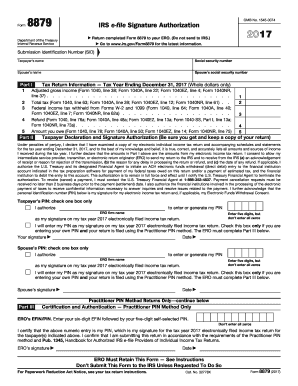
Ormation necessary to answer inquiries and resolve issues related to the payment. I further acknowledge that the personal identification number (PIN) below is my signature for my electronic income tax return and, if applicable, my Electronic Funds Withdrawal Consent. Taxpayer s PIN: check one box only I authorize to enter or generate my PIN ERO firm name Enter five digits, but don t enter all zeros as my signature on my tax year 2017 electronically filed income tax return. I will enter.

This website is not affiliated with IRS

How it works

  1. Open form

    Open form follow the instructions

  2. Easily sign form

    Easily sign the form with your finger

  3. Share form

    Send filled & signed form or save

How to fill out the IRS 8879 online

Filling out the IRS 8879 form is essential for individuals e-filing their tax returns with an electronic return originator (ERO). This guide provides clear, step-by-step instructions on how to complete this form accurately to ensure a smooth filing process.

Follow the steps to complete the IRS 8879 online effectively.

  1. Click ‘Get Form’ button to obtain the form and access it in your preferred editor.
  2. Enter the taxpayer’s name and social security number at the top of the form.
  3. Complete Part I with information from your tax return, including adjusted gross income, total tax, federal income tax withheld, and any refund or amount owed.
  4. In Part II, validate your declaration by verifying the amounts listed in Part I are accurate and reflect your electronic income tax return.
  5. Provide your personal identification number (PIN). You can either authorize the ERO to enter or generate your PIN or enter it yourself. Make sure to follow the requirements for the PIN format.
  6. Review the form for accuracy and completeness before signing and dating it. Ensure both the taxpayer and spouse (if applicable) sign the form.
  7. Return the completed form to the ERO through acceptable methods such as hand delivery, mail, or email.
  8. After the ERO receives the signed form, they will proceed to transmit your electronic return to the IRS.

Start your document filing process by completing the IRS 8879 online today!

Get form

Experience a faster way to fill out and sign forms on the web. Access the most extensive library of templates available.

Related content

About Form 8879, IRS e-file Signature...
Mar 21, 2025 — Form 8879 is the declaration document and signature authorization for an...
Learn more
Signing an Electronic Tax Return
The ERO must retain Forms 8879 and 8878 for three years from the return due date or the...
Learn more
2011 Publication 334
Dec 21, 2011 — You will be asked to complete Form 8879, IRS e-file employee, member...
Learn more

Related links form

PH BIR 1701Q 1999 SG CMPB Medical Screening Questionnaire 2017 HMRC CA8421 2011 UK Surrey Police Transfer of Shotgun/Firearms

Questions & Answers

Get answers to your most pressing questions about US Legal Forms API.

Contact support

A tax preparer must retain the IRS 8879 form for three years from the date the electronic return is filed. Keeping this form on file ensures compliance with IRS requirements and provides a reference in case of future inquiries. It's crucial for preparers to maintain these records accurately for both auditing and verification purposes. Utilizing our US Legal Forms platform can help tax professionals keep track of important documents like the IRS 8879.

The IRS 8879 CORP form is filed by corporations to authorize electronic filing of their tax returns. This form is specifically for corporate tax returns and must be signed by an authorized officer of the corporation. By using the IRS 8879 CORP, corporations ensure that their filings are compliant with IRS regulations. Our US Legal Forms platform simplifies this process by providing the necessary forms and guidance to help corporations stay on track with their tax obligations.

The IRS form 8879, also known as the e-file Signature Authorization, is a crucial document in the electronic filing process. This form is designed for taxpayers to sign, allowing their tax preparers to submit their returns electronically. Utilizing the IRS 8879 accelerates the filing time and reduces the chance of errors, making it a valuable tool for both taxpayers and tax preparers. You can easily access this form through our US Legal Forms platform for your convenience.

The IRS 8879 form serves as the e-file signature authorization for taxpayers. This form allows taxpayers to grant permission for their tax preparer to file their return electronically. Essentially, it acts as a declaration that the prepared return is accurate and complete. By using the IRS 8879, you streamline the filing process, ensuring compliance with IRS requirements.

An Electronic Return Originator (ERO) is a tax professional authorized by the IRS to submit tax returns electronically. In contrast, a tax preparer assists clients with preparing their tax returns but may not necessarily file them electronically. The IRS 8879 is often used in the e-filing process, facilitating the electronic signature for tax returns filed through an ERO. Understanding this distinction can help you choose the right professional for your tax needs.

The 3-day rule for form 8879 requires the ERO to retain the signed form for three days after the return is filed electronically. This rule ensures that the form is available for review if necessary. Adhering to this rule can benefit both the taxpayer and the preparer by ensuring regulatory compliance.

The purpose of IRS form 8879 is to verify the taxpayer's approval of their electronic tax return. It ensures that the taxpayer authorizes the ERO to submit the return and affirms that all information has been accurately recorded. Using form 8879 can streamline your filing process and enhance security.

IRS form 8879 is used to authorize an electronic tax return submission. By signing this form, you provide consent for your tax preparer to file your return electronically. This form simplifies the filing process, reduces paperwork, and speeds up any potential refunds.

Form 8879 is typically filled out by the taxpayer and the tax preparer during the electronic filing process. This form serves as an authorization for the preparer to submit the return on behalf of the taxpayer. Understanding your role in this process ensures a smooth filing experience and helps avoid delays.

The Electronic Return Originator (ERO) signs the tax return using their designated identification number. This individual is responsible for submitting the return electronically on behalf of the taxpayer. It's crucial roles like the ERO are verified, as this can affect the integrity of your tax filing.

Get This Form Now!

Use professional pre-built templates to fill in and sign documents online faster. Get access to thousands of forms.
If you believe that this page should be taken down, please follow our DMCA take down processhere.
Get IRS 8879
  • Adoption
  • Bankruptcy
  • Contractors
  • Divorce
  • Home Sales
  • Employment
  • Identity Theft
  • Incorporation
  • Landlord Tenant
  • Living Trust
  • Name Change
  • Personal Planning
  • Small Business
  • Wills & Estates
  • Packages A-Z
  • Affidavits
  • Bankruptcy
  • Bill of Sale
  • Corporate - LLC
  • Divorce
  • Employment
  • Identity Theft
  • Internet Technology
  • Landlord Tenant
  • Living Wills
  • Name Change
  • Power of Attorney
  • Real Estate
  • Small Estates
  • Wills
  • All Forms
  • Forms A-Z
  • Other Templates
  • Legal Hub
  • About Us
  • Help Portal
  • Legal Resources
  • Blog
  • Affiliates
  • Contact Us
  • Delete My Account
  • Site Map
  • Industries
  • Forms in Spanish
  • Localized Forms
  • State-specific Forms
  • Forms Kit
  • Real Estate Handbook
  • All Guides
  • Notarize
  • Incorporation services
  • For Consumers
  • For Small Business
  • For Attorneys
  • USLegal
  • FormsPass
  • pdfFiller
  • signNow
  • altaFlow
  • DocHub
  • Instapage
Form Packages
  • Adoption
  • Bankruptcy
  • Contractors
  • Divorce
  • Home Sales
  • Employment
  • Identity Theft
  • Incorporation
  • Landlord Tenant
  • Living Trust
  • Name Change
  • Personal Planning
  • Small Business
  • Wills & Estates
  • Packages A-Z
Form Categories
  • Affidavits
  • Bankruptcy
  • Bill of Sale
  • Corporate - LLC
  • Divorce
  • Employment
  • Identity Theft
  • Internet Technology
  • Landlord Tenant
  • Living Wills
  • Name Change
  • Power of Attorney
  • Real Estate
  • Small Estates
  • Wills
  • All Forms
  • Forms A-Z
  • Other Templates
Customer Service
  • Legal Hub
  • About Us
  • Help Portal
  • Legal Resources
  • Blog
  • Affiliates
  • Contact Us
  • Delete My Account
  • Site Map
  • Industries
  • Forms in Spanish
  • Localized Forms
  • State-specific Forms
  • Forms Kit
Legal Guides
  • Real Estate Handbook
  • All Guides
Prepared for you
  • Notarize
  • Incorporation services
Our Customers
  • For Consumers
  • For Small Business
  • For Attorneys
Our Sites
  • USLegal
  • FormsPass
  • pdfFiller
  • signNow
  • altaFlow
  • DocHub
  • Instapage
Social Media
Call us now toll free:
+1 833 426 79 33
As seen in:
© Copyright 1999-2026 airSlate Legal Forms, Inc. 17 Station Street, Suite 303, Brookline, MA 02445
  • Your Privacy Choices
  • Terms of Service
  • Privacy Notice
  • Content Takedown Policy
  • Bug Bounty Program
IRS 8879
This form is available in several versions.
Select the version you need from the drop-down list below.
2019 IRS 8879
Select form
  • 2019 IRS 8879
  • 2018 IRS 8879
  • 2017 IRS 8879
  • 2016 IRS 8879
  • 2015 IRS 8879
  • 2014 IRS 8879
  • 2013 IRS 8879
  • 2012 IRS 8879
  • 2011 IRS 8879
Select form