Loading
Form preview
  • US Legal Forms
  • Form Library
  • Tax Forms
  • Executive Department Treasury IRS Forms
  • Irs 8879 2018

Get Irs 8879 2018

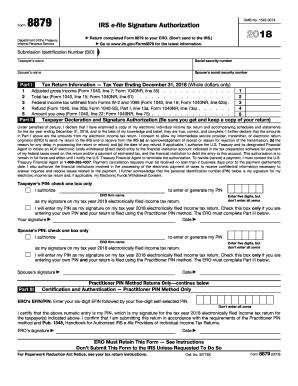
PIN method. The ERO must complete Part III below. Your signature Date Spouse s PIN: check one box only I authorize to enter or generate my PIN ERO firm name Enter five digits, but don t enter all zeros as my signature on my tax year 2018 electronically filed income tax return. I will enter my PIN as my signature on my tax year 2018 electronically filed income tax return. Check this box only if you are entering your own PIN and your return is filed using the Practitioner PIN metho.

This website is not affiliated with IRS

How it works

  1. Open form

    Open form follow the instructions

  2. Easily sign form

    Easily sign the form with your finger

  3. Share form

    Send filled & signed form or save

How to fill out the IRS 8879 online

Filling out the IRS Form 8879 is an essential step for taxpayers filing their individual income tax returns electronically. This guide provides clear instructions on each section of the form, ensuring a smooth online completion process.

Follow the steps to successfully complete the IRS 8879 online.

  1. Click ‘Get Form’ button to obtain the IRS Form 8879 and open it in your preferred editor.
  2. Review the top section of the form where you need to enter the submission identification number (SID), taxpayer's name, taxpayer’s social security number, spouse’s name, and spouse’s social security number.
  3. Proceed to Part I where you will provide tax return information for the tax year ending December 31, 2018. Fill in amounts for adjusted gross income, total tax, federal income tax withheld, refund amount, and amount owed directly from your tax return.
  4. In Part II, authorize your electronic return originator (ERO) to enter or generate your personal identification number (PIN) by selecting the appropriate box. Clearly indicate your PIN, ensuring it is five digits and not all zeros.
  5. Sign and date the form in the taxpayer's signature area to confirm that you have reviewed and agree to the information provided.
  6. If applicable, complete the spouse’s section by following the same authorization, PIN entry, and signature requirements.
  7. Finalize the process by reviewing the entire form for accuracy, saving your changes, and retaining a copy for your records.
  8. Once completed, send the signed form back to your ERO via hand delivery, email, or any secure method of choice ensuring it is received prior to the electronic return submission.

Complete your IRS Form 8879 online today to ensure a smooth tax filing experience.

Get form

Experience a faster way to fill out and sign forms on the web. Access the most extensive library of templates available.

Related content

About Form 8879, IRS e-file Signature...
Mar 21, 2025 — Form 8879 is the declaration document and signature authorization for an...
Learn more
Signing an Electronic Tax Return
The ERO must retain Forms 8879 and 8878 for three years from the return due date or the...
Learn more
2011 Publication 334
Dec 21, 2011 — You will be asked to complete Form 8879, IRS e-file employee, member...
Learn more

Related links form

Manitoba Settlement Plan Part2 Canada Intent to Rent KE Reg 136 A PH SSS E-6 2002

Questions & Answers

Get answers to your most pressing questions about US Legal Forms API.

Contact support

To submit IRS 8879, you typically complete the form and secure the necessary signatures from the taxpayer. Once you have their consent, you can electronically file the tax return using tax preparation software designed for this purpose. Always ensure you keep a copy of IRS 8879 for your records, as it serves as proof of taxpayer authorization. Services like uslegalforms can assist in managing the entire submission process, making it easier for you.

The IRS provides a grace period for e-filing tax returns, allowing taxpayers an additional time frame to file without penalties. Generally, this period extends until the standard due date for tax returns. However, if you filed using IRS 8879, it’s important to adhere to the guidelines to stay compliant. Being aware of this grace period can give you peace of mind during tax season.

The 330-day rule refers to the timeframe in which a tax return can be amended or corrected after initial submission. If a tax return was filed electronically using IRS 8879, you have up to 330 days to submit any changes. This rule allows for an efficient resolution of minor errors or omissions, ensuring that your tax report is accurate and compliant. Understanding this rule can help you avoid potential penalties and keep your account in good standing.

Tax preparers should keep IRS 8879 for a minimum of three years from the date of filing the respective tax return. This retention period mirrors the overall recordkeeping requirements set by the IRS. Retaining IRS 8879 ensures that you have the necessary documentation to defend your client's tax return if issues arise. Using a platform like uslegalforms can simplify managing and storing these records securely.

The IRS mandates that tax preparers retain copies of tax returns and supporting documents for a minimum of three years. This requirement applies to IRS 8879 and any related forms. Retaining these records helps tax preparers provide accurate information in the event of an audit or inquiry. By following this guideline, you can ensure compliance and foster trust with your clients.

The IRS form 8879 is a document that allows taxpayers to authorize their tax preparer to file their tax returns electronically. This form ensures that both the taxpayer and the preparer are on the same page regarding the submitted information. Completing the IRS 8879 correctly is essential for a smooth e-filing process. US Legal Forms provides templates and guidance to simplify this procedure.

IRS 8879 is known as the 'IRS e-file Signature Authorization' form. It authorizes your tax preparer to electronically file your tax return on your behalf. The form serves as a crucial verification step that confirms your agreement to the submitted information. Understanding its purpose can enhance your e-filing experience.

The IRS 8879 form is primarily filed by corporate tax preparers. If you are a tax professional preparing a corporation's tax return, you will need to file this form to e-file the return. It's important to ensure that all required signatures are obtained to validate the submission. This process streamlines the filing experience and enhances compliance.

The Electronic Return Originator (ERO) is typically a tax professional who signs the return after preparing it. The ERO ensures that the e-filing process is completed correctly and timely. Their role is critical in verifying the accuracy of the tax return before submission. Understanding the ERO's responsibilities can enhance your e-filing experience.

You do not send IRS form 8879 to the IRS directly; instead, it remains with the e-filing tax professional. They retain it as part of the electronic filing documentation. Ensure that your signed form is properly documented for record-keeping purposes. Therefore, understanding where to send IRS 8879 is essential for maintaining your tax records.

Get This Form Now!

Use professional pre-built templates to fill in and sign documents online faster. Get access to thousands of forms.
If you believe that this page should be taken down, please follow our DMCA take down processhere.
Get IRS 8879
  • Adoption
  • Bankruptcy
  • Contractors
  • Divorce
  • Home Sales
  • Employment
  • Identity Theft
  • Incorporation
  • Landlord Tenant
  • Living Trust
  • Name Change
  • Personal Planning
  • Small Business
  • Wills & Estates
  • Packages A-Z
  • Affidavits
  • Bankruptcy
  • Bill of Sale
  • Corporate - LLC
  • Divorce
  • Employment
  • Identity Theft
  • Internet Technology
  • Landlord Tenant
  • Living Wills
  • Name Change
  • Power of Attorney
  • Real Estate
  • Small Estates
  • Wills
  • All Forms
  • Forms A-Z
  • Form Library
  • Legal Hub
  • About Us
  • Help Portal
  • Legal Resources
  • Blog
  • Affiliates
  • Contact Us
  • Delete My Account
  • Site Map
  • Industries
  • Forms in Spanish
  • Localized Forms
  • State-specific Forms
  • Forms Kit
  • Real Estate Handbook
  • All Guides
  • Notarize
  • Incorporation services
  • For Consumers
  • For Small Business
  • For Attorneys
  • USLegal
  • FormsPass
  • pdfFiller
  • signNow
  • altaFlow
  • DocHub
  • Instapage
Form Packages
  • Adoption
  • Bankruptcy
  • Contractors
  • Divorce
  • Home Sales
  • Employment
  • Identity Theft
  • Incorporation
  • Landlord Tenant
  • Living Trust
  • Name Change
  • Personal Planning
  • Small Business
  • Wills & Estates
  • Packages A-Z
Form Categories
  • Affidavits
  • Bankruptcy
  • Bill of Sale
  • Corporate - LLC
  • Divorce
  • Employment
  • Identity Theft
  • Internet Technology
  • Landlord Tenant
  • Living Wills
  • Name Change
  • Power of Attorney
  • Real Estate
  • Small Estates
  • Wills
  • All Forms
  • Forms A-Z
  • Form Library
Customer Service
  • Legal Hub
  • About Us
  • Help Portal
  • Legal Resources
  • Blog
  • Affiliates
  • Contact Us
  • Delete My Account
  • Site Map
  • Industries
  • Forms in Spanish
  • Localized Forms
  • State-specific Forms
  • Forms Kit
Legal Guides
  • Real Estate Handbook
  • All Guides
Prepared for you
  • Notarize
  • Incorporation services
Our Customers
  • For Consumers
  • For Small Business
  • For Attorneys
Our Sites
  • USLegal
  • FormsPass
  • pdfFiller
  • signNow
  • altaFlow
  • DocHub
  • Instapage
Social Media
Call us now toll free:
+1 833 426 79 33
As seen in:
© Copyright 1999-2026 airSlate Legal Forms, Inc. 3720 Flowood Dr, Flowood, Mississippi 39232
  • Your Privacy Choices
  • Terms of Service
  • Privacy Notice
  • Content Takedown Policy
  • Bug Bounty Program
IRS 8879
This form is available in several versions.
Select the version you need from the drop-down list below.
2019 IRS 8879
Select form
  • 2019 IRS 8879
  • 2018 IRS 8879
  • 2017 IRS 8879
  • 2016 IRS 8879
  • 2015 IRS 8879
  • 2014 IRS 8879
  • 2013 IRS 8879
  • 2012 IRS 8879
  • 2011 IRS 8879
Select form