Loading
Form preview
  • US Legal Forms
  • Form Library
  • Tax Forms
  • Executive Department Treasury IRS Forms
  • Irs 8863 2015

Get Irs 8863 2015

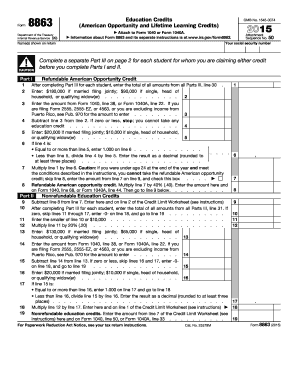
. . . . . . . . . 16 If line 15 is: Equal to or more than line 16, enter 1.000 on line 17 and go to line 18 Less than line 16, divide line 15 by line 16. Enter the result as a decimal (rounded to at least three places) . . . . . . . . . . . . . . . . . . . . . . . . . . . . . . Multiply line 12 by line 17. Enter here and on line 1 of the Credit Limit Worksheet (see instructions) Nonrefundable education credits. Enter the amount from line 7 of the Credit Limit Worksheet (see instru.

This website is not affiliated with IRS

How it works

  1. Open form

    Open form follow the instructions

  2. Easily sign form

    Easily sign the form with your finger

  3. Share form

    Send filled & signed form or save

How to fill out the IRS 8863 online

The IRS Form 8863 is essential for individuals applying for education credits, specifically the American Opportunity and Lifetime Learning Credits. This guide provides a clear, step-by-step approach to filling out the form online, making the process easier and more accessible.

Follow the steps to successfully complete the IRS 8863 online.

  1. Click ‘Get Form’ button to obtain the form and open it in the editor.
  2. Begin filling out Part I of the form, which is focused on the refundable American Opportunity Credit. First, complete Part III for each student for whom you are claiming credit.
  3. Enter the total amount from all Parts III, line 30, and write it in the specified space.
  4. Enter your income limits on line 2 based on your filing status; $180,000 for married filing jointly, or $90,000 for single, head of household, or qualifying widow(er).
  5. For line 3, input the amount from your Form 1040, line 38, or Form 1040A, line 22. Be aware of additional considerations for certain forms like 2555.
  6. Complete line 6 by subtracting the line 3 figure from line 2. If the result is zero or less, you cannot claim any education credit.
  7. Follow the same logic to complete lines 4 and 5 based on your earnings and the specified limits.
  8. Continue with Part II for Nonrefundable Education Credits. Calculate the figures based on instructions provided in the form.
  9. Finally, complete Part III for each student, ensuring all required fields, such as name and social security number, are accurate.
  10. Once all information is filled out and checked for accuracy, you can save changes, download, print, or share the completed form.

Complete your Forms 8863 online today to ensure you claim your eligible education credits.

Get form

Experience a faster way to fill out and sign forms on the web. Access the most extensive library of templates available.

Related content

About Form 8863, Education Credits (American ...
Jan 28, 2025 — Use Form 8863 to figure and claim your education credits, which are based...
Learn more
Education Credits (American Opportunity and...
Part I. Refundable American Opportunity Credit. 1. After completing Part III for each...
Learn more
Form 2106-EZ
You may be able to take a credit for your educational expenses instead of a deduction. See...
Learn more

Related links form

HI DOE OHR 600-004 2012 KY DPP-156 2005 MT Nurse Aide Interstate Endorsement Registry Application 2013 SC UCB-303 2012

Questions & Answers

Get answers to your most pressing questions about US Legal Forms API.

Contact support

TurboTax does assist in completing IRS Form 8962 when you enter information related to health insurance marketplace coverage. This form is crucial for claiming the Premium Tax Credit, separate from education credits. To ensure all your forms are filled out correctly, it's best to follow TurboTax’s prompts and complete any necessary information.

To add IRS Form 8863 on TurboTax, begin by navigating to the education section of your tax return. The software will prompt you with questions regarding your qualified education expenses and credits. Simply answer the questions, and TurboTax will generate Form 8863 based on the information you provide, making the process straightforward.

To file an education tax credit, start by gathering all necessary information, including your tuition fees and enrollment details. Complete IRS Form 8863 accurately, based on the credits you qualify for. After filling out the form, attach it to your tax return, ensuring you have all required supporting documents to submit to the IRS.

You need to file IRS Form 8863 if you are claiming an education tax credit, such as the American Opportunity Credit or the Lifetime Learning Credit. This form helps the IRS determine your eligibility for these credits, which can significantly reduce your tax bill. If you are a student or a parent of a student enrolled in qualified education programs, it's essential to complete this form to take advantage of available benefits.

To report the Lifetime Learning Credit, you will need to include the information from IRS 8863 when you file your federal tax return. Make sure to attach the completed form with your 1040 or 1040A return to ensure the IRS processes your claim correctly. Remember, providing precise details about your qualifying educational expenses will help maximize your credit. For assistance, consider using USLegalForms for a streamlined experience.

IRS 8863 is the form used to claim education credits, specifically the American Opportunity Credit and Lifetime Learning Credit. This form allows eligible taxpayers to report qualified expenses, helping to lower their tax liabilities. Completing IRS 8863 accurately can lead to significant tax savings, making it an important step for students and their families in managing education costs.

IRS 8863 is completed by students or parents of students who wish to claim education credits for eligible expenses. If you're enrolled in a qualified educational program, you’ll likely need to fill out this form. Remember, providing accurate information about your education costs is crucial for claiming the credit. Utilizing services like USLegalForms can help guide you through the process.

There are several reasons you may not qualify for the Lifetime Learning Credit under IRS 8863. Common reasons include your income exceeding the limit or your enrollment status not meeting the requirements. Additionally, if you claim the credit for the same expenses on another tax return, you won't qualify. It's essential to review the guidelines closely to ensure you meet all criteria.

To fill out IRS 8863 for the Lifetime Learning Credit, begin by providing your personal information at the top of the form. Next, enter the qualified education expenses, such as tuition and fees, in the relevant sections. Be sure to follow the instructions carefully to determine the credit amount you can claim. If you need assistance, consider using online resources or platforms like USLegalForms to guide you.

When you claim the American Opportunity Credit, you can reduce your taxable income and potentially receive a refund. This credit covers eligible expenses such as tuition and required course materials. It also allows you to reclaim up to 40% of the credit as a refundable credit, which can be beneficial for many taxpayers.

Get This Form Now!

Use professional pre-built templates to fill in and sign documents online faster. Get access to thousands of forms.
If you believe that this page should be taken down, please follow our DMCA take down processhere.

Industry-leading security and compliance

US Legal Forms protects your data by complying with industry-specific security standards.
  • In businnes since 1997
    25+ years providing professional legal documents.
  • Accredited business
    Guarantees that a business meets BBB accreditation standards in the US and Canada.
  • Secured by Braintree
    Validated Level 1 PCI DSS compliant payment gateway that accepts most major credit and debit card brands from across the globe.
Get IRS 8863
  • Adoption
  • Bankruptcy
  • Contractors
  • Divorce
  • Home Sales
  • Employment
  • Identity Theft
  • Incorporation
  • Landlord Tenant
  • Living Trust
  • Name Change
  • Personal Planning
  • Small Business
  • Wills & Estates
  • Packages A-Z
  • Affidavits
  • Bankruptcy
  • Bill of Sale
  • Corporate - LLC
  • Divorce
  • Employment
  • Identity Theft
  • Internet Technology
  • Landlord Tenant
  • Living Wills
  • Name Change
  • Power of Attorney
  • Real Estate
  • Small Estates
  • Wills
  • All Forms
  • Forms A-Z
  • Form Library
  • Legal Hub
  • About Us
  • Help Portal
  • Legal Resources
  • Blog
  • Affiliates
  • Contact Us
  • Delete My Account
  • Site Map
  • Industries
  • Forms in Spanish
  • Localized Forms
  • State-specific Forms
  • Forms Kit
  • Real Estate Handbook
  • All Guides
  • Notarize
  • Incorporation services
  • For Consumers
  • For Small Business
  • For Attorneys
  • USLegal
  • FormsPass
  • pdfFiller
  • signNow
  • altaFlow
  • DocHub
  • Instapage
Form Packages
  • Adoption
  • Bankruptcy
  • Contractors
  • Divorce
  • Home Sales
  • Employment
  • Identity Theft
  • Incorporation
  • Landlord Tenant
  • Living Trust
  • Name Change
  • Personal Planning
  • Small Business
  • Wills & Estates
  • Packages A-Z
Form Categories
  • Affidavits
  • Bankruptcy
  • Bill of Sale
  • Corporate - LLC
  • Divorce
  • Employment
  • Identity Theft
  • Internet Technology
  • Landlord Tenant
  • Living Wills
  • Name Change
  • Power of Attorney
  • Real Estate
  • Small Estates
  • Wills
  • All Forms
  • Forms A-Z
  • Form Library
Customer Service
  • Legal Hub
  • About Us
  • Help Portal
  • Legal Resources
  • Blog
  • Affiliates
  • Contact Us
  • Delete My Account
  • Site Map
  • Industries
  • Forms in Spanish
  • Localized Forms
  • State-specific Forms
  • Forms Kit
Legal Guides
  • Real Estate Handbook
  • All Guides
Prepared for you
  • Notarize
  • Incorporation services
Our Customers
  • For Consumers
  • For Small Business
  • For Attorneys
Our Sites
  • USLegal
  • FormsPass
  • pdfFiller
  • signNow
  • altaFlow
  • DocHub
  • Instapage
Social Media
Call us now toll free:
+1 833 426 79 33
As seen in:
© Copyright 1999-2026 airSlate Legal Forms, Inc. 3720 Flowood Dr, Flowood, Mississippi 39232
  • Your Privacy Choices
  • Terms of Service
  • Privacy Notice
  • Content Takedown Policy
  • Bug Bounty Program
IRS 8863
This form is available in several versions.
Select the version you need from the drop-down list below.
2024 IRS 8863
Select form
  • 2024 IRS 8863
  • 2023 IRS 8863
  • 2022 IRS 8863
  • 2021 IRS 8863
  • 2020 IRS 8863
  • 2019 IRS 8863
  • 2018 IRS 8863
  • 2017 IRS 8863
  • 2016 IRS 8863
  • 2015 IRS 8863
  • 2014 IRS 8863
  • 2013 IRS 8863
  • 2012 IRS 8863
  • 2011 IRS 8863
  • 2006 IRS 8863
  • 8863 Form
Select form