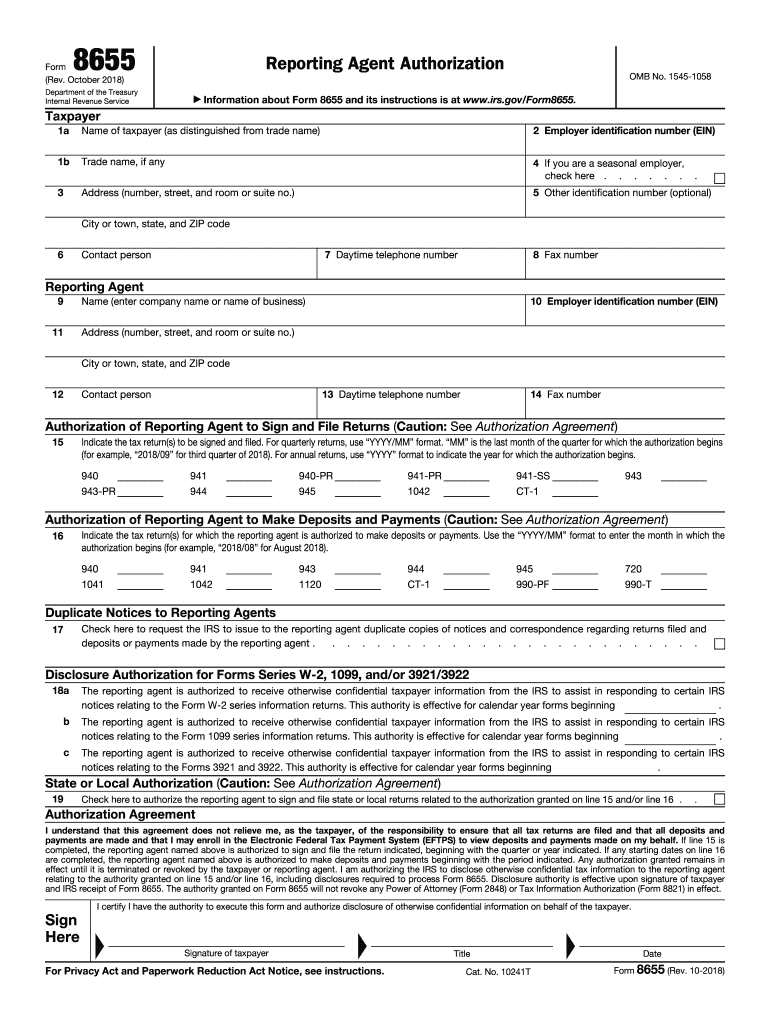
Agreement I understand that this agreement does not relieve me, as the taxpayer, of the responsibility to ensure that all tax returns are filed and that all deposits and payments are made and that I may enroll in the Electronic Federal Tax Payment System (EFTPS) to view deposits and payments made on my behalf. If line 15 is completed, the reporting agent named above is authorized to sign and file the return indicated, beginning with the quarter or year indicated. If any starting dates on line 16.
Loading

Open form follow the instructions

Easily sign the form with your finger

Send filled & signed form or save
How to fill out the IRS 8655 online
The IRS Form 8655, Reporting Agent Authorization, is designed to allow individuals to authorize a reporting agent to file certain tax returns and handle tax payments on their behalf. This guide will provide clear, step-by-step instructions for filling out this form online, ensuring users can complete it accurately and efficiently.
Follow the steps to complete the IRS 8655 online effectively.
- Press the ‘Get Form’ button to access the IRS 8655 form and open it in your editor.
- In section 1, provide the taxpayer's name, ensuring it is distinct from the trade name, and enter the employer identification number (EIN). If there is a trade name, fill that in section 1b.
- Complete section 3 with the address for the taxpayer, including the city, state, and ZIP code.
- In section 4, if the taxpayer is a seasonal employer, mark the checkbox provided.
- Fill in optional identification numbers in section 5 and the daytime telephone number in section 7.
- Identify the reporting agent in section 9 by entering their name, EIN, address, and contact information in the respective sections.
- In sections 15 and 16, specify the tax returns to be filed and authorized payments, using the format specified (YYYY/MM for quarterly returns, YYYY for annual returns).
- If necessary, indicate in section 17 to receive duplicate notices by marking the checkbox.
- For disclosure authorizations regarding Forms W-2, 1099, and others in section 18, mark the relevant checkboxes and provide effective dates.
- In section 19, check the box to authorize the reporting agent to sign and file state or local returns as applicable.
- Review the Authorization Agreement at the end of the form, confirming the responsibilities of both the taxpayer and reporting agent. Ensure that the taxpayer signs the form, indicating their authority.
- Finally, save any changes made to the filled-out form, and choose to download, print, or share the completed IRS 8655 as needed.
Complete your IRS 8655 online today to streamline your reporting process.
Experience a faster way to fill out and sign forms on the web. Access the most extensive library of templates available.
Related content
Form 8655 is used to authorize a reporting agent to sign and file tax returns, make...
... 8655] Removal of Final and Temporary Regulations AGENCY: Internal Revenue Service...
8655 submitted to IRS for processing. 2.4.5 94x OnLine Filing Provider. A 94x OnLine...
Get answers to your most pressing questions about US Legal Forms API.
Can I use a digital signature on a tax return?
Yes, you can use a digital signature on a tax return if you file electronically. The IRS accepts digital signatures as long as they comply with certain requirements. Utilizing e-filing services, like those from US Legal Forms, simplifies the process, allowing you to file confidently. Always ensure your digital signature is stored securely and is compliant with IRS guidelines.
How do I check the status of my form 8655?
To check the status of your Form 8655, you need to contact the IRS directly. Unfortunately, there is no online portal specifically for checking the status of Form 8655 submissions. Keeping a record of your submission date and confirmation can be helpful when inquiring. Using US Legal Forms can keep your submissions organized, making it easier to follow up.
How long does it take to process form 8655?
The processing time for Form 8655 can vary, but generally, it takes around 4-6 weeks for the IRS to process. Factors such as seasonal volume and the accuracy of the submitted form can influence this timeline. To avoid delays, ensure you fill out the form correctly and submit it electronically if possible. Using tools from US Legal Forms can help you ensure all information is accurate before submission.
Can W-9 be electronically signed?
Yes, W-9 forms can be electronically signed, following IRS guidelines on electronic submissions. By using electronic signatures, you can quickly complete and send the necessary documentation without delays. Tools available on US Legal Forms help maintain compliance and streamline your workflow. Explore these options to simplify your tax-related tasks effectively.
Can an IRS power of attorney be signed electronically?
Yes, an IRS power of attorney can be signed electronically, aligning with current IRS guidelines. This method allows you to grant someone authority to act on your behalf without the need for physical signatures. Platforms like US Legal Forms facilitate this process, ensuring that signatures and submissions are compliant with IRS regulations. Using electronic signatures saves time and increases efficiency.
Can form 8655 be signed electronically?
Yes, Form 8655 can be signed electronically. An electronic signature will help expedite the process, making it easier to authorize a representative for IRS transactions. Leveraging reliable services, such as those offered by US Legal Forms, can ensure that your e-signature meets IRS compliance. Embracing electronic submission helps you stay organized and compliant.
How do I become a whistleblower for the IRS?
To become a whistleblower for the IRS, you must report tax fraud or other substantial issues. This generally involves filling out Form 211 and providing concrete evidence. If your information leads to the recovery of tax funds, you may receive a monetary reward. Utilizing platforms like US Legal Forms can help you navigate the requirements for reporting and ensure your submission is accurate.
Can W-4 forms be signed electronically?
Yes, W-4 forms can be signed electronically. This process simplifies submission and helps you avoid the hassle of printing and mailing documents. Using e-signatures, like those available through the US Legal Forms platform, can streamline your tax-related tasks. Ensure your e-signature complies with IRS standards for valid electronic submissions.
What is IRS form 8655 for?
IRS form 8655 is used to authorize the representation of a taxpayer by a designated third party, typically a tax professional. This form grants the representative the ability to act on the taxpayer's behalf, including filing returns and receiving information from the IRS. Understanding its importance can enhance your tax filing experience, and utilizing resources like US Legal Forms can simplify the process.
How long does it take for form 8655 to be processed?
Generally, it takes the IRS a few weeks to process form 8655, but various factors can impact this duration. If submitted during a busy season, or if there are any errors, processing times may be longer. To increase the chances of a swift process, use a service like US Legal Forms, which ensures your form is accurately completed before submission.
Use professional pre-built templates to fill in and sign documents online faster. Get access to thousands of forms.
If you believe that this page should be taken down, please follow our DMCA take down process here.