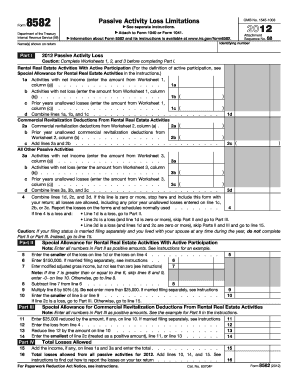
Information about Form 8582 and its instructions is available at www.irs.gov/form8582. Name(s) shown on return Part I 2012 Attachment Sequence No. 88 Identifying number 2012 Passive Activity Loss Caution: Complete Worksheets 1, 2, and 3 before completing Part I. Rental Real Estate Activities With Active Participation (For the definition of active participation, see Special Allowance for Rental Real Estate Activities in the instructions.) 1a Activities with net income (enter the amount from.
Open form follow the instructions
Easily sign the form with your finger
Send filled & signed form or save
How to fill out the IRS 8582 online
This guide provides detailed instructions on how to accurately complete the IRS 8582 form online, focusing on passive activity loss limitations. By following these steps, users can efficiently navigate the form and ensure compliance with IRS regulations.
Follow the steps to fill out the IRS 8582 online.
- Click ‘Get Form’ button to obtain the form and open it in the editor.
- Begin by entering the name(s) shown on your return and your identifying number in the designated fields.
- Complete Worksheets 1, 2, and 3 for the current year before proceeding to Part I of the form.
- In Part I, input the total amounts for activities with net income, net loss, and prior years’ unallowed losses as outlined in Worksheets 1, 2, and 3.
- Follow the instructions to combine the lines as needed, checking if the total losses are allowed or if they should go to Part II or Part III.
- If applicable, complete Part II by entering the amounts as required, ensuring to enter all numbers as positive amounts.
- If necessary, proceed to Part III and complete the special allowance calculations once the relevant values are entered.
- In Part IV, summarize total losses allowed by adding the final amounts and report them correctly on your tax return.
- Once all information is filled in, users can save changes, download the completed form, print it for their records, or share it as needed.
Complete your IRS forms online to ensure accuracy and efficiency.
Experience a faster way to fill out and sign forms on the web. Access the most extensive library of templates available.
Related content
Dec 4, 2024 — Noncorporate taxpayers use Form 8582 to: Figure the amount of any passive...
Form 8582, passive activity loss limitations. ; United States. Internal Revenue Service.
Jan 19, 2017 — This publication discusses common business expenses and explains what is...
Get answers to your most pressing questions about US Legal Forms API.
How do you calculate passive loss limitation?
To calculate passive loss limitation, determine your total passive losses, then compare them to the income limit of $25,000 if you qualify. Subtract any income over the threshold, which reduces your allowable loss deduction. Understanding this calculation is vital for accurately completing Form 8582 and maximizing your tax situation.
What is the passive loss limitation for rental property?
The passive loss limitation for rental property is typically set at $25,000 for individuals with modified adjusted gross incomes below $100,000. This limitation gradually phases out for incomes between $100,000 and $150,000. Knowing and applying this limit is essential for effective tax planning.
How do I report passive income on my tax return?
To report passive income on your tax return, complete Schedule E for rental activities and include it with your IRS Form 1040. You should also consider any applicable losses outlined in Form 8582. This ensures that all income and losses are accurately captured, maximizing your potential deductions.
What is the loophole for passive activity loss?
The loophole for passive activity loss allows some taxpayers with modified adjusted gross income under $100,000 to deduct up to $25,000 in rental losses. This deduction phases out as income increases. Understanding this provision can provide significant tax savings, especially when coupled with the guidance found in Form 8582.
Is my rental property a passive activity?
Most rental properties are considered passive activities, according to the IRS. Passive activities typically involve limited participation in the operation, which means you may not materially participate in management or operations. To determine whether your rental activity qualifies as passive, consider your level of involvement and the IRS guidelines.
What is Form 8582 for rental property?
Form 8582 is used to limit passive activity losses according to IRS rules. It helps taxpayers understand how much of their rental losses they can deduct against other income. If rental properties are part of your investments, understanding Form 8582 is crucial for managing your taxes effectively.
Where do I report passive rental income?
You report passive rental income on Schedule E of your tax return. This form is specifically designed for reporting income and losses from rental real estate. Remember, accurately reporting your passive income, alongside Form 8582, can help you maximize your tax benefits and avoid penalties.
Do I need to file form 8582 for rental property?
You may need to file Form 8582 if you have passive activities, including rental properties. This form helps track your passive losses and income, which can significantly impact your tax situation. By filing Form 8582, you can ensure that you properly report any losses that might be limited due to IRS regulations.
Does TurboTax have Form 8582?
Yes, TurboTax includes IRS Form 8582 as part of its tax software offerings. This makes it easy for you to report your passive income and losses without hassles. Using TurboTax can simplify the filing process, allowing you to focus on maximizing your deductions accurately and efficiently.
Is passive income reported on Schedule C?
No, passive income is not reported on Schedule C, which is reserved for self-employment income. Instead, you will report passive income on IRS Form 8582 and any related schedules that apply to your tax situation. This ensures that your income is categorized correctly under IRS guidelines.
Use professional pre-built templates to fill in and sign documents online faster. Get access to thousands of forms.
If you believe that this page should be taken down, please follow our DMCA take down process here.
This form is available in several versions. Select the version you need from the drop-down list below.