Loading
Get Irs 8453-eo 2014
This website is not affiliated with IRS
How it works
-

Open form follow the instructions
-

Easily sign the form with your finger
-

Send filled & signed form or save
How to fill out the IRS 8453-EO online
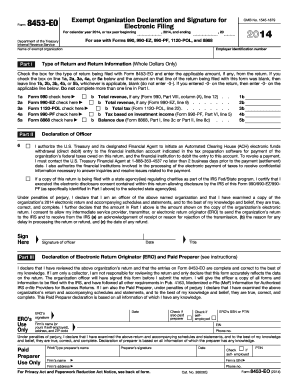
This guide provides a clear and supportive overview of the IRS 8453-EO, which is essential for the electronic filing of various exempt organization returns. By following these steps, users can complete the form efficiently and confidently.
Follow the steps to complete the IRS 8453-EO online.
- Click the ‘Get Form’ button to access the IRS 8453-EO. This will enable you to open the document in your preferred editing program.
- Enter the name of the exempt organization and the employer identification number in the designated fields. Ensure that these details are accurate, as they are crucial for identifying the organization.
- In Part I, check the box corresponding to the type of return you are filing, such as Form 990 or Form 990-EZ. Enter any required amounts from the return in the respective fields (1b, 2b, etc.). Be sure to only fill out one line in this section.
- For Part II, declare the authorization for the U.S. Treasury to initiate an Automated Clearing House (ACH) electronic funds withdrawal if applicable. If opting for a direct debit, provide the necessary bank details such as routing number and account number.
- Sign and date the declaration of the officer at the bottom of Part II. This signature indicates your affirmation that the information provided is true and correct.
- If applicable, complete Part III for the Electronic Return Originator (ERO) or Paid Preparer. Ensure that this section is filled out correctly according to the specifics of who assisted in preparing the return.
- Review all fields for accuracy and completeness. Once verified, save changes to the document. You may then download, print, or share the completed form as necessary.
Start the process of completing your IRS 8453-EO form online today!
Get form
Experience a faster way to fill out and sign forms on the web. Access the most extensive library of templates available.
When writing a reply letter to the IRS, start by addressing the specific issue they raised in their correspondence. Clearly reference your taxpayer identification number and include any requested documentation. Be concise and straightforward, explaining your concerns or providing the necessary information. Using a professional tone reinforces your commitment to resolving any tax-related matters.
Get This Form Now!
Use professional pre-built templates to fill in and sign documents online faster. Get access to thousands of forms.