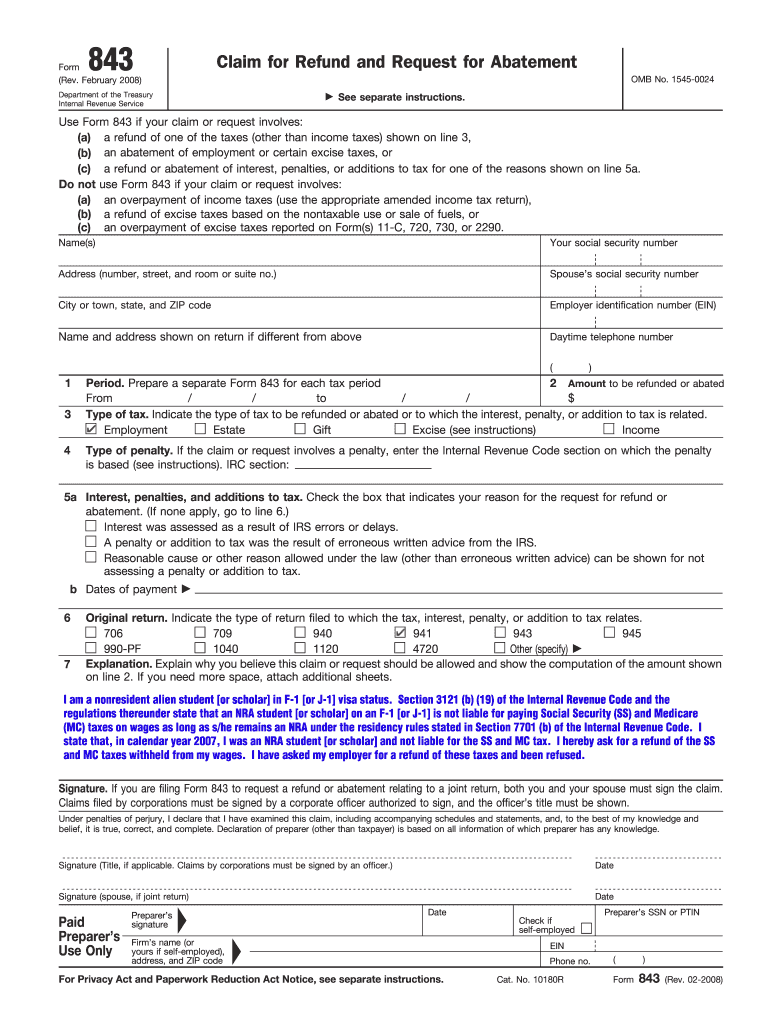
843 Claim for Refund and Request for Abatement Form (Rev. February 2008) OMB No. 1545-0024 Department of the Treasury Internal Revenue Service See separate instructions. Use Form 843 if your claim.
Loading

Open form follow the instructions

Easily sign the form with your finger

Send filled & signed form or save
How to fill out the IRS 843 online
The IRS 843 form, also known as the claim for refund and request for abatement, is utilized for various requests concerning refunds and abatements related to specific taxes. This guide provides clear instructions on how to complete this form online effectively.
Follow the steps to fill out the IRS 843 online.
- Click the ‘Get Form’ button to obtain the form and open it in the editor.
- Begin by entering your personal information in the 'Name(s)' field. This includes your full name and your spouse's name if applicable. Provide the required Social Security numbers (SSNs) in the designated fields.
- Fill in your address, including number, street, room or suite number, city or town, state, and ZIP code. If the address shown on your tax return differs from this, include that information as well.
- Indicate your Employer Identification Number (EIN) if applicable and your daytime telephone number.
- Specify the period for which you are requesting a refund or abatement. Ensure to prepare a separate Form 843 for each distinct tax period.
- Enter the amount you wish to be refunded or abated. Include the specific dates from and to which the claim relates.
- Select the type of tax for the refund or abatement. Check the box that corresponds to Employment, Estate, Gift, Excise, Income, etc.
- If your request involves a penalty, specify the Internal Revenue Code section on which it is based. You can find guidance in the relevant instructions.
- Indicate the reason for your request for refund or abatement by checking the appropriate box. If applicable, provide any additional details in the explanation section.
- Clarify the relationship of your claim to the original return. Check the type of return you originally filed related to your claim.
- Provide a detailed explanation of why you believe your claim should be granted, along with a calculation of the amount. Attach additional sheets if necessary.
- For claims involving a joint return, ensure both you and your spouse sign the form. If filed by a corporation, a corporate officer must sign and include their title.
- After completing the form, review all information for accuracy. Once finalized, save your changes, download the form for your records, and print or share as necessary.
Complete your IRS 843 form online and submit your claims effortlessly.
Experience a faster way to fill out and sign forms on the web. Access the most extensive library of templates available.
Related content
Check the box below that indicates your reason for filing Form 843. Tax. Abatement or...
Check the box below that indicates your reason for filing Form 843. Tax. Abatement or...
Feb 20, 2018 — Extensions of Deadlines To File Your Tax. Return, To Pay Your Taxes, and...
Get answers to your most pressing questions about US Legal Forms API.
What is a reasonable cause for IRS 843?
A reasonable cause for IRS 843 generally encompasses situations that genuinely hindered your ability to comply with tax obligations. Examples include incapacitating medical issues, severe family crises, or significant natural disasters that impacted your financial stability. When filling out form 843, it’s crucial to clearly detail these circumstances and attach relevant documentation. USLegalForms can guide you through this process to ensure you articulate your case correctly.
What is a good reasonable cause for IRS penalty abatement?
A good reasonable cause for IRS penalty abatement includes circumstances that were beyond your control, such as a natural disaster, serious illness, or unexpected financial difficulties. These events can provide a solid foundation for your case when submitting form 843. It’s important to document any incident fully to support your request effectively. Using USLegalForms can help you understand what qualifies as reasonable cause and how to present it.
How long does it take to process form 843 IRS?
The processing time for form 843 can vary, but it typically takes about eight to twelve weeks for the IRS to respond to your request. Factors that can influence processing time include the volume of requests the IRS is receiving and whether your application requires additional review. While waiting, maintain communication with the IRS to stay updated on your request's status. Consider tracking your submission with USLegalForms for organized follow-up.
How do I get my IRS penalties abated?
To get your IRS penalties abated, you can complete and send form 843 along with supporting documents that prove your case for abatement. It is essential to show reasonable cause, such as serious illness, natural disasters, or other factors that prevented compliance. Be clear and precise in your submission to improve your chances of a positive outcome. You can rely on USLegalForms for the right guidance in gathering your paperwork and filling out the form.
How to write a letter to the IRS to remove penalties?
When writing a letter to the IRS to remove penalties, clearly state your name, taxpayer identification number, and the specific penalties you wish to contest. Include details about your situation and any relevant documentation that supports your claim for relief. Use form 843 as a reference and ensure your letter is concise and professional. USLegalForms can provide you with a template to help format your request effectively.
Does the IRS have a one-time forgiveness program?
Yes, the IRS offers a first-time penalty abatement program that may forgive certain penalties for taxpayers who have a clean compliance history for the previous three years. If eligible, you can request this via form 843. It’s important to meet specific criteria, as the program is designed to provide relief for those who have demonstrated responsible tax behavior. Consider using resources on USLegalForms to better understand how to qualify and apply.
How do I request an IRS penalty abatement?
To request an IRS penalty abatement, you can submit form 843 along with any necessary documentation that supports your case for abatement. Clearly explain your situation in the form or an accompanying letter, demonstrating reasonable cause for the penalties you received. It is important to be thorough and precise in your explanation to increase the likelihood of approval. USLegalForms offers templates to help you draft effective letters and forms.
How to submit form 843 to IRS?
To submit form 843 to the IRS, you need to complete the form with accurate information. After filling it out, print the form, sign it, and mail it to the appropriate IRS address based on your location and type of tax issue. You can find possible mailing addresses on the IRS website. Using USLegalForms can streamline this process by providing a guided method to ensure you fill out the form correctly.
How long does IRS take to process form 843?
The IRS generally takes around 30 to 90 days to process form 843, but this can vary based on their volume and the specifics of your request. It's important to ensure that the form is filled out completely to avoid delays. If you're facing an extended wait, consider reaching out for updates. Utilizing USLegalForms can help you know what to expect during this process.
How long does it take for the IRS to respond to form 843?
Typically, the IRS responds to form 843 requests within 30 to 90 days, although processing times can vary. Factors such as the complexities of your request or the IRS's current workload may influence response times. Be patient, and if you do not hear back in that timeframe, consider checking the status by contacting the IRS directly. USLegalForms can guide you on how to effectively follow up.
Use professional pre-built templates to fill in and sign documents online faster. Get access to thousands of forms.
If you believe that this page should be taken down, please follow our DMCA take down process here.
This form is available in several versions. Select the version you need from the drop-down list below.