Loading
Form preview
  • US Legal Forms
  • Other Templates
  • Tax Forms
  • Executive Department Treasury IRS Forms
  • Irs 8082 2017

Get Irs 8082 2017

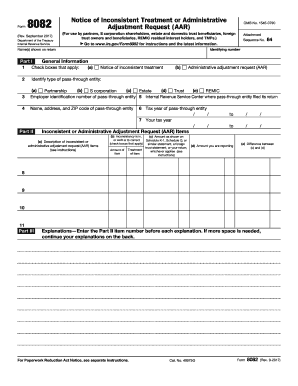
For Paperwork Reduction Act Notice see separate instructions. Cat. No. 49975G Rev. 9-2017 Form 8082 Rev. 9-2017 Page. Form Rev* September 2017 Department of the Treasury Internal Revenue Service Notice of Inconsistent Treatment or Administrative Adjustment Request AAR For use by partners S corporation shareholders estate and domestic trust beneficiaries foreign trust owners and beneficiaries REMIC residual interest holders and TMPs. Go Attachment Sequence No* to www*irs*gov/Form8082 for instruct.

This website is not affiliated with IRS

How it works

  1. Open form

    Open form follow the instructions

  2. Easily sign form

    Easily sign the form with your finger

  3. Share form

    Send filled & signed form or save

How to fill out the IRS 8082 online

The IRS 8082 form is essential for individuals involved in pass-through entities who need to report inconsistent treatment or make an administrative adjustment request. This guide provides clear, step-by-step instructions to help users efficiently complete the form online.

Follow the steps to fill out the IRS 8082 form effectively.

  1. Click ‘Get Form’ button to obtain the form and open it in the editor.
  2. Begin by entering the identifying number associated with your tax return, along with the names as they appear on your return in the designated fields.
  3. In Part I, check the appropriate boxes that apply to your situation, including the type of pass-through entity you are dealing with, such as a partnership or S corporation.
  4. Enter the employer identification number of the pass-through entity and the IRS Center where the entity filed its return.
  5. Provide the name, address, and ZIP code of the pass-through entity in the specified fields.
  6. In Part II, specify whether you are reporting a notice of inconsistent treatment or an administrative adjustment request (AAR) by checking the appropriate box.
  7. Fill in the tax year of the pass-through entity and your own tax year by entering the relevant dates in the provided format.
  8. Detail the inconsistent or administrative adjustment request items by providing descriptions and indicating where the inconsistencies lie in the corresponding fields.
  9. For each item, report amounts as per the Schedule K-1 or other relevant statement and indicate any differences between those amounts and the ones you are reporting.
  10. In Part III, provide explanations for each item listed in Part II by entering the item numbers followed by your detailed explanations.
  11. Once you have filled out all necessary fields and provided explanations, you can save changes, download, print, or share the completed form as needed.

Complete the IRS 8082 form online today to ensure accurate reporting of your tax situation.

Get form

Experience a faster way to fill out and sign forms on the web. Access the most extensive library of templates available.

Related content

About Form 8082, Notice of Inconsistent Treatment...
Jan 28, 2025 — File this form if they wish to report items differently than the way they...
Learn more
Form 8082 instructions - International Products...
Given article text here IRS Form 8082 is a notice used by various entities to report any...
Learn more
Guidelines for hazardous substance management in...
Dec 30, 2019 — Harmful effect. Abnormal symptom on skin, loss of hair, weight losses...
Learn more

Related links form

Camelback Moving Bill of Lading NJ CM-100 2011 Air Canada Baggage Declaration BDSM Checklist

Questions & Answers

Get answers to your most pressing questions about US Legal Forms API.

Contact support

The number of withholding allowances you claim should be based on your personal and financial situation, including dependents and tax credits. It is vital to complete the IRS worksheets accurately to calculate the correct number. Using the IRS 8082 can help you address specific issues that may affect your withholding allowances, leading to more accurate tax payments.

Filling out a tax amendment form requires you to start with the correct form, usually 1040-X, to correct any previously filed federal tax return. You will need to explain your changes clearly and provide any supporting documentation. The IRS 8082 can also be relevant if you are amending due to inconsistencies to ensure your amendment is processed smoothly.

Whether to claim 0 or 1 on your W-4 depends on your personal tax situation. Claiming 0 increases your withholding and may lead to a refund, while claiming 1 allows you to take home more of your paycheck. Assess your expected tax liability and use the IRS 8082 form if your situation involves multiple income sources or complex deductions.

Filling out an IRS withholding form typically involves reporting your filing status, personal information, and the number of allowances you wish to claim. You should carefully consider any additional deductions or credits that apply to you. If you're unsure about specific entries, resources like the IRS 8082 can provide guidance and prevent potential errors.

Form 8082 serves as a notice of inconsistent treatment or administrative adjustment for partnerships, including issues regarding K-1 forms not received. If you have not received a K-1, you can file form 8082 to indicate any discrepancies that may affect your tax filings. This form helps you provide clarity to the IRS and protects your interests as a taxpayer.

To fill out your tax withholding form correctly, start by providing your personal information, including your name and Social Security number. Next, accurately estimate your income and deductions to determine your withholding allowances. If you have complex situations, consider using the IRS 8082 form to clarify any uncertainties and ensure your withholding aligns with your tax strategy.

Determining the right percentage to withhold for taxes depends on your income level and individual situation. Generally, many people find that withholding 15% to 20% works well, but it may be beneficial to consult the IRS guidelines or calculate your specific tax obligation. The IRS 8082 form can assist in managing complex tax scenarios, ensuring accurate withholding aligns with your financial goals.

For tax purposes, a merger typically requires various forms to report the transaction to the IRS, depending on its nature and structure. It's essential to understand how the merger will impact assets, liabilities, and tax obligations. Properly utilizing IRS 8082 can help ensure your merger's tax implications are documented adequately. For further assistance, explore resources available on the US Legal Forms platform to ease your process.

To speak with a live person at the IRS, you can call their customer service line, following the prompts carefully to navigate through the automated system. Make sure to have your tax information ready for verification. Keep in mind that busy times may lead to long wait periods. If you face challenges, consider using IRS 8082 to clarify any ongoing issues.

The IRS letter 5071C is typically triggered when the IRS needs to verify your identity before processing your tax return. This occurs if there are discrepancies or if the return appears unusual. If you receive this letter, responding promptly and accurately is vital to avoid delays in your return, and using IRS 8082 can aid in addressing potential issues.

Get This Form Now!

Use professional pre-built templates to fill in and sign documents online faster. Get access to thousands of forms.
If you believe that this page should be taken down, please follow our DMCA take down processhere.
Get IRS 8082
  • Adoption
  • Bankruptcy
  • Contractors
  • Divorce
  • Home Sales
  • Employment
  • Identity Theft
  • Incorporation
  • Landlord Tenant
  • Living Trust
  • Name Change
  • Personal Planning
  • Small Business
  • Wills & Estates
  • Packages A-Z
  • Affidavits
  • Bankruptcy
  • Bill of Sale
  • Corporate - LLC
  • Divorce
  • Employment
  • Identity Theft
  • Internet Technology
  • Landlord Tenant
  • Living Wills
  • Name Change
  • Power of Attorney
  • Real Estate
  • Small Estates
  • Wills
  • All Forms
  • Forms A-Z
  • Other Templates
  • Legal Hub
  • About Us
  • Help Portal
  • Legal Resources
  • Blog
  • Affiliates
  • Contact Us
  • Delete My Account
  • Site Map
  • Industries
  • Forms in Spanish
  • Localized Forms
  • State-specific Forms
  • Forms Kit
  • Real Estate Handbook
  • All Guides
  • Notarize
  • Incorporation services
  • For Consumers
  • For Small Business
  • For Attorneys
  • USLegal
  • FormsPass
  • pdfFiller
  • signNow
  • altaFlow
  • DocHub
  • Instapage
Form Packages
  • Adoption
  • Bankruptcy
  • Contractors
  • Divorce
  • Home Sales
  • Employment
  • Identity Theft
  • Incorporation
  • Landlord Tenant
  • Living Trust
  • Name Change
  • Personal Planning
  • Small Business
  • Wills & Estates
  • Packages A-Z
Form Categories
  • Affidavits
  • Bankruptcy
  • Bill of Sale
  • Corporate - LLC
  • Divorce
  • Employment
  • Identity Theft
  • Internet Technology
  • Landlord Tenant
  • Living Wills
  • Name Change
  • Power of Attorney
  • Real Estate
  • Small Estates
  • Wills
  • All Forms
  • Forms A-Z
  • Other Templates
Customer Service
  • Legal Hub
  • About Us
  • Help Portal
  • Legal Resources
  • Blog
  • Affiliates
  • Contact Us
  • Delete My Account
  • Site Map
  • Industries
  • Forms in Spanish
  • Localized Forms
  • State-specific Forms
  • Forms Kit
Legal Guides
  • Real Estate Handbook
  • All Guides
Prepared for you
  • Notarize
  • Incorporation services
Our Customers
  • For Consumers
  • For Small Business
  • For Attorneys
Our Sites
  • USLegal
  • FormsPass
  • pdfFiller
  • signNow
  • altaFlow
  • DocHub
  • Instapage
Social Media
Call us now toll free:
+1 833 426 79 33
As seen in:
© Copyright 1999-2026 airSlate Legal Forms, Inc. 17 Station Street, Ste. 203, Brookline, MA 02445
  • Your Privacy Choices
  • Terms of Service
  • Privacy Notice
  • Content Takedown Policy
  • Bug Bounty Program
IRS 8082
This form is available in several versions.
Select the version you need from the drop-down list below.
2018 IRS 8082
Select form
  • 2018 IRS 8082
  • 2017 IRS 8082
  • 2011 IRS 8082
Select form