Time filing 2.3% of sales price $ Part II IRS No. Patient Centered Outcomes Research Fee (see instructions) Specified health insurance policies (a) Avg. number of lives covered (see inst.) (b) Rate for avg. covered life (c) Fee (see instructions) (a) With a policy year ending before October 1, 2016 133 (b) With a policy year ending on or after October 1, 2016, and before October 1, 2017 Applicable self insured health plans (c) With a plan year ending before October 1, 2016.

Open form follow the instructions

Easily sign the form with your finger

Send filled & signed form or save
How to fill out the IRS 720 online
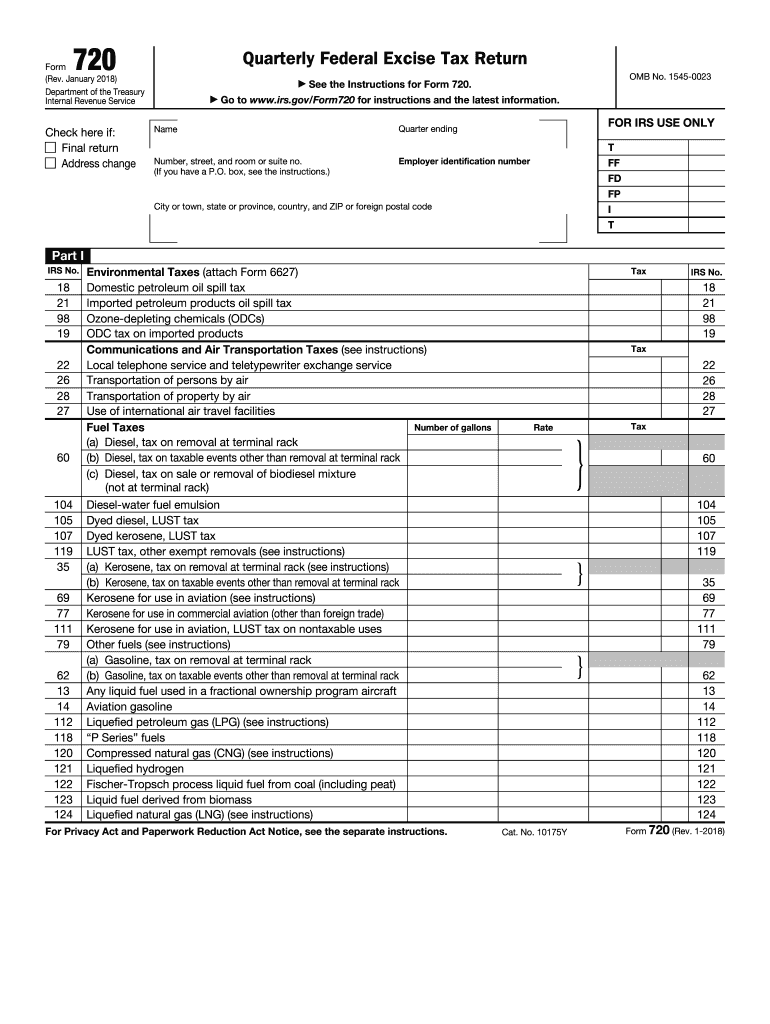
Filing the IRS 720, the Quarterly Federal Excise Tax Return, online can seem daunting. However, this guide provides clear and systematic instructions tailored to assist individuals with varying levels of experience in completing this essential tax document.
Follow the steps to efficiently complete the IRS 720 online.
- Press the ‘Get Form’ button to access the IRS 720 form and open it in the online editor.
- Begin by entering your basic information, including your name, address, and employer identification number in the designated fields at the top of the form.
- Indicate whether this is your final return or if you have an address change by checking the appropriate box.
- Fill out Part I for excise taxes, detailing the amounts in the specified categories. Provide entries for environmental taxes, communication services, fuel taxes, and other excise taxes as applicable.
- Complete Part II if applicable, by reporting the Patient-Centered Outcomes Research Fee and other specified health insurance policies. Input the average number of lives covered and associated fees.
- Proceed to Part III to calculate the total tax. Ensure to include amounts from Part I and Part II and account for any claims, deposits, and overpayments in the relevant fields.
- Make sure to indicate your payment preferences, whether applying an overpayment to the next return or requesting a refund.
- Designate a third-party designee if applicable, filling in their name, title, and contact information.
- Finally, sign and date the form. If prompted, include the preparer's name and signature if applicable.
- After reviewing your entries for accuracy, you can save changes, download, print, or share the completed form as needed.
Start completing your IRS 720 form online today for a smoother tax filing experience.
Experience a faster way to fill out and sign forms on the web. Access the most extensive library of templates available.
Related content
Mar 18, 2025 — Use Form 720 and attachments to: Report liability by IRS number. Pay the...
The return is filed to report excise tax on foreign insurance premiums, telecommunication...
Apr 27, 2017 — Use Form 720 and attachments to report your liability by IRS. No. and pay...
Get answers to your most pressing questions about US Legal Forms API.
What does tax period blocked from automated levy program mean?
When you encounter a tax period blocked from the automated levy program, it means that the IRS has placed restrictions to prevent automated collection actions for that specific period. This is often due to ongoing disputes, such as payment arrangements or pending reviews. Understanding this can guide you through resolving your tax situation effectively.
What is a frozen refund IRS?
A frozen refund from the IRS happens when there are issues that prevent your refund from being processed. This can occur for various reasons, such as discrepancies in your tax information or ongoing audits. If your refund seems frozen, it is wise to obtain assistance through platforms like US Legal Forms to find solutions and expedite the process.
How long after 766 code will I get my refund?
If you see the IRS code 766 on your account, it indicates that your refund has been processed. Generally, once this code appears, you can expect your refund to be issued within a few weeks. Timing may vary based on how the IRS handles specific situations, so remaining informed through IRS updates is beneficial.
Is form 720 still required?
As of now, IRS form 720 is still required for reporting specific health insurance-related taxes. However, regulations can change, so it's important to stay updated on the IRS's compliance requirements. To ensure you properly address any obligations under the IRS 720, consulting with experts can provide clarity and reduce potential errors.
What does code 720 mean on IRS transcript?
The IRS code 720 on your transcript refers to the reporting of certain healthcare coverage. Specifically, it indicates that a form 720 has been filed, typically connected to the Patient Protection and Affordable Care Act. Understanding this code can help you confirm that necessary health insurance obligations are met, especially if you are facing any issues with your tax filings.
Who is required to file the IRS form 720?
The IRS form 720 must be filed by businesses involved in activities subject to excise taxes, including certain manufacturers and retailers. If your business generates income from applicable excise tax activities, you are required to file this form. Understanding your business’s tax obligations is essential to avoid penalties associated with non-compliance.
Can I file IRS form 720 online?
Yes, you can file IRS form 720 online. The IRS provides an electronic filing option that allows for quicker processing and immediate confirmation of receipt. Using e-filing can streamline your tax process, making it easier to meet deadlines and manage documentation efficiently.
What is code 720 on IRS transcript?
Code 720 on your IRS transcript indicates an excise tax return has been filed using IRS form 720. This code is part of the IRS's record-keeping system, showing the filing status and any tax obligations. It helps track the payment and compliance with excise tax regulations for your business.
Who prepares form 720?
IRS form 720 can be prepared by business owners or tax professionals. If you find the form complex, seeking help from a qualified accountant or tax advisor can ensure accuracy. Using tax preparation services, such as US Legal Forms, can simplify the process and help you avoid common mistakes.
Who needs to file an excise tax return?
Businesses that engage in activities subject to excise taxes are required to file an excise tax return. This includes businesses in industries like alcohol, tobacco, and certain fuel sellers. If your business is involved in the manufacturing of certain products or taxable activities, you will need to file IRS 720 to fulfill your tax obligations.
Use professional pre-built templates to fill in and sign documents online faster. Get access to thousands of forms.
If you believe that this page should be taken down, please follow our DMCA take down process here.
This form is available in several versions. Select the version you need from the drop-down list below.