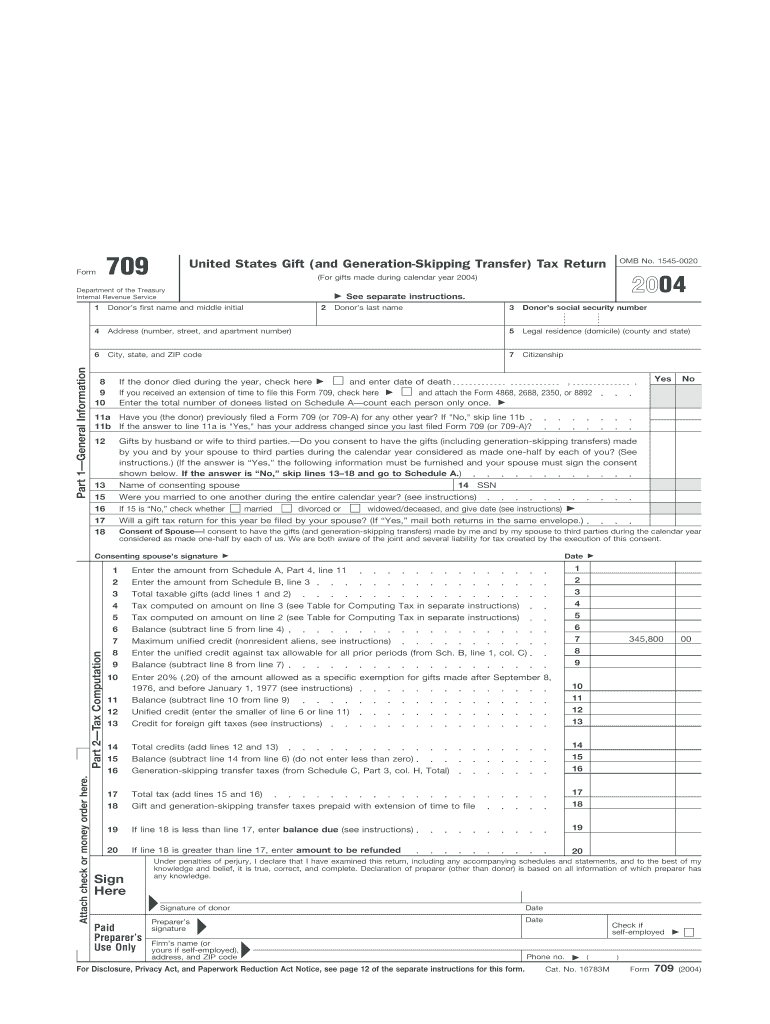
Or periods (from Sch. B, line 1, col. C) 8 9 Balance (subtract line 8 from line 7) 9 10 Enter 20% (.20) of the amount allowed as a specific exemption for gifts made after September 8, 1976, and before January 1, 1977 (see instructions) 10 11 Balance (subtract line 10 from line 9) 11 12 Unified credit (enter the smaller of line 6 or line 11) 12 13 Credit for foreign gift taxes (see instructions) 13 14 Total credits (add lines 12 and 13) 14 15 Balance (subtract line 14 from li.
Loading

Open form follow the instructions

Easily sign the form with your finger

Send filled & signed form or save
How to fill out the IRS 709 online
This guide provides a comprehensive overview of how to fill out the IRS 709 form online, ensuring that users understand the necessary steps and information required for accurate tax reporting related to gift and generation-skipping transfer taxes. By following these instructions, individuals can confidently complete their filing without any legal complications.
Follow the steps to complete your IRS 709 form online accurately.
- Click ‘Get Form’ button to obtain the form and open it in the editor.
- Begin by entering the donor's first name, middle initial, last name, and social security number in the spaces provided. Additionally, fill in the address, including number, street, and apartment number, along with the city, state, and ZIP code.
- Specify the donor's legal residence, including county and state, and indicate the citizenship status.
- If applicable, check the box indicating whether the donor died during the year and provide the date of death. If you received an extension to file, check the appropriate box and attach the relevant form.
- Enter the total number of donees as listed on Schedule A, counting each person only once.
- Respond to the questions regarding prior filings of Form 709, including if the address has changed since the last filing.
- If you are splitting gifts with your spouse, consent to treat the gifts as made one-half by each spouse by providing the necessary information and signatures.
- Complete the sections associated with taxable gifts by summarizing amounts from Schedule A and calculating the total taxable gifts.
- Continue with the tax computation, including entering values for any credits and deductions applicable to the current year's tax.
- Once all fields are filled, review the entire document for accuracy, and save any changes before downloading, printing, or sharing the completed form.
Start completing your IRS 709 form online now to ensure timely and accurate filing.
Experience a faster way to fill out and sign forms on the web. Access the most extensive library of templates available.
Related content
Jan 30, 2025 — Use Form 709 to report: Transfers subject to the federal gift and certain...
No deduction shall be allowed under this chapter to the partnership or to any partner for...
If you are filing this form solely to elect allocation. See the instructions for Line 5...
Get answers to your most pressing questions about US Legal Forms API.
How do I document a gift for the IRS?
To document a gift for IRS purposes, keep precise records such as a written acknowledgment of the gift and its value. If the gift exceeds the annual exclusion limit, you will need to file IRS 709 and include necessary details. Additional documentation might include receipts or appraisals, especially for high-value items. Platforms like US Legal Forms offer guidance on effective documentation methods for IRS 709.
How does the IRS know if you have a gift?
The IRS may become aware of gifts through various means, such as tips or audits, but generally relies on individual taxpayers to report significant gifts via IRS 709. It is vital to understand the tax implications of any gifts you give, especially if they surpass the exclusion limit. Moreover, maintaining proper documentation can provide protection in case of an inquiry. Using resources like US Legal Forms can help clarify these reporting requirements.
Does the recipient of a gift have to report it to the IRS?
Typically, the recipient of a gift does not need to report it to the IRS unless it exceeds certain thresholds. Instead, the donor is responsible for reporting taxable gifts on IRS 709. However, the recipient should keep detailed records and be aware of any implications, especially if they sell the gifted item. For thorough understanding, US Legal Forms can provide resources related to IRS 709 obligations.
Can form 709 be electronically filed?
Yes, IRS 709 can be electronically filed using various tax preparation software authorized by the IRS. This option makes it easier to submit your form and ensures that you meet deadlines. Many users find that electronic filing reduces the chances of errors and speeds up the processing time. Consider using US Legal Forms for guidance on how to electronically file IRS 709 correctly.
Do I really need to file form 709?
Filing IRS 709 is necessary if you give taxable gifts that exceed the annual exclusion limit set by the IRS. This form reports the total value of gifts made and helps calculate your lifetime gift tax exemption. If you are unsure about your obligations, consulting a tax professional can provide clarity. Utilizing platforms like US Legal Forms can simplify the process of filing IRS 709.
What is IRS Form 709 for?
IRS Form 709 is used to report gifts that exceed the annual exclusion limit. This form helps the IRS track gifts to ensure compliance with gift tax rules and limits. It is essential for individuals who want to manage their tax liabilities effectively when planning large gifts. If you are unsure about completing this form, consider using uslegalforms, which can simplify the process for you.
How does the IRS know if I give a gift?
The IRS can find out about gifts you give through the filing of IRS Form 709, which reports gifts that exceed the annual exclusion amount. Additionally, financial institutions may report large transactions that can draw the IRS’s attention. It’s important to maintain transparency and adhere to IRS regulations to avoid complications. Utilize uslegalforms for efficient guidance in these matters.
Does the person receiving a gift have to report to the IRS?
Generally, the recipient of a gift does not need to report it to the IRS. However, if the gift generates income, such as interest or dividends, that income must be reported on the recipient’s tax return. The responsibility typically falls on the person giving the gift to file IRS Form 709 if applicable. Stay informed to ensure you're complying with IRS regulations.
What triggers a gift tax return?
A gift tax return, specifically IRS Form 709, is triggered when the total amount of gifts given exceeds the annual exclusion limit. Any gifts to individuals exceeding this limit require you to report them. Additionally, if you make certain types of gifts, like those with future interests, you must file regardless of the total amount. Be sure to keep track of your gifts for compliance.
Which of the following situations would require the filing of form 709?
You need to file IRS Form 709 if you give a gift that exceeds the annual exclusion amount. This form is also necessary for gifts made to spouses who are not U.S. citizens, or if you make a gift of future interests, like a trust. It’s crucial to be proactive, as failure to file may lead to penalties. For your ease, consider uslegalforms, which can guide you through the filing process.
Use professional pre-built templates to fill in and sign documents online faster. Get access to thousands of forms.
If you believe that this page should be taken down, please follow our DMCA take down process here.
This form is available in several versions. Select the version you need from the drop-down list below.