Loading
Form preview
  • US Legal Forms
  • Other Templates
  • Tax Forms
  • Executive Department Treasury IRS Forms
  • Irs 709 2012

Get Irs 709 2012

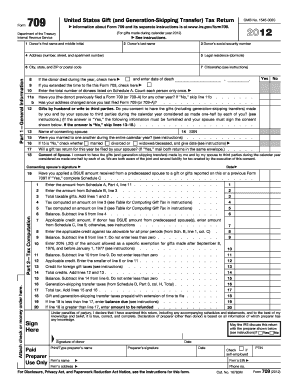
Amount from Schedule C, line 5; otherwise, see instructions . . . . . . . . . . . . . . 7 8 9 Enter the applicable credit against tax allowable for all prior periods (from Sch. B, line 1, col. C) Balance. Subtract line 8 from line 7. Do not enter less than zero . . . . . . . . . . 8 9 . . . . . . . . . . . 10 Enter 20% (.20) of the amount allowed as a specific exemption for gifts made after September 8, 1976, and before January 1, 1977 (see instructions) . . . . . . . . . . . .

This website is not affiliated with IRS

How it works

  1. Open form

    Open form follow the instructions

  2. Easily sign form

    Easily sign the form with your finger

  3. Share form

    Send filled & signed form or save

How to fill out the IRS 709 online

Filling out the IRS 709 form, also known as the United States Gift (and Generation-Skipping Transfer) Tax Return, can seem daunting. This guide provides you with clear, step-by-step instructions to help you through the process of completing the form online.

Follow the steps to fill out the IRS 709 online successfully.

  1. Click the ‘Get Form’ button to obtain the form and open it in the editor.
  2. Provide your first name, middle initial, and last name in the appropriate fields. Make sure to enter your social security number accurately.
  3. Fill in your legal residence address, including the city, state, and ZIP code.
  4. Indicate your citizenship status as required.
  5. Answer questions regarding prior filings: if you have filed Form 709 previously and if your address has changed since then.
  6. If you are married, decide if you want to split gifts made with your spouse, and provide the necessary details and the consenting spouse's signature if applicable.
  7. Detail all gifts made during the calendar year in Schedule A, specifying the donees and descriptions of the gifts.
  8. Calculate your taxable gifts, entering totals from Schedule A into the appropriate fields in Part 2—Tax Computation.
  9. Review your calculations for any applicable credits and tax computation adjustments.
  10. Sign the form, ensuring all information provided is correct and complete. You may also need to provide the signature of your tax preparer if applicable.
  11. Once completed, save your changes, and choose to download, print, or share the form as needed.

Start preparing your IRS 709 form online today.

Get form

Experience a faster way to fill out and sign forms on the web. Access the most extensive library of templates available.

Related content

About Form 709, United States Gift (and...
Jan 30, 2025 — Use Form 709 to report: Transfers subject to the federal gift and certain...
Learn more
26 U.S. Code § 709 - Treatment of organization...
No deduction shall be allowed under this chapter to the partnership or to any partner for...
Learn more
2001 - Instructions for Form 709
If you are filing this form solely to elect allocation. See the instructions for Line 5...
Learn more

Related links form

Gamma Phi Beta Sorority Form 38 2011 KS KIPBS Modules ABC Chart Form Qualifications Form 330 Rutgers Time Management Worksheet

Questions & Answers

Get answers to your most pressing questions about US Legal Forms API.

Contact support

To document a gift for IRS purposes, maintain detailed records including the date of the gift, the amount, and the recipient’s information. You should also keep any receipts or statements that support the gift value. Filing IRS 709 with accurate details ensures proper reporting of your gifts. Using tools available on uslegalforms can help you to prepare your documentation correctly.

IRS 709 does not have a set tax rate because it primarily tracks gift amounts rather than imposing taxes directly. However, gifts above the annual exclusion limit may be subject to federal gift tax rates, which can go up to 40%. It’s crucial to understand how your gifts may affect your overall tax situation. Exploring resources on the uslegalforms platform can provide clarity on these rates.

Yes, you can electronically file IRS 709 through certain tax preparation software. This option streamlines the submission process and can help you avoid mistakes common in paper filing. Check with your software provider to confirm that they support IRS 709. This feature can save you time and reduce stress during tax season.

If you make gifts above a certain value, you need to file IRS 709. This form is required for reporting gifts to individuals that exceed the annual exclusion limit. It is important to comply with IRS regulations to avoid penalties. If you’re unsure about your situation, consider seeking guidance from a tax professional or utilizing the uslegalforms platform.

While many IRS forms can be e-filed, certain forms, including some tax forms and those involving specific claims, cannot be filed electronically. It’s important to check the IRS website for an updated list of forms that cannot be filed this way. Remember, IRS Form 709 is allowed for e-filing, so you can take advantage of the convenience with this specific form.

Yes, there are several software options available for completing IRS Form 709. These tools often allow you to fill out, e-file, and manage your submissions efficiently. Consider using uslegalforms, which provides a user-friendly platform with step-by-step guidance to help you navigate the form's complexities.

Yes, you can electronically sign IRS Form 709 if you use an e-filing platform that supports electronic signatures. This feature simplifies the filing process and enhances security. Make sure the software you choose complies with IRS requirements to ensure your submission is valid.

Yes, you can file IRS Form 709 online using approved e-filing software. This method provides convenience, allowing you to complete and submit your form from anywhere with internet access. Just remember to follow IRS guidelines to ensure that your submission is valid and accepted.

Yes, you can file IRS Form 709 electronically, streamlining the process and making it more efficient. Filing electronically reduces the risk of errors and expedites the processing time. Ensure you use the IRS-approved e-filing software or service for your submission, as not all platforms support this feature.

Yes, when you sell an inherited home, you generally need to report the sale to the IRS. The basis of the home is usually stepped up to its fair market value at the time of the deceased's passing, which can impact your capital gains tax liability. Filing accurate documentation is essential, and using IRS Form 709 may come into play if the sale involves gifts tied to the estate.

Get This Form Now!

Use professional pre-built templates to fill in and sign documents online faster. Get access to thousands of forms.
If you believe that this page should be taken down, please follow our DMCA take down processhere.
Get IRS 709
  • Adoption
  • Bankruptcy
  • Contractors
  • Divorce
  • Home Sales
  • Employment
  • Identity Theft
  • Incorporation
  • Landlord Tenant
  • Living Trust
  • Name Change
  • Personal Planning
  • Small Business
  • Wills & Estates
  • Packages A-Z
  • Affidavits
  • Bankruptcy
  • Bill of Sale
  • Corporate - LLC
  • Divorce
  • Employment
  • Identity Theft
  • Internet Technology
  • Landlord Tenant
  • Living Wills
  • Name Change
  • Power of Attorney
  • Real Estate
  • Small Estates
  • Wills
  • All Forms
  • Forms A-Z
  • Other Templates
  • Legal Hub
  • About Us
  • Help Portal
  • Legal Resources
  • Blog
  • Affiliates
  • Contact Us
  • Delete My Account
  • Site Map
  • Industries
  • Forms in Spanish
  • Localized Forms
  • State-specific Forms
  • Forms Kit
  • Real Estate Handbook
  • All Guides
  • Notarize
  • Incorporation services
  • For Consumers
  • For Small Business
  • For Attorneys
  • USLegal
  • FormsPass
  • pdfFiller
  • signNow
  • altaFlow
  • DocHub
  • Instapage
Form Packages
  • Adoption
  • Bankruptcy
  • Contractors
  • Divorce
  • Home Sales
  • Employment
  • Identity Theft
  • Incorporation
  • Landlord Tenant
  • Living Trust
  • Name Change
  • Personal Planning
  • Small Business
  • Wills & Estates
  • Packages A-Z
Form Categories
  • Affidavits
  • Bankruptcy
  • Bill of Sale
  • Corporate - LLC
  • Divorce
  • Employment
  • Identity Theft
  • Internet Technology
  • Landlord Tenant
  • Living Wills
  • Name Change
  • Power of Attorney
  • Real Estate
  • Small Estates
  • Wills
  • All Forms
  • Forms A-Z
  • Other Templates
Customer Service
  • Legal Hub
  • About Us
  • Help Portal
  • Legal Resources
  • Blog
  • Affiliates
  • Contact Us
  • Delete My Account
  • Site Map
  • Industries
  • Forms in Spanish
  • Localized Forms
  • State-specific Forms
  • Forms Kit
Legal Guides
  • Real Estate Handbook
  • All Guides
Prepared for you
  • Notarize
  • Incorporation services
Our Customers
  • For Consumers
  • For Small Business
  • For Attorneys
Our Sites
  • USLegal
  • FormsPass
  • pdfFiller
  • signNow
  • altaFlow
  • DocHub
  • Instapage
Social Media
Call us now toll free:
+1 833 426 79 33
As seen in:
© Copyright 1999-2026 airSlate Legal Forms, Inc. 17 Station Street, Ste. 203, Brookline, MA 02445
  • Your Privacy Choices
  • Terms of Service
  • Privacy Notice
  • Content Takedown Policy
  • Bug Bounty Program
IRS 709
This form is available in several versions.
Select the version you need from the drop-down list below.
2020 IRS 709
Select form
  • 2020 IRS 709
  • 2019 IRS 709
  • 2018 IRS 709
  • 2017 IRS 709
  • 2016 IRS 709
  • 2015 IRS 709
  • 2014 IRS 709
  • 2013 IRS 709
  • 2012 IRS 709
  • 2011 IRS 709
  • 2009 IRS 709
  • 2008 IRS 709
  • 2004 IRS 709
  • 2003 IRS 709
  • 2002 IRS 709
  • 2000 IRS 709
  • 1996 IRS 709
  • 1993 IRS 709
  • 1991 IRS 709
Select form