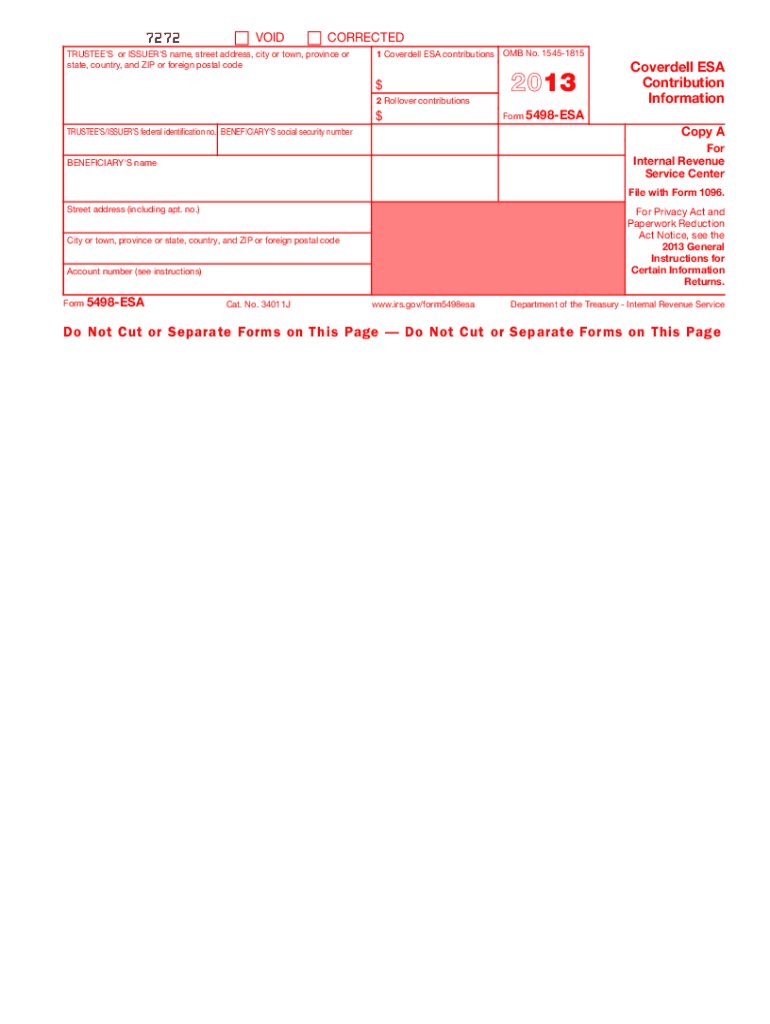
This website. The official printed version of this IRS form is scannable, but the online version of it, printed from this website, is not. A penalty may be imposed for filing forms that can t be scanned. See part O in the current General Instructions for Certain Information Returns for more information about penalties. To order official IRS forms, call 1-800-TAX-FORM (1-800-829-3676) or Order Information Returns and Employer Returns Online, and we ll mail you the scannable forms and other p.
Loading

Open form follow the instructions

Easily sign the form with your finger

Send filled & signed form or save
How to fill out the IRS 5498-ESA online
The IRS 5498-ESA is a crucial document that reports contributions made to a Coverdell education savings account. Filling it out online can streamline the process, ensuring accurate submission and compliance. This guide will help you navigate each section of the form in a clear and supportive manner.
Follow the steps to fill out the IRS 5498-ESA online.
- Click ‘Get Form’ button to obtain the form and open it in the editor.
- Begin by entering the trustee’s or issuer's name, street address, city or town, province or state, country, and ZIP or foreign postal code in the appropriate fields.
- Provide the beneficiary's name as it appears on official documentation, followed by their social security number, ensuring accuracy to avoid discrepancies.
- In Box 1, enter the total Coverdell ESA contributions made in the specified year. Make sure to include all relevant contributions while considering the contribution limits.
- For Box 2, input any rollover contributions made during the tax year. This includes direct rollovers and contributions from military death gratuities.
- Fill in the account number designated by the trustee or issuer, which helps identify the beneficiary's specific account.
- Review all information entered to ensure everything is correct, as filing inaccurate information may lead to penalties or complications.
- Once you have confirmed accuracy, save changes, download the form, print it, or share it as needed. Ensure that you are utilizing the official printed version for submissions.
Complete your IRS 5498-ESA online today to ensure accurate reporting of your Coverdell ESA contributions.
Experience a faster way to fill out and sign forms on the web. Access the most extensive library of templates available.
Related content
Jan 23, 2025 — File this form for each person for whom you maintained any Coverdell...
Form. 5498-ESA reports contributions and rollover contributions made for you for 2003. For...
Get answers to your most pressing questions about US Legal Forms API.
Can I claim my ESA dog on my taxes?
You typically cannot claim an ESA dog on your taxes, as emotional support animals do not qualify for medical expense deductions under the current IRS rules. However, if the ESA is necessary for medical conditions recognized by a licensed professional, some expenses may be considered. Consulting a tax specialist can provide the best insights regarding your specific situation.
What is the difference between 5498 and 5498 ESA?
Form 5498 is used for reporting contributions to various retirement accounts, while Form 5498-ESA is specifically for Education Savings Accounts. Each form serves different purposes and records distinct types of contributions. Understanding these differences can help you manage your finances more effectively and ensure you remain compliant with IRS regulations.
Can you write off pets on your taxes?
In general, you cannot write off pets on your taxes, as they are typically considered personal property. However, if a pet serves a specific business purpose or assists someone with a disability, some expenses may be deductible. Understanding the rules around tax deductions can be tricky, so it may be beneficial to consult a tax professional for clarity on your situation.
How do I report form 5498 to the IRS?
To report Form 5498-ESA to the IRS, you do not need to submit the form itself, as it is provided by your financial institution. Instead, you will use the information on the form to complete your tax return. Ensure that you keep this form for your records, and you may refer to it when preparing your financial documentation. For assistance, consider using US Legal Forms.
Can I change my beneficiary on ESA?
You can change the beneficiary on your ESA if you follow the guidelines set by the IRS. Generally, you may transfer the account to a family member without tax implications. It is wise to maintain proper documentation and notify the financial institution holding your ESA. Utilizing a platform like US Legal Forms can ensure you complete the necessary paperwork correctly.
Do you report ESA on taxes?
You need to report the contributions to your ESA when filing your taxes, especially if you've received a Form 5498-ESA from the financial institution. This form provides details about your contributions and helps ensure compliance with IRS regulations. If you don’t report this correctly, you may face penalties. Always check with a tax professional for personalized advice.
What is the difference between a 1099 and a 5498?
IRS Form 1099 reports income types, including distributions from accounts, while IRS Form 5498 is focused on contributions to retirement and savings accounts. Specifically, the 5498-ESA version captures information regarding contributions to Education Savings Accounts. Both forms serve crucial roles in tax reporting, so understanding their differences can aid in accurate tax preparation. For scenarios involving these forms, consider resources from platforms like US Legal Forms.
Where do I get my form 5498?
You will receive your IRS Form 5498 from the financial institution managing your Education Savings Account. They are required to send it to you by May 31 each year. If you do not receive this form as expected, follow up directly with your financial institution to ensure you have the correct information. Additionally, using tools from US Legal Forms can streamline your inquiries into such matters.
Do I have to wait for 5498 to file taxes?
You do not need to wait for IRS Form 5498 to file your taxes. Although this form provides important details regarding contributions, you can file your return based on the information available to you by the tax deadline. However, make a note to retain the form for your records, as it could be beneficial if you need to verify contributions. US Legal Forms can help you understand how to handle various tax documents efficiently.
What tax form do I get for ESA distribution?
When you take a distribution from your Education Savings Account, you will receive IRS Form 1099-Q. This form details the amounts withdrawn and indicates whether the funds were used for qualified educational expenses. It is essential to keep this documentation handy for tax filing purposes. If you need more information about managing your ESAs, US Legal Forms can offer useful resources.
Use professional pre-built templates to fill in and sign documents online faster. Get access to thousands of forms.
If you believe that this page should be taken down, please follow our DMCA take down process here.
This form is available in several versions. Select the version you need from the drop-down list below.