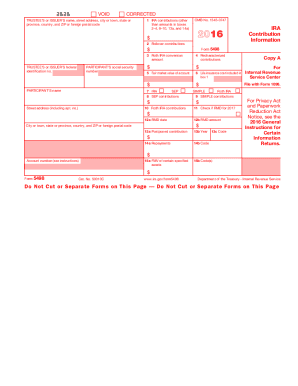
Get Irs 5498 2016
How it works
-

Open form follow the instructions
-

Easily sign the form with your finger
-

Send filled & signed form or save
How to fill out the IRS 5498 online
Filling out the IRS 5498 form online can be a straightforward process if you follow the right steps. This guide aims to provide clear and user-friendly instructions for completing each section of the form correctly.
Follow the steps to successfully complete the IRS 5498 online.
- Click ‘Get Form’ button to obtain the form and open it in the editor.
- Enter the trustee's or issuer's name, street address, city or town, state or province, country, and ZIP or foreign postal code in the designated fields.
- Fill in the participant's name and social security number accurately to ensure proper identification.
- Complete box 1 by inputting the total IRA contributions made during the specified timeframe—those made in the year indicated and through the filing date.
- In box 2, record any rollover contributions that were made, including direct rollovers to either a traditional or Roth IRA.
- For box 3, specify the amount converted from a traditional IRA to a Roth IRA within the applicable year.
- If any contributions were recharacterized, detail those amounts under box 4.
- Provide the fair market value of the account as of the end of the year in box 5.
- Input any life insurance costs included in the contributions in box 6.
- Fill in the applicable IRA type in box 7, specifying whether it is a traditional, SEP, or SIMPLE IRA.
- Record any SEP contributions made in box 8 and SIMPLE contributions in box 9.
- In box 10, input the Roth IRA contributions total for the specified period.
- Check box 11 if there is a required minimum distribution (RMD) for the year indicated.
- Complete the RMD date and amount in boxes 12a and 12b, respectively, if applicable.
- If there are postponed contributions, input those amounts and the corresponding year in boxes 13a and 13b.
- Detail any repayments related to qualified reservist distributions or federally designated disaster withdrawals in boxes 14a and 14b.
- Complete boxes 15a and 15b to provide additional fair market value information if necessary.
- After filling in all applicable sections, save your changes. You can then download, print, or share the completed form as needed.
Begin completing your IRS 5498 form online to ensure timely and accurate submission.
Get form
You do not need to enter IRS form 5498 SA on your tax return either. This form is specifically for reporting contributions to Health Savings Accounts (HSAs) and qualifies for tax benefits, but it functions similarly to the 5498 in that it is used for informational purposes. However, be sure to keep this documentation for your records, as it may help when calculating your qualifying medical expenses. Understanding your forms can streamline your tax filing process.