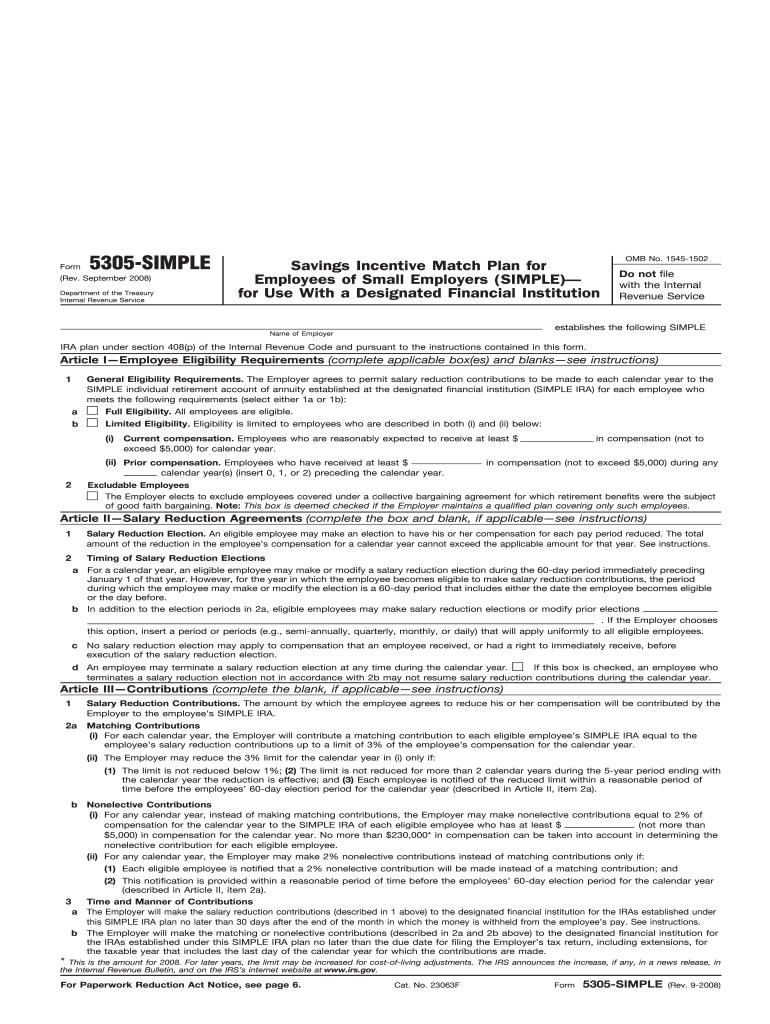
Ions . If the Employer chooses this option, insert a period or periods (e.g., semi-annually, quarterly, monthly, or daily) that will apply uniformly to all eligible employees. c No salary reduction election may apply to compensation that an employee received, or had a right to immediately receive, before execution of the salary reduction election. d An employee may terminate a salary reduction election at any time during the calendar year. If this box is checked, an employee who terminates a sal.
Loading

Open form follow the instructions

Easily sign the form with your finger

Send filled & signed form or save
How to fill out the IRS 5305-SIMPLE online
This guide provides clear instructions on completing the IRS 5305-SIMPLE form, which is designed for establishing a savings incentive match plan for employees of small employers. By following these steps, users can ensure accurate online submission and compliance with IRS requirements.
Follow the steps to fill out the IRS 5305-SIMPLE form correctly.
- Click the ‘Get Form’ button to obtain the IRS 5305-SIMPLE form and open it in an editor.
- Begin by filling out the employer's name and address as indicated on the form.
- Complete Article I regarding employee eligibility requirements. Choose either full eligibility (all employees) or limited eligibility (specific criteria). Ensure to fill in any required monetary values for compensation based on your selection.
- In Article II, specify the salary reduction agreements. Indicate if there will be salary reduction elections and the timing of those elections, including additional periods if applicable.
- Proceed to Article III to define contributions. Clearly indicate the matching or nonelective contributions that the employer will provide to eligible employees’ SIMPLE IRAs. Ensure the percentages and conditions reflect your plan.
- Fill out Article IV with any additional requirements or provisions pertinent to your SIMPLE IRA plan, including withdrawal and transfer conditions.
- Finally, select the effective date in Article VII, sign the form, and ensure that the designated financial institution also completes their sections.
- Once all parts of the form are filled out, ensure to save your changes. You can then download, print, or share the form as needed.
Complete your IRS 5305-SIMPLE form online today for a smooth submission process.
Experience a faster way to fill out and sign forms on the web. Access the most extensive library of templates available.
Related content
Form 5305-SIMPLE is a model Savings. Incentive Match Plan for Employees of. Small...
However, you must report to the IRS which eligible employees are active participants in...
Jan 26, 2017 — Use Form 5305SIMPLE if you require that all contributions under the...
Get answers to your most pressing questions about US Legal Forms API.
What is the difference between a 5305 and a 5305A SEP IRA?
The IRS 5305-SIMPLE and 5305A forms serve different purposes in retirement planning. The 5305-SIMPLE is specifically designed for SIMPLE IRAs, which are geared towards smaller businesses and include employee contributions. In contrast, the 5305A SEP IRA is for larger employers and allows for more flexible employer-only contributions. Understanding these differences aids businesses in selecting the right retirement plan for their specific size and employee needs.
What is DA form 5305?
DA Form 5305 is a form used by the U.S. Army for military personnel to access certain benefits. It should not be confused with the IRS 5305-SIMPLE, which pertains to retirement savings. While both forms deal with benefits, the contexts and applications differ significantly, so it's important to refer to the correct form for specific needs.
What is 5305?
The term 5305 refers to the IRS form used to establish a SIMPLE IRA plan, specifically the IRS 5305-SIMPLE form. This document is crucial for small businesses looking to provide an accessible retirement savings option for employees. Understanding the 5305 helps employers ensure they meet IRS requirements while facilitating their employees' financial well-being.
What is form 5305 used for?
Form 5305 is specifically used for setting up a SIMPLE IRA plan under IRS guidelines. This form is essential for employers who want to offer their employees an easy and effective way to save for retirement while ensuring compliance with tax laws. By filing this form, employers lay a solid foundation for their retirement plan, promoting long-term financial wellness for their workforce.
What is form 5305 SIMPLE?
Form 5305-SIMPLE is the IRS document used to establish a SIMPLE IRA plan for small businesses. This form outlines the terms of the savings plan, including employee eligibility and contribution requirements. When completed, this form helps employers comply with IRS regulations while providing employees with a straightforward way to save for retirement.
Does the employer have to match 3% for a SIMPLE IRA?
Under the IRS 5305-SIMPLE plan, employers are required to make contributions to their employees' SIMPLE IRAs. Employers can choose to either match employee contributions up to 3% or make a flat contribution of 2% of eligible compensation. This requirement helps to ensure that both employers and employees contribute to the retirement savings, providing a more secure financial future.
What is the difference between SIMPLE IRA 5304 and 5305?
The IRS 5305-SIMPLE and IRS 5304-SIMPLE allow employers to set up a SIMPLE IRA for their employees, but they differ in how employee contributions are made. The 5304 form allows for employee choice of financial institution, while the 5305 form requires that all contributions go to one specific financial institution. This distinction is key for employers who want to provide their employees with more flexibility in managing their retirement funds.
How to calculate 3 employer match for SIMPLE IRA?
To calculate a 3% employer match for a SIMPLE IRA, simply multiply the employee's compensation by 3%. For example, if an employee earns $50,000, the employer’s contribution would be $1,500. This straightforward calculation helps ensure employees can benefit from robust retirement savings through IRS 5305-SIMPLE.
What type of contribution allocation must be used on IRS Form 5305-SEP?
When using IRS Form 5305-SEP, contributions must be allocated in a way that complies with IRS regulations regarding employee eligibility. Typically, contributions must be based on a percentage of the employee's compensation. This structure helps both employers and employees maximize their benefits while adhering to IRS guidelines.
What is form 5305-SIMPLE?
Form 5305-SIMPLE is the IRS form used to establish a SIMPLE IRA plan. This form outlines the terms and conditions of the SIMPLE IRA, including contribution limits and eligibility requirements. Utilizing this form can simplify your retirement planning while ensuring compliance with IRS regulations.
Use professional pre-built templates to fill in and sign documents online faster. Get access to thousands of forms.
If you believe that this page should be taken down, please follow our DMCA take down process here.
This form is available in several versions. Select the version you need from the drop-down list below.