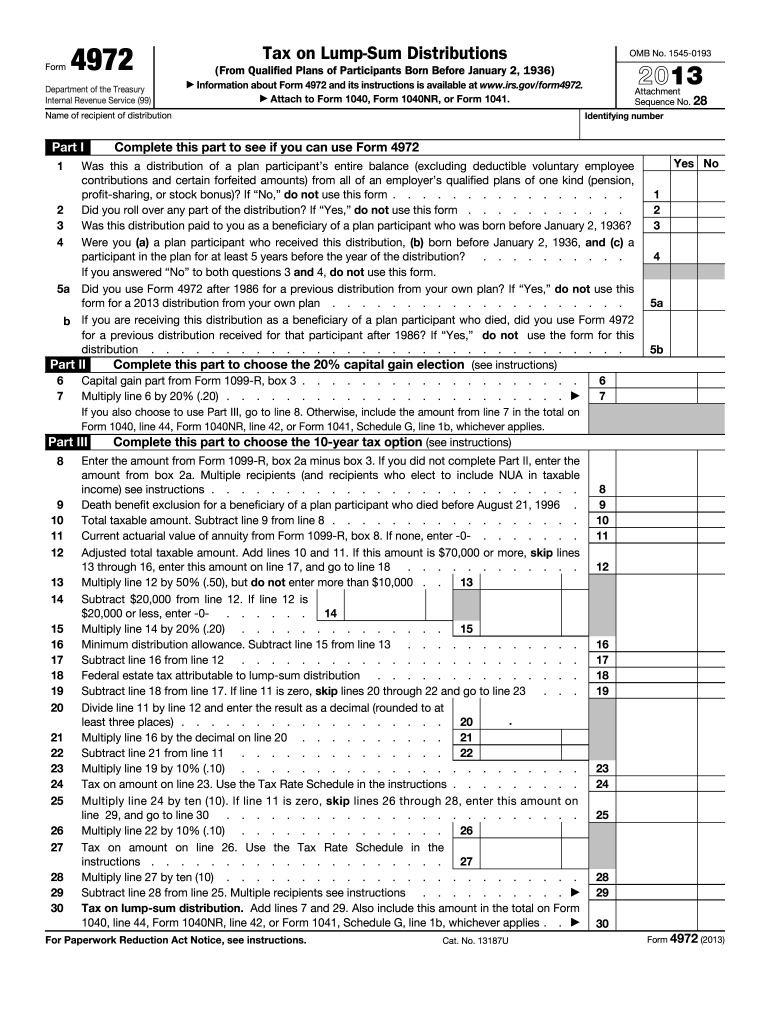
Rm 4972 and its instructions is available at www.irs.gov/form4972. Attach to Form 1040, Form 1040NR, or Form 1041. Name of recipient of distribution Part I OMB No. 1545-0193 Attachment Sequence No. 28 Identifying number Complete this part to see if you can use Form 4972 Yes No 1 Was this a distribution of a plan participant s entire balance (excluding deductible voluntary employee contributions and certain forfeited amounts) from all of an employer s qualified plans of one kind (p.
Loading

Open form follow the instructions

Easily sign the form with your finger

Send filled & signed form or save
How to fill out the IRS 4972 online
The IRS 4972 form is used to calculate the tax on qualified lump-sum distributions. This guide provides clear, step-by-step instructions to help users complete the form online with ease and accuracy.
Follow the steps to fill out the IRS 4972 effectively.
- Press the ‘Get Form’ button to access the IRS 4972 form and open it in the digital format.
- Begin by entering the name of the recipient of the distribution and their identifying number at the top of the form.
- Review Part I to determine eligibility by answering the questions. If the answer is 'No' to applicable questions, you may not need to use this form.
- If eligible, proceed to Part II to choose the capital gain election by entering the capital gain amount from Form 1099-R, box 3.
- If applicable, multiply the capital gain amount by 20% and fill in the result on the designated line in Part II.
- If you are using Part III to choose the 10-year tax option, follow the provided instructions to complete the calculations based on your distribution.
- Ensure all required information has been entered accurately in all applicable sections of the form.
- Finally, save your changes, and download or print the completed form for submission along with your tax return.
Complete your IRS 4972 form online today to ensure accurate tax reporting.
Experience a faster way to fill out and sign forms on the web. Access the most extensive library of templates available.
Related content
Apr 29, 2025 — Use this form to figure the tax on a qualified lump-sum distribution...
In the case of any qualified employer plan, there is hereby imposed a tax equal to 10...
Jan 4, 2017 — This publication discusses the tax treatment of distribu- tions you...
Get answers to your most pressing questions about US Legal Forms API.
What is the tax on Section 4972?
Taxation on Section 4972 distributions largely depends on your tax bracket, the amount of the distribution, and other income. Failure to adhere to tax obligations could result in underpayment penalties, especially when lump-sum distributions are involved. Familiarity with IRS 4972 can help clarify your tax responsibilities and avert financial pitfalls.
What qualifies as a lump sum distribution?
sum distribution qualifies when an individual withdraws their total accrued benefits from a retirement account as one payment. This includes funds from traditional IRAs, pensions, and other qualified plans. Understanding the qualifications for lumpsum distributions can enhance your financial planning and impact your tax situation related to IRS 4972.
What is the IRS form 4972 used for?
Form 4972 is used to report the tax due on lump-sum distributions from retirement plans. This form helps taxpayers calculate the tax liability, particularly when they receive multiple distributions in a single year. If you are facing a lump-sum payout, understanding how to complete IRS Form 4972 can prevent costly mistakes.
Who is eligible for lump sum?
Eligibility for a lump-sum distribution is usually linked to specific criteria, such as retirement status, job separation, or qualifying hardships. Additionally, certain retirement plans may lay out specific conditions that must be met. Ensuring you understand these eligibility requirements can aid in planning your financial future and managing your IRS 4972 obligations.
How far back can the IRS go after back taxes?
The IRS typically has up to ten years from the assessment date to collect back taxes. However, if you have ongoing disputes or other factors at play, this timeframe could be extended. Knowing your rights regarding IRS 4972 can empower you during discussions about back taxes with the IRS.
Does the IRS forgive taxes after 10 years?
While the IRS may write off debts after a ten-year period, this does not mean all taxes are forgiven. Certain conditions and types of tax debt may still be collectible beyond this timeframe. With IRS 4972 in mind, it's smart to stay informed about your tax obligations and seek help if needed.
How much tax will be taken for a lump-sum payout?
The tax withheld from a lump-sum payout can depend on several factors, including your overall tax bracket and whether the withdrawal is rolled over or not. Typically, the IRS may withhold up to 20% for federal taxes on distributions. Understanding these implications is vital, especially in relation to IRS 4972, to prevent unpleasant surprises during tax season.
What is the IRS Code 4972?
IRS Code 4972 pertains to tax penalties associated with lump-sum distributions. It applies when distributions from qualified plans lead to a tax liability. Familiarizing yourself with IRS 4972 can help you avoid unexpected tax penalties and plan your withdrawals wisely. Access to precise information through resources like US Legal Forms can make this easier.
Who gets lump sum payments?
Lump-sum payments are generally awarded to eligible retirement plan participants. This could include retirees, individuals who have changed jobs, or those who are experiencing certain qualifying events under their retirement plans. Understanding IRS 4972 can be crucial for anyone looking to maximize their financial benefits from lump-sum distributions.
What triggers a lump sum distribution?
sum distribution is typically triggered by certain events such as retirement, job termination, or a plan termination. Additionally, if a participant reaches a specific age or disability status, they may also qualify for a lumpsum payout. Knowing the triggers helps individuals plan better for retirement and manage their tax liabilities under IRS 4972.
Use professional pre-built templates to fill in and sign documents online faster. Get access to thousands of forms.
If you believe that this page should be taken down, please follow our DMCA take down process here.
This form is available in several versions. Select the version you need from the drop-down list below.