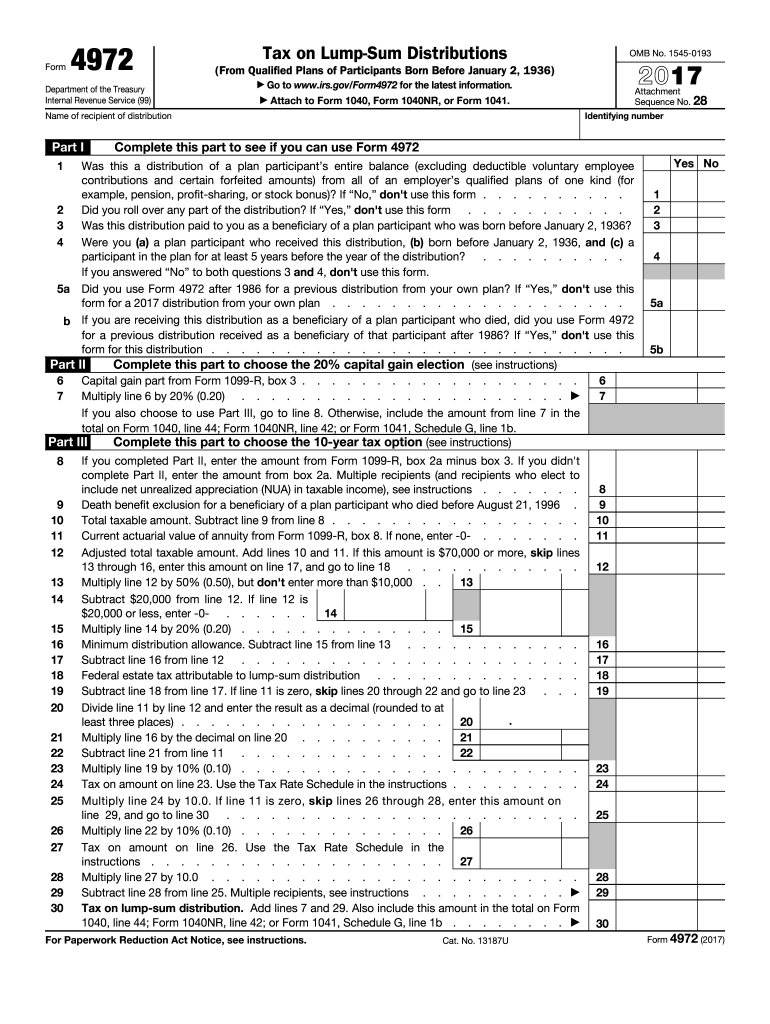
Lines 13 through 16, enter this amount on line 17, and go to line 18 . . . . . . . . . . . . Multiply line 12 by 50% (0.50), but don't enter more than $10,000 . . 13 Subtract $20,000 from line 12. If line 12 is $20,000 or less, enter -0. . . . . . 14 Multiply line 14 by 20% (0.20) . . . . . . . . . . . . . . 15 Minimum distribution allowance. Subtract line 15 from line 13 . . . . . . . . . . . . Subtract line 16 from line 12 . . . . . . . . . . . . . . . . . . . . . . . Federal estate tax attrib.
Loading

Open form follow the instructions

Easily sign the form with your finger

Send filled & signed form or save
How to fill out the IRS 4972 online
Filling out the IRS Form 4972 can be a straightforward process when you have the right guidance. This form is used to calculate the tax on qualified lump-sum distributions from retirement plans, specifically for individuals born before January 2, 1936. This guide will walk you through each section of the form to ensure accurate completion.
Follow the steps to complete your IRS 4972 form with confidence
- Press the ‘Get Form’ button to access the form and open it in your editing tool.
- At the top of the form, enter the name and identifying number of the recipient of the distribution.
- Complete Part I to determine your eligibility for using Form 4972 by responding to questions 1 through 5. Select 'Yes' or 'No' as applicable.
- If eligible, proceed to Part II if you wish to utilize the 20% capital gain election. Enter the capital gain amount from Form 1099-R, box 3 on line 6.
- Multiply the amount on line 6 by 20% (0.20) and enter the result on line 7. If opting to use Part III, continue; otherwise, include the line 7 amount in your total on Form 1040.
- For Part III, enter the ordinary income portion of your distribution by subtracting box 3 from box 2a of Form 1099-R on line 8.
- Follow the specific calculations detailed in Part III to determine the appropriate tax due, ensuring to include necessary adjustments.
- Once all sections have been completed, review your entries for accuracy. You can then save your changes, download, print, or share the completed form as needed.
Get started now to complete your IRS 4972 form online!
Experience a faster way to fill out and sign forms on the web. Access the most extensive library of templates available.
Related content
Apr 29, 2025 — Use this form to figure the tax on a qualified lump-sum distribution...
In the case of any qualified employer plan, there is hereby imposed a tax equal to 10...
Jan 4, 2017 — This publication discusses the tax treatment of distribu- tions you...
Get answers to your most pressing questions about US Legal Forms API.
What triggers a lump-sum distribution?
sum distribution is typically triggered by a specific event such as retirement, reaching a certain age, or an early plan termination. It refers to the full payout of your retirement plan funds in one distribution rather than periodic payments. Recognizing what causes a lumpsum distribution is essential for understanding your tax obligations under IRS 4972.
When to use the qualified dividends and capital gain tax worksheet?
You should use the qualified dividends and capital gain tax worksheet if you received qualified dividends or capital gains during the tax year. This worksheet helps you determine the tax rate applicable to these earnings, ensuring you report them accurately. Understanding when to use this worksheet helps you optimize your tax situation when considering IRS regulations.
When to use IRS form 4972?
Use IRS Form 4972 when you receive a lump-sum distribution from your retirement plans and need to report the tax on that distribution. This form provides a simplified way to calculate tax and can have favorable tax rates compared to regular income. Completing Form 4972 correctly can lead to potential savings on your tax bill, emphasizing its importance.
How to fill out an employee withholding certificate form?
To fill out an employee withholding certificate form, begin by reviewing the form's sections that involve personal information, such as your name and Social Security number. Next, indicate the number of allowances you are claiming and any additional withholding you prefer. Completing this form accurately ensures that your employer withholds the correct amount in taxes, impacting your tax return significantly.
When to use form 4972?
You should use IRS Form 4972 when you receive a lump-sum distribution that you want to report for tax purposes. Completing this form helps you calculate the tax owed on the distribution accurately. Filing this form timely ensures you are following IRS regulations and can help avoid penalties or additional taxes.
What is Section 4972 of the Internal Revenue Code?
Section 4972 of the Internal Revenue Code deals with the taxation of lump-sum distributions from qualified retirement plans. Essentially, it defines how taxes are applied to certain distributions, ensuring that individuals understand their tax liabilities. If you receive a lump-sum distribution, understanding IRS 4972 is crucial to minimize your tax burden.
How to avoid taxes on lump-sum pension payout?
To potentially avoid taxes on a lump-sum pension payout, consider rolling over the funds into another qualified retirement account. Additionally, analyzing your finances for eligibility under IRS 4972 and opting for lump-sum treatment can minimize your immediate tax exposure. Using platforms like US Legal Forms can guide you through the necessary paperwork for rollovers and tax strategies.
What is the tax on Section 4972?
The tax on Section 4972 hinges on whether you meet certain criteria for special tax treatment on lump-sum distributions. If eligible, you may take advantage of a potentially lower tax rate through averaging. Understanding how this section affects your tax situation is vital, as it can lead to significant savings when applied properly.
How do I report qualified dividends to the IRS?
To report qualified dividends, you will need to include them on your tax return, generally using Form 1040. Qualified dividends are taxed at a lower rate compared to ordinary income, so it's crucial to identify which of your dividends qualify. The IRS provides specific guidelines, including nuances related to investments that fall under IRS 4972, helping you report accurately.
How are lump-sum annuity distributions taxed?
Lump-sum annuity distributions are taxed as ordinary income, meaning they will be subject to your applicable income tax rate. However, under the IRS 4972 guidelines, you may have the option to average the tax rate over a period of years, which can reduce your overall tax liability. It’s essential to consult a tax advisor for detailed guidance tailored to your situation.
Use professional pre-built templates to fill in and sign documents online faster. Get access to thousands of forms.
If you believe that this page should be taken down, please follow our DMCA take down process here.
This form is available in several versions. Select the version you need from the drop-down list below.