Loading
Form preview
  • US Legal Forms
  • Form Library
  • Tax Forms
  • Executive Department Treasury IRS Forms
  • Irs 4598e 2003

Get Irs 4598e 2003-2026

Any Internal Revenue law. Generally, tax returns and return information are confidential, as required by Code section 6103. The time needed to complete the form will vary depending on individual circumstances. The estimated average time is 15 minutes. If you have comments concerning the accuracy of this time estimate or suggestions for making this form simpler, we would be happy to hear from you. You can write the Tax Forms Committee, Western Area Distribution Center, Rancho Cordova, CA 95743-00.

How it works

  1. Open form

    Open form follow the instructions

  2. Easily sign form

    Easily sign the form with your finger

  3. Share form

    Send filled & signed form or save

How to fill out the IRS 4598E online

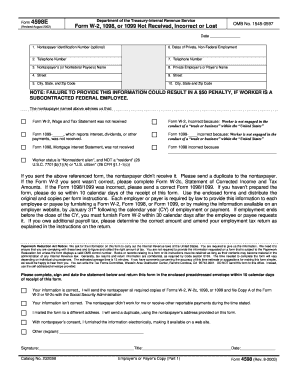
Filling out the IRS 4598E form is an essential step in reporting issues with Forms W-2, 1098, or 1099 for individuals who did not receive or received incorrect versions of these forms. This guide will provide clear and detailed instructions to assist you in completing the form effectively online.

Follow the steps to complete the IRS 4598E online.

  1. Click ‘Get Form’ button to obtain the form and open it in the editor.
  2. Provide the date in the designated field to indicate when you are submitting the request.
  3. Optionally, enter the nontaxpayer identification number in the provided space. This is important for identifying the individual affected by the missing or incorrect form.
  4. Input your telephone number to ensure that you can be reached for any questions regarding your submission.
  5. Fill in the nontaxpayer's or nonfederal payee's name in the appropriate field.
  6. Enter the street address where the nontaxpayer resides.
  7. Provide the city, state, and zip code of the nontaxpayer's residence.
  8. Enter the dates of private, non-federal employment for the nontaxpayer in the designated section.
  9. Input the telephone number of the private employer or payer.
  10. Fill in the name of the private employer or payer responsible for issuing the relevant forms.
  11. Provide the street address of the private employer or payer.
  12. Complete the city, state, and zip code for the private employer or payer.
  13. Indicate which form was not received or was incorrect by checking the appropriate options provided.
  14. If applicable, specify reasons for any corrections related to the reported forms.
  15. Sign and date the form to certify the information is accurate before submitting it.
  16. Once all fields are completed, save your changes, then choose to download, print, or share the form as needed.

Complete your document online today to ensure timely processing and compliance.

Get form

Experience a faster way to fill out and sign forms on the web. Access the most extensive library of templates available.
Get form

Related content

united states district court
at 10–11) (asserting that he has “contracted with” Iron Mountain regarding his...
Learn more
Summary and Perspectives
by B Feuerbacher · 1999 — ADS Classic is now deprecated. It will be completely retired...
Learn more

Related links form

On-Site Rental Dispute Form Certificate of Origin uniform household goods bill of lading FEMA 086-0-33 2012

Questions & Answers

Get answers to your most pressing questions about US Legal Forms API.

Contact support

Form 5498 is typically issued in May because it reports contributions made to retirement accounts up to the tax filing deadline. This timing allows custodians the necessary period to collect and compile accurate information. Understanding this timeline can help you stay organized for IRS 4598E filings and ensure you meet all obligations.

You do not report form 5498 directly on your tax return. Instead, use the information it contains to inform your understanding of contributions and rollovers related to your retirement accounts. Familiarity with this form is essential for compliance, particularly concerning IRS 4598E.

While you do not file form 5498 with your tax return, treat the information it contains carefully. It provides details on contributions and rollovers that may affect your tax calculations. Make sure you are aware of these aspects when preparing your return related to IRS 4598E to ensure compliance.

You can send documents to the IRS by mailing them to the address specified for your particular form or situation. Alternatively, some documents can be submitted through e-filing if supported. Using a reliable platform like US Legal Forms can help you prepare your submissions accurately to address IRS 4598E matters correctly.

No, you do not need to include IRS form 5498 with your tax return. This form is typically submitted directly by the trustee or custodian to the IRS. However, keeping it for your records is beneficial as it provides critical details about your retirement accounts relevant to IRS 4598E.

To file an uncollectible claim with the IRS, you need to present your financial situation clearly. Fill out the appropriate forms, such as Form 433-A, and submit it along with supporting documents. This process helps demonstrate that payment is not feasible, allowing you to address your tax responsibilities effectively, especially concerning IRS 4598E.

Trustees or custodians of IRAs complete the IRS form 5498. They gather relevant financial details from account holders and ensure accurate reporting. If you are an account holder, you typically don't need to fill this form yourself, but it's crucial to understand its importance in relation to IRS 4598E.

The IRS form 5498 is filed by trustees or custodians of individual retirement accounts (IRAs). These entities provide essential information about contributions, rollovers, and required minimum distributions to the IRS. Understanding your responsibilities related to this form can simplify your tax filings and compliance with IRS 4598E.

The IRS whistleblower incentive is a program designed to encourage individuals to report tax fraud and evasion. It offers financial rewards based on the successful recovery of taxes owed, fostering public participation in tax enforcement. The IRS 4598E plays a vital role in explaining how these incentives work and what protections are available to whistleblowers. Engaging with professional legal services can further enhance your understanding of this program.

Whistleblower payouts are determined based on the additional taxes collected as a result of the information provided. Generally, the percentage ranges from 15% to 30% of the total amount collected by the IRS. The IRS 4598E outlines these payout structures, helping potential whistleblowers understand their potential earnings. For tailored advice, consider using platforms like US Legal Forms when managing your claims.

Get This Form Now!

Use professional pre-built templates to fill in and sign documents online faster. Get access to thousands of forms.
Get form
If you believe that this page should be taken down, please follow our DMCA take down processhere.

Industry-leading security and compliance

US Legal Forms protects your data by complying with industry-specific security standards.
  • In businnes since 1997
    25+ years providing professional legal documents.
  • Accredited business
    Guarantees that a business meets BBB accreditation standards in the US and Canada.
  • Secured by Braintree
    Validated Level 1 PCI DSS compliant payment gateway that accepts most major credit and debit card brands from across the globe.
Get IRS 4598E
Get form
  • Adoption
  • Bankruptcy
  • Contractors
  • Divorce
  • Home Sales
  • Employment
  • Identity Theft
  • Incorporation
  • Landlord Tenant
  • Living Trust
  • Name Change
  • Personal Planning
  • Small Business
  • Wills & Estates
  • Packages A-Z
  • Affidavits
  • Bankruptcy
  • Bill of Sale
  • Corporate - LLC
  • Divorce
  • Employment
  • Identity Theft
  • Internet Technology
  • Landlord Tenant
  • Living Wills
  • Name Change
  • Power of Attorney
  • Real Estate
  • Small Estates
  • Wills
  • All Forms
  • Forms A-Z
  • Form Library
  • Legal Hub
  • About Us
  • Help Portal
  • Legal Resources
  • Blog
  • Affiliates
  • Contact Us
  • Delete My Account
  • Site Map
  • Industries
  • Forms in Spanish
  • Localized Forms
  • State-specific Forms
  • Forms Kit
  • Real Estate Handbook
  • All Guides
  • Notarize
  • Incorporation services
  • For Consumers
  • For Small Business
  • For Attorneys
  • USLegal
  • FormsPass
  • pdfFiller
  • signNow
  • altaFlow
  • DocHub
  • Instapage
Form Packages
  • Adoption
  • Bankruptcy
  • Contractors
  • Divorce
  • Home Sales
  • Employment
  • Identity Theft
  • Incorporation
  • Landlord Tenant
  • Living Trust
  • Name Change
  • Personal Planning
  • Small Business
  • Wills & Estates
  • Packages A-Z
Form Categories
  • Affidavits
  • Bankruptcy
  • Bill of Sale
  • Corporate - LLC
  • Divorce
  • Employment
  • Identity Theft
  • Internet Technology
  • Landlord Tenant
  • Living Wills
  • Name Change
  • Power of Attorney
  • Real Estate
  • Small Estates
  • Wills
  • All Forms
  • Forms A-Z
  • Form Library
Customer Service
  • Legal Hub
  • About Us
  • Help Portal
  • Legal Resources
  • Blog
  • Affiliates
  • Contact Us
  • Delete My Account
  • Site Map
  • Industries
  • Forms in Spanish
  • Localized Forms
  • State-specific Forms
  • Forms Kit
Legal Guides
  • Real Estate Handbook
  • All Guides
Prepared for you
  • Notarize
  • Incorporation services
Our Customers
  • For Consumers
  • For Small Business
  • For Attorneys
Our Sites
  • USLegal
  • FormsPass
  • pdfFiller
  • signNow
  • altaFlow
  • DocHub
  • Instapage
Social Media
Call us now toll free:
+1 833 426 79 33
As seen in:
© Copyright 1999-2026 airSlate Legal Forms, Inc. 3720 Flowood Dr, Flowood, Mississippi 39232
  • Your Privacy Choices
  • Terms of Service
  • Privacy Notice
  • Content Takedown Policy
  • Bug Bounty Program