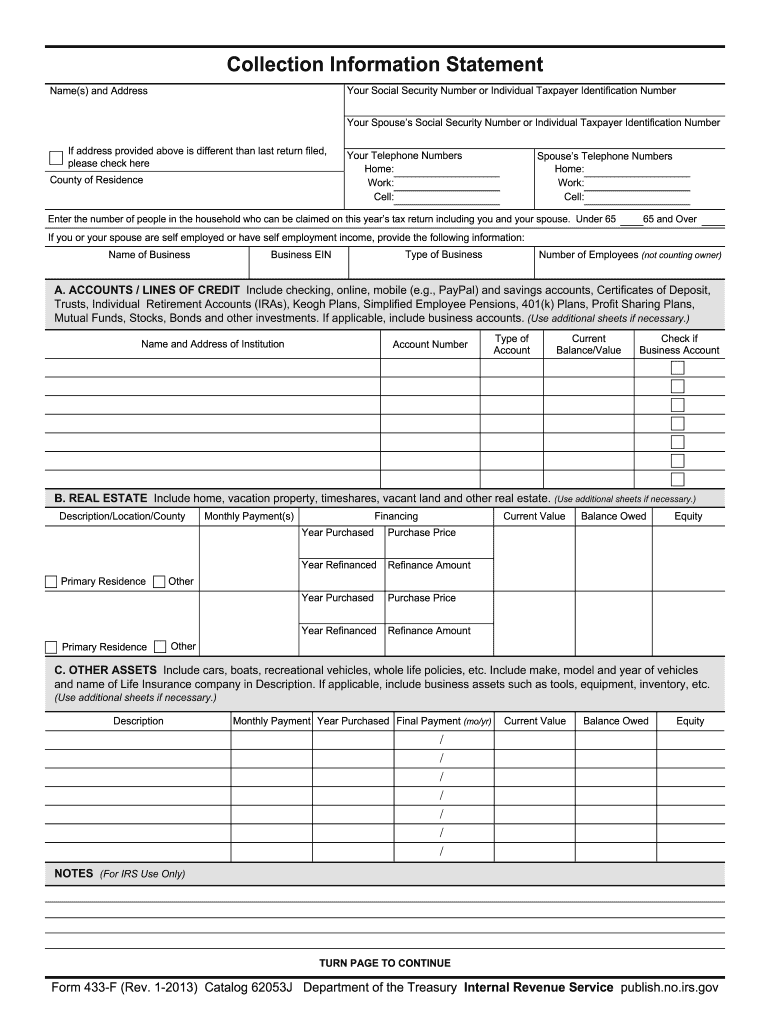
Number or Individual Taxpayer Identification Number If address provided above is different than last return filed, please check here County of Residence Your Telephone Numbers Home: Work: Cell: Spouse s Telephone Numbers Home: Work: Cell: Enter the number of people in the household who can be claimed on this year s tax return including you and your spouse. Under 65 65 and Over If you or your spouse are self employed or have self employment income, provide the following information: Name.
Loading

Open form follow the instructions

Easily sign the form with your finger

Send filled & signed form or save
How to fill out the IRS 433-F online
Filling out the IRS Form 433-F is an essential step for individuals seeking to provide detailed financial information to the IRS. This form is vital for determining how to resolve outstanding tax liabilities effectively and allows you to disclose your financial status accurately.
Follow the steps to complete the form accurately.
- Click ‘Get Form’ button to obtain the form and open it in an appropriate editor.
- Enter your Social Security Number or Individual Taxpayer Identification Number in the designated field.
- Fill in your full name and current address, ensuring accuracy to avoid future correspondence issues.
- If applicable, provide your spouse's Social Security Number or Individual Taxpayer Identification Number.
- Indicate if your address differs from the last return filed by checking the appropriate box.
- Complete your county of residence, ensuring correct and current information.
- List your contact numbers, including home, work, and cell phone information in the respective sections.
- State the number of people in your household who can be claimed on your current year's tax return, categorized by age group.
- If self-employed, provide detailed business information, including the business name, type, EIN, and number of employees.
- In Section A, list all accounts and lines of credit, including account details and balances, checking the business account box if necessary.
- For Section B, detail any real estate properties owned, including their current value, financing details, and related information.
- In Section C, list other assets such as vehicles or recreational properties, including descriptions and financial information.
- Section D requires a listing of all credit cards with applicable details, even if there is no balance owed.
- Complete Section E if you have accounts receivable or credit card payment information for your business.
- Fill out employment information in Section F, ensuring to provide accurate employer details and income specifics.
- List any non-wage household income in Section G, ensuring totals align with monthly amounts received.
- Detail monthly necessary living expenses in Section H, being sure to calculate figures based on IRS guidelines.
- Finally, review all provided information for accuracy, sign the document, and indicate the date.
- Save your changes, download a copy, print, or share the completed form as needed.
Complete your IRS Form 433-F online now for efficient management of your tax obligations.
Experience a faster way to fill out and sign forms on the web. Access the most extensive library of templates available.
Related content
Form 433-F is used to obtain current financial information necessary for determining how a...
Form 433-F is used to obtain current financial information necessary for determining how a...
Apr 15, 2015 — What's New. Premium tax credit. You may be eligible to claim the premium...
Get answers to your most pressing questions about US Legal Forms API.
How to fill out form 433-F IRS allowed expenses?
Filling out the allowed expenses on Form 433-F requires gathering accurate data about your monthly expenditures. Include essential costs like rent or mortgage, utilities, food, and transportation. It helps to be thorough and truthful in detailing your expenses, as this information directly influences the IRS's assessment of your financial situation and potential relief.
What is form 433 A used for?
Form 433-A is another financial disclosure form used by the IRS, often for individuals with higher income or more complex financial situations. It collects detailed information about your income, expenses, assets, and liabilities, similar to Form 433-F. Choosing the correct form is important, so consult with a tax professional if you're unsure which one to use.
How do I submit form 433-F to the IRS?
Submitting Form 433-F to the IRS is a straightforward process. You can send it via mail to the address listed in your IRS correspondence or related forms, depending on your case. Additionally, ensuring that you keep a copy for your records is essential, as this form plays a vital role in negotiating repayment plans with the IRS.
What expenses are allowed on the 433-F?
When filling out Form 433-F, you can include various expenses that reflect your necessary living costs. Allowed expenses typically cover housing, utilities, food, transportation, and medical costs. By accurately listing these expenses, you can provide the IRS with a clear picture of your financial situation, which is vital for potential relief options.
What is the IRS form 433-F used for?
Form 433-F is crucial for individuals seeking to address their tax liabilities with the IRS. This form helps the IRS assess your financial situation by gathering information about your income, expenses, assets, and liabilities. Completing the IRS 433-F accurately is essential to finding a suitable repayment plan for any outstanding tax dues.
What are the allowable expenses for 433F?
Allowable expenses for IRS Form 433-F include basic living costs such as housing, groceries, transportation, utilities, and care for dependents. You should compile and report these expenses accurately, as they help paint a clear financial picture for the IRS. Ensuring that you include all eligible expenses can lead to a more favorable resolution in your dealings with the IRS. Using a service like uslegalforms can provide guidance in this process.
What is the IRS form 433-F allowance?
The IRS form 433-F allowance refers to the expenses permitted by the IRS when assessing your financial condition for tax relief. It typically includes costs for necessary living expenses, such as housing, groceries, transportation, and other essential bills. Understanding these allowances is crucial for effectively completing Form 433-F and demonstrating your financial needs. This information directly influences your qualification for tax relief options.
What is the IRS form 433-F?
IRS Form 433-F is a financial disclosure form required by the IRS for individuals who owe back taxes. This form collects detailed information about your income, expenses, assets, and liabilities. Completing Form 433-F accurately is vital for establishing your financial position when seeking assistance from the IRS. By using this form effectively, you can pursue options that may alleviate your tax burden.
What does the IRS consider to be utilities?
The IRS considers utilities to be essential services that keep your household running, including electricity, gas, water, and basic heating and cooling costs. When filling out Form 433-F, you can include these utility expenses as part of your allowable monthly living expenses. This inclusion is crucial in demonstrating your financial situation to the IRS. Understanding what qualifies as utilities can help you include all relevant expenses when negotiating your tax debts.
How much does the IRS allow for groceries?
The IRS uses guidelines to determine how much can be allowed for groceries in your financial statement. This amount may vary based on your location and family size. When you complete IRS Form 433-F, you can include reasonable grocery expenses as part of your allowable costs. This allocation can help lower your overall financial obligations when dealing with the IRS.
Use professional pre-built templates to fill in and sign documents online faster. Get access to thousands of forms.
If you believe that this page should be taken down, please follow our DMCA take down process here.
This form is available in several versions. Select the version you need from the drop-down list below.