Loading
Form preview
  • US Legal Forms
  • Form Library
  • Tax Forms
  • Executive Department Treasury IRS Forms
  • Irs 4136 2018

Get Irs 4136 2018

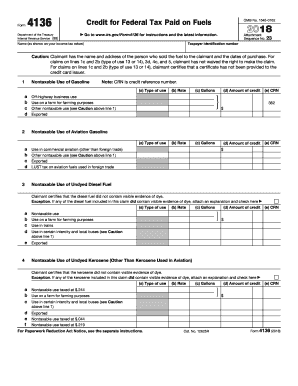
Of tax to the buyer, or has obtained the written consent of the buyer to make the claim. Claimant certifies that the diesel fuel did not contain visible evidence of dye. Exception. If any of the diesel fuel included in this claim did contain visible evidence of dye, attach an explanation and check here (b) Rate (c) Gallons (d) Amount of credit (e) CRN a Use by a state or local government b Use in certain intercity and local buses 7 $ Sales by Registered Ultimate Vendors of Undyed Kerose.

This website is not affiliated with IRS

How it works

  1. Open form

    Open form follow the instructions

  2. Easily sign form

    Easily sign the form with your finger

  3. Share form

    Send filled & signed form or save

How to fill out the IRS 4136 online

Filling out the IRS 4136 form, which is used for claiming the credit for federal tax paid on fuels, can be straightforward with the right guidance. This guide provides a clear step-by-step approach to help you complete the form efficiently and accurately.

Follow the steps to complete the IRS 4136 form online.

  1. Click 'Get Form' button to access the IRS 4136 form and open it in your chosen editing tool.
  2. Enter your taxpayer identification number in the appropriate field. This number is essential for processing your claim.
  3. Provide your name exactly as it appears on your income tax return in the designated section.
  4. Refer to the cautionary note regarding your purchases. Ensure you have the name and address of the seller and dates of purchase if applicable.
  5. In the section for nontaxable use of gasoline, identify the type of use from the provided options, fill in the applicable rate and total gallons used, then calculate and enter the amount of credit.
  6. Repeat the procedure for nontaxable use of aviation gasoline, undyed diesel fuel, undyed kerosene, and kerosene used in aviation, as specified in the respective sections of the form.
  7. Complete sections for sales by registered ultimate vendors of undyed diesel fuel and undyed kerosene, ensuring the registration number and amounts are accurately filled.
  8. For any alternative fuels used, fill out the corresponding section, identifying the type of fuel and using the specified rates to calculate the amount of credit.
  9. Total your claimed credits from all sections and enter the sum in the total income tax credit claimed line.
  10. Once all information has been entered, review your responses carefully for any errors or omissions.
  11. Finally, save your changes, download or print a copy of the completed form for your records, and proceed to submit it as required.

Complete your IRS 4136 form online today to ensure you claim the credits you are entitled to.

Get form

Experience a faster way to fill out and sign forms on the web. Access the most extensive library of templates available.

Related content

About Form 4136, Credit For Federal Tax Paid On...
Jan 28, 2025 — Use Form 4136 to claim: A credit for certain nontaxable uses (or sales)...
Learn more
Delay in E-Filing of Form 4136
The IRS will not accept e-filed Form 4136 (Credit for Federal Tax Paid on Fuels for Tax...
Learn more
2011 - Instructions for Form 1120S
Jan 31, 2012 — Form 4136. the corporation fails to initiate a deposit. If the...
Learn more

Related links form

VA 10-10EZR 2010 VA 21-526b 2010 TREC OP-H 2011 IL Application for Resignation or Retirement

Questions & Answers

Get answers to your most pressing questions about US Legal Forms API.

Contact support

The tax credit for liquefied natural gas (LNG) can be found on IRS Form 4136, which outlines the various credits available for alternative fuels. This credit is available to users who place LNG into tanks for commercial use under specific guidelines. The rates and eligibility may vary, so always refer to the latest IRS publications to make sure you're informed. This credit supports efforts to boost clean energy usage.

To receive an IRS transmitter control code, you must register as an e-file provider. This registration process involves submitting Form 8633, which IRS uses to verify your eligibility. Once approved, you will be assigned a transmitter control code. This code is critical for electronically filing tax forms, including those involving Form 4136.

To obtain an IRS tax clearance certificate, you need to resolve any outstanding tax liabilities and file all required returns. After ensuring compliance, you can request the certificate through the IRS website or by contacting them directly. This certificate confirms that your tax account is in good standing. It's essential for various financial transactions, so stay proactive.

To claim Form 4136, begin by downloading the form from the IRS website or requesting it through a tax professional. Fill in the necessary details regarding fuel usage and purchases, ensuring accuracy throughout. Once you have completed the form, include it with your Form 1040 during your annual tax filing. Using detailed documentation strengthens your claim.

You can obtain an IRS instruction booklet from the official IRS website, where they provide downloadable PDFs of all forms. Simply search for 'Form 4136 Instructions' to find the necessary guidance on completing the form. Having the instruction booklet can clarify any doubts and enhance your understanding of the procedures and requirements. It's a helpful resource for any taxpayer.

To prove your fuel tax credit, you must maintain thorough documentation, including receipts and invoices. Form 4136 requires detailed reporting of fuel usage, so be precise when filling it out. Keeping records of how and when you utilized the fuel can substantiate your claim during audits. This practice ensures that you can validate your credit and avoid potential issues.

Reporting someone to the IRS can help maintain fairness in the tax system, especially if you suspect tax fraud or other violations. However, consider the potential repercussions for both parties before proceeding. While it can feel significant to report an injustice, ensure you have concrete evidence to support your claim, as this could impact your relationship with that individual in the future.

To report a side hustle, you will file Schedule C (Form 1040) along with your annual tax return, detailing your earnings and expenses. Be sure to track all income sources and keep records of your business-related expenses, as they can help reduce your taxable income. Utilizing the IRS 4136 form may also be relevant if you have applicable deductions related to your side hustle.

To file a hardship with the IRS, you usually need to complete Form 433-A or Form 433-F, which provides detailed information about your financial situation. You may also want to include a letter describing your hardship and supporting documentation. This process allows you to request a temporary delay in tax payments or discuss a payment plan that fits your financial capability.

You must report all income from your side hustle, even if it is less than $400, which is the threshold for paying self-employment taxes. The IRS requires complete transparency regarding your earnings. Failing to report any income could lead to an audit, so it is best to maintain accurate records of all your side hustle income to stay compliant.

Get This Form Now!

Use professional pre-built templates to fill in and sign documents online faster. Get access to thousands of forms.
If you believe that this page should be taken down, please follow our DMCA take down processhere.

Industry-leading security and compliance

US Legal Forms protects your data by complying with industry-specific security standards.
  • In businnes since 1997
    25+ years providing professional legal documents.
  • Accredited business
    Guarantees that a business meets BBB accreditation standards in the US and Canada.
  • Secured by Braintree
    Validated Level 1 PCI DSS compliant payment gateway that accepts most major credit and debit card brands from across the globe.
Get IRS 4136
  • Adoption
  • Bankruptcy
  • Contractors
  • Divorce
  • Home Sales
  • Employment
  • Identity Theft
  • Incorporation
  • Landlord Tenant
  • Living Trust
  • Name Change
  • Personal Planning
  • Small Business
  • Wills & Estates
  • Packages A-Z
  • Affidavits
  • Bankruptcy
  • Bill of Sale
  • Corporate - LLC
  • Divorce
  • Employment
  • Identity Theft
  • Internet Technology
  • Landlord Tenant
  • Living Wills
  • Name Change
  • Power of Attorney
  • Real Estate
  • Small Estates
  • Wills
  • All Forms
  • Forms A-Z
  • Form Library
  • Legal Hub
  • About Us
  • Help Portal
  • Legal Resources
  • Blog
  • Affiliates
  • Contact Us
  • Delete My Account
  • Site Map
  • Industries
  • Forms in Spanish
  • Localized Forms
  • State-specific Forms
  • Forms Kit
  • Real Estate Handbook
  • All Guides
  • Notarize
  • Incorporation services
  • For Consumers
  • For Small Business
  • For Attorneys
  • USLegal
  • FormsPass
  • pdfFiller
  • signNow
  • altaFlow
  • DocHub
  • Instapage
Form Packages
  • Adoption
  • Bankruptcy
  • Contractors
  • Divorce
  • Home Sales
  • Employment
  • Identity Theft
  • Incorporation
  • Landlord Tenant
  • Living Trust
  • Name Change
  • Personal Planning
  • Small Business
  • Wills & Estates
  • Packages A-Z
Form Categories
  • Affidavits
  • Bankruptcy
  • Bill of Sale
  • Corporate - LLC
  • Divorce
  • Employment
  • Identity Theft
  • Internet Technology
  • Landlord Tenant
  • Living Wills
  • Name Change
  • Power of Attorney
  • Real Estate
  • Small Estates
  • Wills
  • All Forms
  • Forms A-Z
  • Form Library
Customer Service
  • Legal Hub
  • About Us
  • Help Portal
  • Legal Resources
  • Blog
  • Affiliates
  • Contact Us
  • Delete My Account
  • Site Map
  • Industries
  • Forms in Spanish
  • Localized Forms
  • State-specific Forms
  • Forms Kit
Legal Guides
  • Real Estate Handbook
  • All Guides
Prepared for you
  • Notarize
  • Incorporation services
Our Customers
  • For Consumers
  • For Small Business
  • For Attorneys
Our Sites
  • USLegal
  • FormsPass
  • pdfFiller
  • signNow
  • altaFlow
  • DocHub
  • Instapage
Social Media
Call us now toll free:
+1 833 426 79 33
As seen in:
© Copyright 1999-2026 airSlate Legal Forms, Inc. 3720 Flowood Dr, Flowood, Mississippi 39232
  • Your Privacy Choices
  • Terms of Service
  • Privacy Notice
  • Content Takedown Policy
  • Bug Bounty Program
IRS 4136
This form is available in several versions.
Select the version you need from the drop-down list below.
2022 IRS 4136
Select form
  • 2022 IRS 4136
  • 2020 IRS 4136
  • 2019 IRS 4136
  • 2018 IRS 4136
  • 2017 IRS 4136
  • 2016 IRS 4136
  • 2015 IRS 4136
  • 2014 IRS 4136
  • 2013 IRS 4136
  • 2012 IRS 4136
  • 2011 IRS 4136
Select form