Loading
Get Irs 3911 1997
How it works
-

Open form follow the instructions
-

Easily sign the form with your finger
-

Send filled & signed form or save
How to fill out the IRS 3911 online
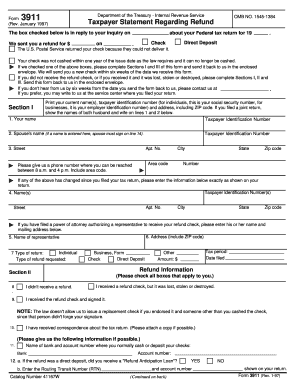
This guide provides comprehensive instructions on how to complete the IRS Form 3911, which is used to request a trace of a tax refund. By following these steps, you can ensure that all required information is accurately submitted.
Follow the steps to successfully complete the IRS 3911 online.
- Click ‘Get Form’ button to access the form and open it in the editing tool.
- Complete Section I by entering your current name(s), taxpayer identification number (such as your social security number for individuals), and your address, including ZIP code. If you filed jointly, include both names.
- In Section I, provide a contact phone number where you can be reached during business hours (8 a.m. to 4 p.m.). This should include the area code.
- If your personal or business information has changed since you filed your tax return, enter it in the space provided below Section I.
- If a power of attorney has been granted, document the name and mailing address of the authorized representative in Section I.
- For Section II, select all boxes that are applicable to your situation regarding your refund (whether it was lost, stolen, or not received).
- Provide information about your bank and account number if you typically cash or deposit your checks in Section II.
- Complete any necessary details regarding direct deposits and related transactions in Section II.
- In Section III, sign the form, ensuring you sign as you did on your tax return. If applicable for a joint return, both partners must sign.
- Once you have filled out all sections of the form, review your entries for accuracy before submitting.
- Finally, save your changes, and choose to download, print, or share the completed form as needed.
Complete your IRS 3911 form online today to ensure a swift resolution to your refund inquiry.
Get form
Experience a faster way to fill out and sign forms on the web. Access the most extensive library of templates available.
Unfortunately, IRS form 3911 cannot be submitted online; it must be sent via mail or fax. You can complete the form and then choose the method that's most convenient for you to send it to the IRS. It’s essential to ensure that your submission is accurate to avoid any processing delays. Meanwhile, consider how our platform can guide you in completing this form correctly.
Get This Form Now!
Use professional pre-built templates to fill in and sign documents online faster. Get access to thousands of forms.