Ing Transit Number(s) , Catalog Number 41167W , , , NO , and account number(s) shown on your return for the refund you did not receive. (Continued on back) Form 3911 (Rev. 4-2009) Certification Section III Please sign below, exactly as you signed the return. If this refund was from a joint return, we need the signatures of both husband and wife before we can trace it. Under penalties of perjury, I declare that I have examined this form, and to the best of my knowledge and belief, the in.

Open form follow the instructions

Easily sign the form with your finger

Send filled & signed form or save
How to fill out the IRS 3911 online
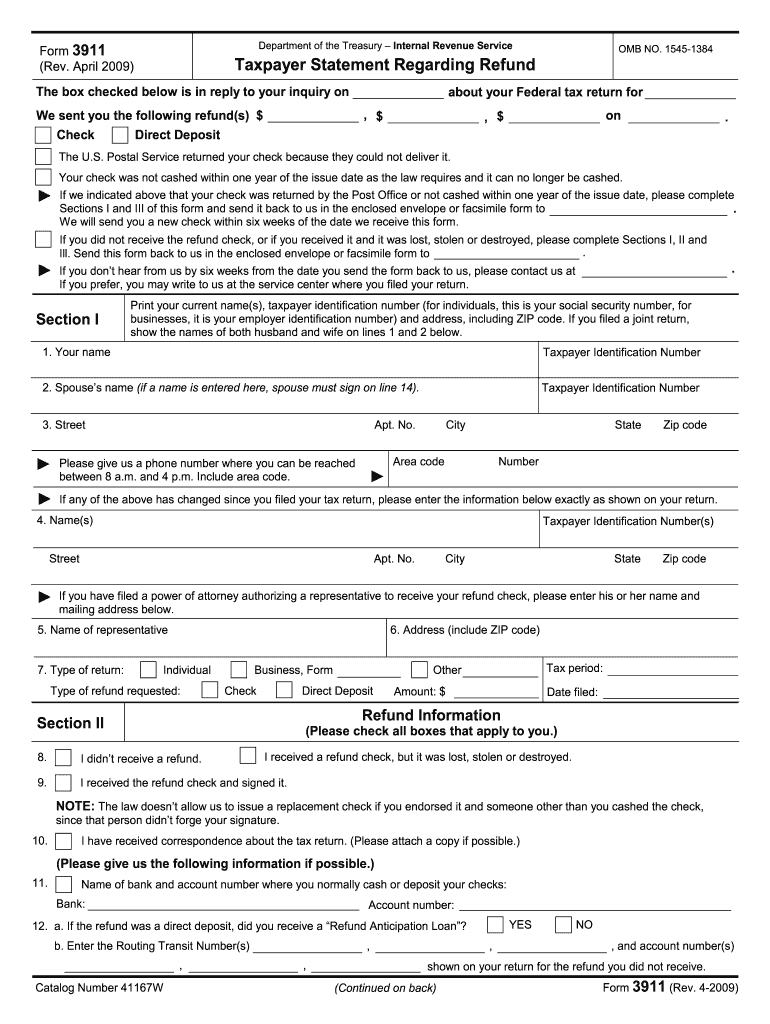
The IRS 3911 form, formally known as the Taxpayer Statement Regarding Refund, is used by individuals to report issues concerning their federal tax refund, such as when a check is lost or not received. This guide provides detailed, step-by-step instructions for completing the form online, ensuring a smooth experience for users of all levels of expertise.
Follow the steps to accurately complete the IRS 3911 online
- Click ‘Get Form’ button to access the IRS 3911 form and open it within your editing tool.
- Begin by completing Section I with your current name(s) and taxpayer identification number (Social Security Number for individuals, Employer Identification Number for businesses). Provide your address, including ZIP code. If you filed a joint return, include both names.
- Enter your phone number where you can be reached during business hours, ensuring to include your area code.
- If any personal information has changed since your initial return, fill out the corresponding fields under Section I with your updated details.
- If applicable, list the power of attorney's name and address in the designated area.
- Proceed to Section II and check all statements that apply to your situation: whether you received a refund check that was lost, stolen, or destroyed, or if you have not received any refund at all.
- For each situation indicated in Section II, provide additional details as requested, such as your bank information for deposits and any correspondence related to your tax return.
- Complete Section III by signing your name as it appears on your tax return. If it is a joint return, your partner must also sign. Ensure to date the form appropriately.
- Review all sections of the form to confirm accuracy and completeness before submission.
- Finally, save your changes, download, print, or share the completed IRS 3911 form as needed.
Start completing your IRS 3911 form online today for a seamless refund inquiry process.
Experience a faster way to fill out and sign forms on the web. Access the most extensive library of templates available.
Related content
Note: You must complete a separate Form 3911 for each refund for which you are requesting...
File to claim your tax refund using Form 3911 . I didn't file my taxes one year. How can I...
Apr 15, 2015 — What's New. Premium tax credit. You may be eligible to claim the premium...
Get answers to your most pressing questions about US Legal Forms API.
What do I write on form 3911?
When filling out form 3911, provide your name, address, Social Security number, and details regarding the payment type you are tracing. Ensure to state the reason for your inquiry, such as a missed stimulus check. Accurate information helps the IRS process your request swiftly.
How do I fill out a 3911 for a lost stimulus check?
To fill out a 3911 form for a lost stimulus check, clearly state your personal details at the top, including your name and Social Security number. Indicate that you are tracing a stimulus payment in the reason section and provide any relevant details, including the estimated date of payment. This clarity helps expedite the process.
Can I use form 3911 for stimulus check?
Yes, you can use the IRS 3911 form to trace a missing stimulus check. By filling out this form, you prompt the IRS to investigate your status and payment details. This step is crucial if you have not received your economic impact payment as expected.
How to initiate a refund trace IRS?
To initiate a refund trace with the IRS, you must complete the IRS 3911 form. This form allows you to request an investigation into your missing refund. After filling out the form correctly, send it to the IRS to start the trace process and hopefully recover your funds.
Can I submit form 3911 online?
Unfortunately, the IRS does not allow online submissions of the IRS 3911 form. You must print it out after completing it and then send it by mail to the appropriate IRS address. This ensures that your request is processed properly and timely.
How to fill out 3911 form IRS?
Filling out the IRS 3911 form is essential for initiating a refund trace. Begin by providing your personal information, including your name, Social Security number, and the tax year related to the check. Ensure you specify the reason for your request, and double-check all entries for accuracy before submitting.
How do I get a lost stimulus check reissued?
To get a lost stimulus check reissued, you need to complete the IRS 3911 form. This form serves as a request for a refund trace, allowing the IRS to locate your payment. After filling it out, send it to the address specified in the instructions, so you can effectively track your lost funds.
How long does it take the IRS to process a 3911 form?
Once you submit IRS form 3911, the processing time generally takes about six to eight weeks, similar to a refund trace. This timeframe can vary depending on the IRS's workload and the complexity of your request. Staying organized and using solutions like US Legal Forms can help you ensure that all information is correctly submitted, potentially speeding up the process.
What happens if IRS sends a refund to a closed bank account?
If the IRS sends a refund to a closed bank account, the bank is likely to reject the transaction and return it to the IRS. Your refund may then be sent via check to your address on file. If you are facing this situation, filing form 3911 can help you start the process of tracing your refund and determining where it went.
What is the longest time to wait for a tax refund?
The longest time to wait for a tax refund can vary, but it generally should not exceed 21 days if you e-filed your tax return and chose direct deposit. If you filed a paper return or encountered issues requiring form 3911, the wait could exceed this timeframe. Always use the IRS tools available to check progress, and consider using US Legal Forms to help organize your tax documents and inquiries.
Use professional pre-built templates to fill in and sign documents online faster. Get access to thousands of forms.
If you believe that this page should be taken down, please follow our DMCA take down process here.
This form is available in several versions. Select the version you need from the drop-down list below.