Loading
Form preview
  • US Legal Forms
  • Other Templates
  • Tax Forms
  • Executive Department Treasury IRS Forms
  • Irs 3520 2014

Get Irs 3520 2014

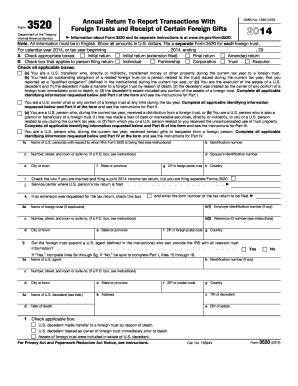
. . . . . k If an extension was requested for the tax return, check this box 1a f State or province g ZIP or foreign postal code h Country and enter the form number of the tax return to be filed. Name of foreign trust (if applicable) b(1) Employer identification number (if any) c Number, street, and room or suite no. (if a P.O. box, see instructions) b(2) Reference ID number (see instructions) d City or town 2a 3 e State or province f ZIP or foreign postal code g Count.

This website is not affiliated with IRS

How it works

  1. Open form

    Open form follow the instructions

  2. Easily sign form

    Easily sign the form with your finger

  3. Share form

    Send filled & signed form or save

How to fill out the IRS 3520 online

Filing Form 3520 is an essential duty for U.S. persons involved with foreign trusts and certain foreign gifts. This guide provides clear, step-by-step instructions to help you navigate the form online with confidence.

Follow the steps to complete your IRS 3520 online.

  1. Click ‘Get Form’ button to obtain the form and open it in the editor.
  2. Enter the tax year for which you are filing at the beginning of the form. For Calendar Year 2014, indicate the start and end dates to establish the correct time frame.
  3. Select the appropriate checkboxes for the type of return you are filing. Choose from initial return, final return, amended return, or initial return with an extension filed.
  4. Indicate the category of person filing the return by checking the relevant box such as individual, partnership, corporation, or trust.
  5. For each applicable transaction, check the appropriate boxes that apply to you, such as if you are a U.S. transferor or if you are a U.S. owner of a foreign trust.
  6. Enter identifying information for the U.S. person for whom the form is being filed, including name, identification number, and address details.
  7. Proceed to Part I if you are reporting transfers by U.S. persons to a foreign trust. Provide details such as the name of the trust creator and the date the trust was created.
  8. Complete Schedule A if you received obligations from a related foreign trust. Enter specifics about the obligations, such as date of the transfer and any relevant identification numbers.
  9. If applicable, fill out Part II regarding being a U.S. owner of a foreign trust, detailing the values and specifics of the foreign trust assets you own.
  10. In Part III, provide information about distributions received from a foreign trust during the current tax year. Document amounts, descriptions, and dates accordingly.
  11. If you've received gifts from foreign persons, complete Part IV with relevant details, specifying the value and description for any gifts or bequests exceeding $100,000.
  12. After ensuring all sections are complete and accurate, save your changes, then download, print, or share the finalized IRS 3520 form as needed.

Complete your IRS 3520 online today to meet your reporting obligations!

Get form

Experience a faster way to fill out and sign forms on the web. Access the most extensive library of templates available.

Related content

About Form 3520, Annual Return To Report...
Apr 29, 2025 — U.S. persons (and executors of estates of U.S. decedents) file Form 3520...
Learn more
f3520--1999.pdf
(a) You are a U.S. transferor who, directly or indirectly, transferred money or other...
Learn more
Form 3520
Note: All information must be in English. Show all amounts in U.S. dollars. File a...
Learn more

Related links form

Prestige Financial Vehicle Condition Report DS-174 2017 VA 29-4125 2020 USCIS I-130 2015

Questions & Answers

Get answers to your most pressing questions about US Legal Forms API.

Contact support

Reasonable cause for filing issues related to form 3520 typically refers to events that hinder your ability to submit accurately and on time. These could involve miscommunication about foreign assets, lack of knowledge regarding requirements, or other personal hardships. Understanding the conditions under which you can claim reasonable cause can ultimately save you from penalties and should be a priority for those dealing with foreign inheritances or gifts.

In the context of the FTB, a reasonable cause for penalty abatement might include circumstances akin to those recognized by the IRS, such as illness or unforeseen financial challenges. If you find yourself in such situations, documenting your cause clearly and effectively can lead to a favorable outcome. Utilizing resources like legal forms can help you navigate this process.

A reasonable cause can be qualified based on situations that are genuinely beyond your control. Events like natural disasters, medical emergencies, or significant life changes often qualify. When exploring options for forms such as the IRS 3520, establishing this reasonable cause can prove essential in discussions with the IRS.

When it comes to foreign inheritance, the IRS has specific rules that you must follow. Individuals must report foreign inheritances if they exceed a certain dollar threshold, and this often necessitates filing the IRS 3520. Meeting these requirements ensures compliance and prevents unexpected penalties.

The IRS form 3520 is required for individuals who receive large gifts or inheritances from foreign entities. If you have foreign financial interests or are involved with foreign trusts, you may need to file this form. Understanding your obligations regarding the IRS 3520 is crucial for maintaining compliance and avoiding potential penalties.

A strong reasonable cause for IRS penalty abatement can be linked to unforeseen events that hindered your compliance. Examples include significant financial hardship, serious medical emergencies, or reliance on erroneous advice from a tax professional. Each case is unique, and effectively citing your reasons, particularly when addressing forms such as the IRS 3520, can significantly improve your chances of abatement.

Reasonable cause for not filing taxes can arise from a variety of unexpected circumstances. These include serious illness, natural disasters, or other situations that impede your ability to meet tax requirements. When dealing with the IRS, demonstrating reasonable cause can help mitigate penalties, especially regarding filings like the IRS 3520. If you're unsure, consulting with a tax professional can provide tailored guidance.

Filing IRS Form 3520 does not automatically trigger an audit. However, thorough and accurate reporting is essential, as inaccuracies might draw IRS attention. Following the guidelines and providing complete information lowers the chances of an audit. If you need assistance, consider using resources like USLegalForms to help you file correctly.

Yes, IRS Form 3520 must be filed separately from your regular tax return. It serves a unique purpose, specifically related to reporting foreign trusts and gifts. You should not attach it to your Form 1040 or other tax filings. Filing the IRS 3520 independently ensures clear reporting to the IRS.

TurboTax does not support filing IRS Form 3520 directly. However, there are many other software platforms that do, including USLegalForms, which can guide you through the process effectively. It's essential to use the right tools to ensure that your IRS 3520 is filed correctly and on time. Always confirm that the software meets your specific needs.

Get This Form Now!

Use professional pre-built templates to fill in and sign documents online faster. Get access to thousands of forms.
If you believe that this page should be taken down, please follow our DMCA take down processhere.
Get IRS 3520
  • Adoption
  • Bankruptcy
  • Contractors
  • Divorce
  • Home Sales
  • Employment
  • Identity Theft
  • Incorporation
  • Landlord Tenant
  • Living Trust
  • Name Change
  • Personal Planning
  • Small Business
  • Wills & Estates
  • Packages A-Z
  • Affidavits
  • Bankruptcy
  • Bill of Sale
  • Corporate - LLC
  • Divorce
  • Employment
  • Identity Theft
  • Internet Technology
  • Landlord Tenant
  • Living Wills
  • Name Change
  • Power of Attorney
  • Real Estate
  • Small Estates
  • Wills
  • All Forms
  • Forms A-Z
  • Other Templates
  • Legal Hub
  • About Us
  • Help Portal
  • Legal Resources
  • Blog
  • Affiliates
  • Contact Us
  • Delete My Account
  • Site Map
  • Industries
  • Forms in Spanish
  • Localized Forms
  • State-specific Forms
  • Forms Kit
  • Real Estate Handbook
  • All Guides
  • Notarize
  • Incorporation services
  • For Consumers
  • For Small Business
  • For Attorneys
  • USLegal
  • FormsPass
  • pdfFiller
  • signNow
  • altaFlow
  • DocHub
  • Instapage
Form Packages
  • Adoption
  • Bankruptcy
  • Contractors
  • Divorce
  • Home Sales
  • Employment
  • Identity Theft
  • Incorporation
  • Landlord Tenant
  • Living Trust
  • Name Change
  • Personal Planning
  • Small Business
  • Wills & Estates
  • Packages A-Z
Form Categories
  • Affidavits
  • Bankruptcy
  • Bill of Sale
  • Corporate - LLC
  • Divorce
  • Employment
  • Identity Theft
  • Internet Technology
  • Landlord Tenant
  • Living Wills
  • Name Change
  • Power of Attorney
  • Real Estate
  • Small Estates
  • Wills
  • All Forms
  • Forms A-Z
  • Other Templates
Customer Service
  • Legal Hub
  • About Us
  • Help Portal
  • Legal Resources
  • Blog
  • Affiliates
  • Contact Us
  • Delete My Account
  • Site Map
  • Industries
  • Forms in Spanish
  • Localized Forms
  • State-specific Forms
  • Forms Kit
Legal Guides
  • Real Estate Handbook
  • All Guides
Prepared for you
  • Notarize
  • Incorporation services
Our Customers
  • For Consumers
  • For Small Business
  • For Attorneys
Our Sites
  • USLegal
  • FormsPass
  • pdfFiller
  • signNow
  • altaFlow
  • DocHub
  • Instapage
Social Media
Call us now toll free:
+1 833 426 79 33
As seen in:
© Copyright 1999-2026 airSlate Legal Forms, Inc. 17 Station Street, Ste. 203, Brookline, MA 02445
  • Your Privacy Choices
  • Terms of Service
  • Privacy Notice
  • Content Takedown Policy
  • Bug Bounty Program
IRS 3520
This form is available in several versions.
Select the version you need from the drop-down list below.
2021 IRS 3520
Select form
  • 2021 IRS 3520
  • 2020 IRS 3520
  • 2019 IRS 3520
  • 2018 IRS 3520
  • 2017 IRS 3520
  • 2016 IRS 3520
  • 2015 IRS 3520
  • 2014 IRS 3520
  • 2013 IRS 3520
  • 2012 IRS 3520
  • 2010 IRS 3520
Select form