Otice, see the instructions. Cat. No. 11980J Form 2848 (Rev.12-2015) Page 2 Form 2848 (Rev. 12-2015) b 6 Specific acts not authorized. My representative(s) is (are) not authorized to endorse or otherwise negotiate any check (including directing or accepting payment by any means, electronic or otherwise, into an account owned or controlled by the representative(s) or any firm or other entity with whom the representative(s) is (are) associated) issued by the government in respect of a fede.
Loading

Open form follow the instructions

Easily sign the form with your finger

Send filled & signed form or save
How to fill out the IRS 2848 online
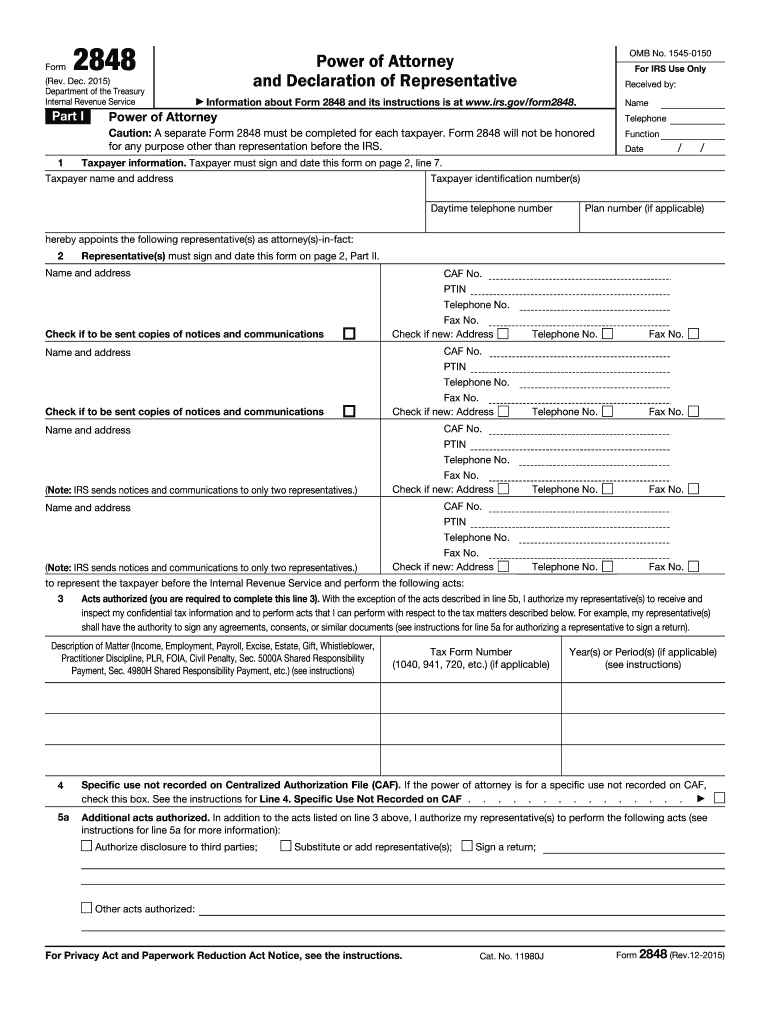
The IRS 2848 form, also known as the Power of Attorney and Declaration of Representative, allows taxpayers to appoint a representative to act on their behalf before the Internal Revenue Service. This guide provides clear, step-by-step instructions on how to complete the form online.
Follow the steps to fill out the IRS 2848 online
- Press the ‘Get Form’ button to access the IRS 2848 form and open it for editing.
- In Part I of the form, provide your taxpayer information. Enter your name, address, and taxpayer identification number (TIN). Make sure to include your daytime telephone number.
- Below the taxpayer information, appoint your representative(s). List their names and addresses, and if applicable, check the box to send copies of notices and communications.
- In line 3, specify the acts authorized for your representative(s). This is necessary to allow your representative(s) to access your confidential tax information and perform tasks on your behalf.
- If there are any additional acts you authorize, note them in line 5a. You can also check the box if there are specific acts not authorized in line 6.
- Signature and date are required in line 7. Taxpayers must sign and date the form to validate it.
- In Part II, the representative must complete the Declaration of Representative section. They should provide their designation, licensing jurisdiction, and sign the form.
- Once all information is completed and reviewed, save your changes. You can then download, print, or share the form as needed.
Complete your IRS 2848 form online today to ensure proper representation.
Experience a faster way to fill out and sign forms on the web. Access the most extensive library of templates available.
Related content
Part I. Power of Attorney. Caution: A separate Form 2848 must be completed for each...
Caution: A separate Form 2848 must be completed for each taxpayer. Form 2848 will not be...
-Distinctions between power of attorney (Form 2848) and tax information authorization...
Get answers to your most pressing questions about US Legal Forms API.
What is the best way to submit POA to the IRS?
To submit your Power of Attorney (POA) to the IRS, you can mail form 2848 to the appropriate IRS address listed in the instructions. Alternatively, you might opt to fax the form if you are following specified IRS guidelines. This ensures your submission is tracked efficiently. USLegalForms can offer tips on the most effective submission methods for your circumstances.
How long does it take for the IRS to approve form 2848?
The IRS generally processes form 2848 within a few weeks, but it can vary based on their workload and the completeness of your form. Keep in mind that you can confirm the status of your request by contacting the IRS directly. Prompt and accurate submission of IRS 2848 can help expedite this approval process. For further assistance, USLegalForms can provide insights on tracking your submission.
Who fills out power of attorney form?
Typically, you, the taxpayer, fill out the power of attorney form to authorize an individual or organization to represent you before the IRS. Your representative may assist in providing necessary information, but the responsibility of formal submission lies with you. This ensures clarity and compliance with IRS requirements. Consider using USLegalForms to facilitate this process and ensure accuracy.
Do I need to file form 2848?
If you want someone to act on your behalf regarding your tax matters, you should file form 2848. This document officially grants your representative the authority to discuss and resolve issues with the IRS for you. Not filing this form can lead to delays or complications in managing your tax affairs. USLegalForms can help you determine when and how to file to ensure smooth representation.
Do I need a PTIN for form 2848?
A Preparer Tax Identification Number (PTIN) is required for representatives who prepare taxes on your behalf using form 2848. If you are simply giving someone authority to communicate with the IRS without them preparing your taxes, a PTIN is not necessary. However, ensure your authorized representative understands these requirements. USLegalForms offers guidance to help clarify the need for PTINs in your situation.
Who fills out form 2848?
You, as the taxpayer, are responsible for filling out form 2848 to grant power of attorney to your representative. This form requires your information, your representative's details, and the specific tax matters for which you authorize them. It’s vital to provide accurate information to avoid delays in processing with the IRS. Using USLegalForms can streamline this process and ensure proper completion.
Who can be listed on form 2848?
Form 2848 allows you to list individuals as authorized representatives who will have access to your tax information. This includes attorneys, certified public accountants, and enrolled agents, among others. You can add multiple representatives on the same form if needed. Ensuring the right individuals are listed on IRS 2848 is crucial for seamless representation.
Who can be an authorized representative for the IRS?
An authorized representative for the IRS can be an individual or entity that you designate to act on your behalf. This includes attorneys, certified public accountants, and enrolled agents. It's essential to select someone who understands tax matters and your specific needs. Proper designation on form 2848 ensures that they have the authority to represent you effectively.
How do I submit a 2848 to the IRS?
Submitting a Form 2848 to the IRS involves either mailing or faxing the completed form to the appropriate IRS office, depending on the type of representation. Make sure that all signatures are included and that the information is accurate for a smoother process. Utilizing resources like US Legal Forms can help ensure your submission is correctly completed and filed.
How long does it take the IRS to issue a CAF number?
The IRS usually takes about four to six weeks to issue a Centralized Authorization File (CAF) number after receiving a completed Form 2848. This number is essential for your representative to act on your behalf. Be proactive and follow up if you do not receive your CAF number within this timeframe.
Use professional pre-built templates to fill in and sign documents online faster. Get access to thousands of forms.
If you believe that this page should be taken down, please follow our DMCA take down process here.
This form is available in several versions. Select the version you need from the drop-down list below.