Loading
Form preview
  • US Legal Forms
  • Form Library
  • Tax Forms
  • Executive Department Treasury IRS Forms
  • Irs 2441 2012

Get Irs 2441 2012

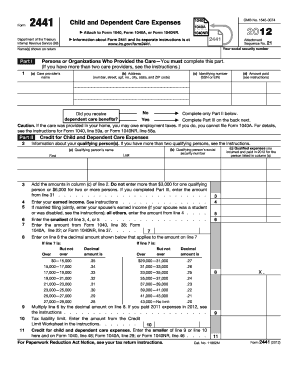
E your tax return instructions. X. 9 11 Cat. No. 11862M Form 2441 (2012) Page 2 Form 2441 (2012) Part III Dependent Care Benefits 12 Enter the total amount of dependent care benefits you received in 2012. Amounts you received as an employee should be shown in box 10 of your Form(s) W-2. Do not include amounts reported as wages in box 1 of Form(s) W-2. If you were self-employed or a partner, include amounts you received under a dependent care assistance program from your sole proprieto.

This website is not affiliated with IRS

How it works

  1. Open form

    Open form follow the instructions

  2. Easily sign form

    Easily sign the form with your finger

  3. Share form

    Send filled & signed form or save

How to fill out the IRS 2441 online

The IRS 2441 form, officially known as the Child and Dependent Care Expenses form, allows individuals to claim a credit for expenses incurred for the care of qualifying persons in order to work or look for work. This guide provides clear, step-by-step instructions to help you fill out the IRS 2441 online efficiently and accurately.

Follow the steps to complete the IRS 2441 online effectively.

  1. Click ‘Get Form’ button to obtain the form and open it in the editor.
  2. In Part I, enter the name of the care provider in column (a), their address in column (b), their identifying number (either SSN or EIN) in column (c), and the amount paid for their services in column (d). Remember to complete only this part if you have more than two care providers.
  3. Indicate whether you received dependent care benefits by checking 'Yes' or 'No'.
  4. Proceed to Part II, where you will provide information about your qualifying person(s). Enter their name(s) in column (a) and their social security number(s) in column (b). Make sure to adhere to the instructions, especially if you have more than two qualifying persons.
  5. Add the amounts from column (c) of line 2 to report your total qualifying expenses. Remember, the maximums are $3,000 for one qualifying person and $6,000 for two or more.
  6. Enter your earned income from line 4. If married filing jointly, also include your spouse’s earned income.
  7. Enter the smallest amount from lines 3, 4, or 5 on line 6.
  8. Complete the calculations on lines 9 through 11 based on your income bracket, using the designated decimal amounts.
  9. On the second part, Part III, document any dependent care benefits you received on line 12 as shown on your W-2 form.
  10. Track down the amounts for lines 13 through 26 according to the provided instructions, and calculate your taxable benefits.
  11. Finally, make sure to save your changes and either download, print, or share the completed form as per your needs.

Start completing your IRS 2441 online today for accurate filing.

Get form

Experience a faster way to fill out and sign forms on the web. Access the most extensive library of templates available.

Related content

About Form 2441, Child and Dependent Care Expenses
Dec 4, 2024 — If you paid someone to care for your child or other qualifying person so...
Learn more
2022 Publication 503
2022 · Cited by 1 — You must include on line 2 of Form. 2441, Child and Dependent Care...
Learn more
f2441--2017.pdf
3. Add the amounts in column (c) of line 2. Don't enter more than $3,000 for one...
Learn more

Related links form

LPA Lease Addendum TX 130-U 2013 OH Residential Property Disclosure Form 2013 ISO Form CG 20 2004

Questions & Answers

Get answers to your most pressing questions about US Legal Forms API.

Contact support

The correct amount for the Child and Dependent Care Credit varies depending on your qualifying expenses and income level. IRS 2441 details the calculations, which include limits on the credit amount based on the number of children and your total spending. Taking the time to understand these parameters can help you claim the full credit available to you.

To calculate line 10 on IRS 2441, you need to input your qualifying expenses and apply the appropriate percentage based on your income. Make sure to reference the IRS guidelines, as they outline how to maximize your credit correctly. Using a reliable platform, like uslegalforms, can assist you in calculating and completing this line accurately.

Line 10 on Schedule 1 of the 1040 outlines adjustments to income, which can impact your total taxable income. It is essential to understand this line, especially when preparing your IRS 2441, as changes here may affect your eligibility for certain credits. Careful documentation will ensure you're capturing all relevant deductions.

Line 10 of the 1040 tax form is generally where you report your taxable income for the year. This line plays a vital role when calculating your overall tax and benefits, including the amount you report on IRS 2441. Take your time to review your income details to ensure precision in your filing.

Line 10 of your W-2 form shows the amount of dependent care benefits that your employer provided. This amount is significant when filling out IRS 2441, as it helps determine any excess spending you may claim for a credit. Understanding this line can help you accurately report these benefits and benefit from available credits.

Line 10 on your tax return refers to specific entries related to you or your dependents, particularly associated with credits or deductions. In the context of IRS 2441, this line helps indicate any credits you are claiming for dependent care. Make sure to cross-verify the figures for accuracy to ensure you are maximizing your benefits.

Not being eligible for the Child and Dependent Care Credit can stem from various factors, such as exceeding income limits or not having qualifying expenses. It's essential to verify your childcare costs against the IRS guidelines. Consulting IRS 2441 can provide insight into your specific situation and inform you of any adjustments needed.

The IRS 2441 form for tax year 2022 allows taxpayers to claim the Child and Dependent Care Credit. This form helps you report eligible childcare expenses that you incurred while you worked or sought employment. Filling it out correctly is vital for maximizing your credits. For assistance, you may want to utilize reliable platforms like uslegalforms, which provide guidance on tax issues.

If you are not receiving credit for your dependents, it may be due to not meeting eligibility criteria established by the IRS. Ensure your dependents qualify, based on age, residency, and other factors. It's also possible that your provided expenses do not match what qualifies under the IRS 2441 form. Consulting with a tax professional may help to resolve this.

There are several reasons you might not qualify for the child dependent care credit. One common reason is exceeding the income thresholds set by the IRS. Another factor might be a lack of qualifying expenses, as only certain costs are eligible. Reviewing IRS 2441 can provide clarity on qualifications and help identify any gaps.

Get This Form Now!

Use professional pre-built templates to fill in and sign documents online faster. Get access to thousands of forms.
If you believe that this page should be taken down, please follow our DMCA take down processhere.

Industry-leading security and compliance

US Legal Forms protects your data by complying with industry-specific security standards.
  • In businnes since 1997
    25+ years providing professional legal documents.
  • Accredited business
    Guarantees that a business meets BBB accreditation standards in the US and Canada.
  • Secured by Braintree
    Validated Level 1 PCI DSS compliant payment gateway that accepts most major credit and debit card brands from across the globe.
Get IRS 2441
  • Adoption
  • Bankruptcy
  • Contractors
  • Divorce
  • Home Sales
  • Employment
  • Identity Theft
  • Incorporation
  • Landlord Tenant
  • Living Trust
  • Name Change
  • Personal Planning
  • Small Business
  • Wills & Estates
  • Packages A-Z
  • Affidavits
  • Bankruptcy
  • Bill of Sale
  • Corporate - LLC
  • Divorce
  • Employment
  • Identity Theft
  • Internet Technology
  • Landlord Tenant
  • Living Wills
  • Name Change
  • Power of Attorney
  • Real Estate
  • Small Estates
  • Wills
  • All Forms
  • Forms A-Z
  • Form Library
  • Legal Hub
  • About Us
  • Help Portal
  • Legal Resources
  • Blog
  • Affiliates
  • Contact Us
  • Delete My Account
  • Site Map
  • Industries
  • Forms in Spanish
  • Localized Forms
  • State-specific Forms
  • Forms Kit
  • Real Estate Handbook
  • All Guides
  • Notarize
  • Incorporation services
  • For Consumers
  • For Small Business
  • For Attorneys
  • USLegal
  • FormsPass
  • pdfFiller
  • signNow
  • altaFlow
  • DocHub
  • Instapage
Form Packages
  • Adoption
  • Bankruptcy
  • Contractors
  • Divorce
  • Home Sales
  • Employment
  • Identity Theft
  • Incorporation
  • Landlord Tenant
  • Living Trust
  • Name Change
  • Personal Planning
  • Small Business
  • Wills & Estates
  • Packages A-Z
Form Categories
  • Affidavits
  • Bankruptcy
  • Bill of Sale
  • Corporate - LLC
  • Divorce
  • Employment
  • Identity Theft
  • Internet Technology
  • Landlord Tenant
  • Living Wills
  • Name Change
  • Power of Attorney
  • Real Estate
  • Small Estates
  • Wills
  • All Forms
  • Forms A-Z
  • Form Library
Customer Service
  • Legal Hub
  • About Us
  • Help Portal
  • Legal Resources
  • Blog
  • Affiliates
  • Contact Us
  • Delete My Account
  • Site Map
  • Industries
  • Forms in Spanish
  • Localized Forms
  • State-specific Forms
  • Forms Kit
Legal Guides
  • Real Estate Handbook
  • All Guides
Prepared for you
  • Notarize
  • Incorporation services
Our Customers
  • For Consumers
  • For Small Business
  • For Attorneys
Our Sites
  • USLegal
  • FormsPass
  • pdfFiller
  • signNow
  • altaFlow
  • DocHub
  • Instapage
Social Media
Call us now toll free:
+1 833 426 79 33
As seen in:
© Copyright 1999-2026 airSlate Legal Forms, Inc. 3720 Flowood Dr, Flowood, Mississippi 39232
  • Your Privacy Choices
  • Terms of Service
  • Privacy Notice
  • Content Takedown Policy
  • Bug Bounty Program
IRS 2441
This form is available in several versions.
Select the version you need from the drop-down list below.
2022 IRS 2441
Select form
  • 2022 IRS 2441
  • 2021 IRS 2441
  • 2020 IRS 2441
  • 2019 IRS 2441
  • 2018 IRS 2441
  • 2017 IRS 2441
  • 2016 IRS 2441
  • 2015 IRS 2441
  • 2014 IRS 2441
  • 2013 IRS 2441
  • 2012 IRS 2441
  • 2011 IRS 2441
  • 2010 IRS 2441
  • 2009 IRS 2441
Select form