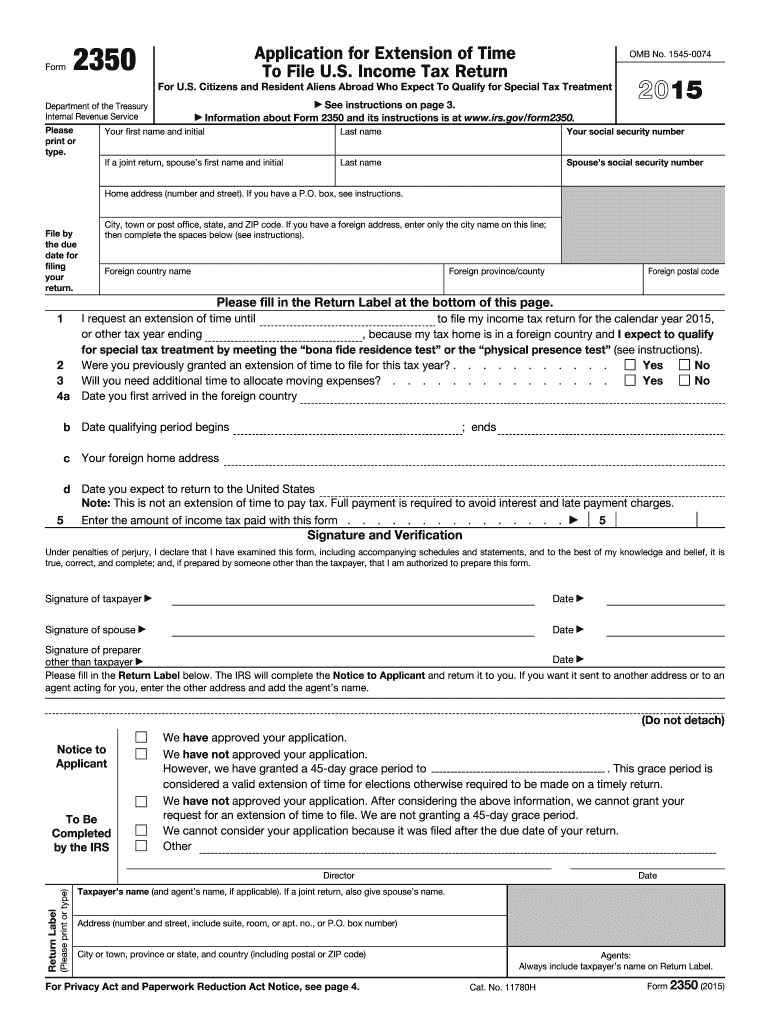
Lease print or type) Return Label Director Date Taxpayer s name (and agent s name, if applicable). If a joint return, also give spouse s name. Address (number and street, include suite, room, or apt. no., or P.O. box number) City or town, province or state, and country (including postal or ZIP code) For Privacy Act and Paperwork Reduction Act Notice, see page 4. Agents: Always include taxpayer s name on Return Label. Cat. No. 11780H Form 2350 (2015) This page left blank intenti.
Loading

Open form follow the instructions

Easily sign the form with your finger

Send filled & signed form or save
How to fill out the IRS 2350 online
Filling out Form 2350, the application for extension of time to file your U.S. income tax return, can be a straightforward process when guided correctly. This guide provides step-by-step instructions to help users complete the form online efficiently.
Follow the steps to complete the IRS 2350 form online.
- Use the 'Get Form' button to access the IRS 2350 form and open it in your preferred document editor.
- Enter your first name, middle initial, last name, and social security number in the designated fields. If filing jointly, include your spouse's information as well.
- Provide your home address, ensuring to include the city, state, and ZIP code. If applicable, follow instructions for entering a foreign address.
- In line 1, specify the new due date for filing your income tax return by providing the necessary dates relating to your foreign residence.
- Answer the questions regarding previous extensions and the allocation of moving expenses by marking 'Yes' or 'No'.
- Fill in the dates related to your arrival in the foreign country, the commencement and end of the qualifying period, and your expected return date to the U.S. if applicable.
- Enter any income tax amount you plan to pay with this extension in the prescribed field.
- Sign and date the form, and if filing jointly, ensure your spouse also signs. If prepared by someone else, include their signature as well.
- Complete the return label at the bottom of the page to receive acknowledgment from the IRS regarding your application.
- Once completed, save your changes, and consider downloading, printing, or sharing the form as needed.
Start the process of filling out Form 2350 online today to secure your extension!
Experience a faster way to fill out and sign forms on the web. Access the most extensive library of templates available.
Related content
Jan 21, 2025 — US citizens and resident aliens abroad file this form 2350 to ask for an...
Use Form 2350 to ask for an extension to file your tax return if you need the time to meet...
Use Form 2350 to ask for an extension of time to file your tax return only if you expect...
Get answers to your most pressing questions about US Legal Forms API.
Is form 9325 required?
Form 9325 is not always required but is helpful for certain tax situations. This form acknowledges the receipt of your electronic tax return and can confirm that it was accepted by the IRS. Although it's not necessary for all taxpayers, having this form can provide peace of mind when filing electronically. It is particularly useful if you engage with tax software for accurate filing.
What is an IRS form 2350?
IRS Form 2350 is specifically designed for individuals who need extra time to file their tax returns while overseas. This form allows you to request an extension if you are a U.S. citizen or resident alien living outside the United States. It's important to file this form accurately to avoid penalties for late submission. Utilizing resources like USLegalForms can simplify the process for you.
What is an IRS withholding certificate?
An IRS withholding certificate is a document that helps you adjust how much tax is withheld from your income. This can benefit you if you want to reduce the amount withheld or if you qualify for a lower withholding rate. It's essential to complete the appropriate form, such as Form 8233, to request this certificate. By doing so, you align your withholding with your tax situation.
Is it hard to get an IRS extension?
Generally, obtaining an IRS extension is a straightforward process. Most individuals can easily file the appropriate forms either online or via mail. However, it's crucial to ensure that you meet the requirements and file on time. The IRS usually approves valid requests quickly, allowing you extra time to ensure accurate filings.
How do I ask the IRS for an extension?
To ask the IRS for an extension, you can electronically file Form 4868 online or submit a paper form. This request allows you to extend the deadline for filing your individual income tax return. However, keep in mind that this extension does not mean you are exempt from paying taxes due by the original deadline. Be proactive in estimating your tax payments.
How do I file an extension for an estate tax return?
To file an extension for an estate tax return, you need to submit Form 4768 to the IRS. This form allows you to request additional time to file the estate tax return without incurring penalties. Remember, filing an extension does not extend the payment deadline for any taxes owed. Therefore, it's essential to estimate your tax liability accurately.
Does the IRS provide proof of an extension?
Yes, when you file the IRS 2350 or any extension form, you will receive an acknowledgment from the IRS. This acknowledgment serves as proof that your extension request was filed correctly. It's essential to keep this confirmation for your records, as it can protect you from penalties should you need additional time.
How do I fill out a tax payment check?
To fill out a tax payment check, start by writing the date on the check. Then note 'U.S. Treasury' as the payee. Next, write the amount in numbers and then in words, ensuring they match, and include your Social Security number on the memo line for proper identification. For convenience, consider using our resources at USLegalForms to guide you through the process.
What is the IRS extension form for married couples?
For married couples, the IRS extension form is usually IRS form 4868. This form allows both spouses to jointly request an extension for filing their tax returns. Ensure that both partners sign the form to validate the request and avoid any delays in processing.
What is the IRS form 2350?
The IRS form 2350 is an application for an extension of time to file your U.S. individual income tax return. This form is particularly useful for U.S. citizens and residents who are living abroad and need additional time to gather necessary documentation. By submitting form 2350, you can ensure you meet your tax obligations without rushing your preparation.
Use professional pre-built templates to fill in and sign documents online faster. Get access to thousands of forms.
If you believe that this page should be taken down, please follow our DMCA take down process here.
This form is available in several versions. Select the version you need from the drop-down list below.