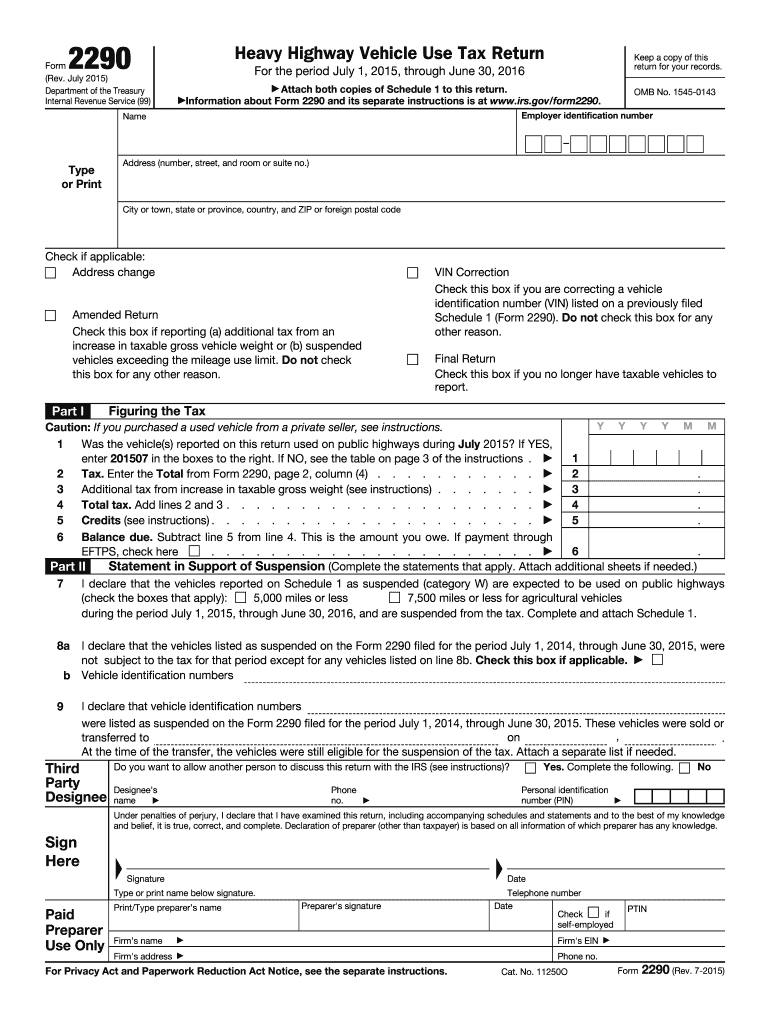
Esignee s name Phone no. Personal identification number (PIN) No Under penalties of perjury, I declare that I have examined this return, including accompanying schedules and statements and to the best of my knowledge and belief, it is true, correct, and complete. Declaration of preparer (other than taxpayer) is based on all information of which preparer has any knowledge. Sign Here Signature Type or print name below signature. Paid Preparer Use Only Print/Type.
Loading

Open form follow the instructions

Easily sign the form with your finger

Send filled & signed form or save
How to fill out the IRS 2290 online
Filing the IRS 2290, the heavy highway vehicle use tax return, can seem daunting. This guide will provide you with step-by-step instructions on how to complete this form online, ensuring you understand every section and field.
Follow the steps to efficiently complete your IRS 2290 online.
- Click ‘Get Form’ button to obtain the form and open it in the editor.
- Begin by entering your employer identification number (EIN), name, address, and contact information in the specified sections. Make sure this information is accurate.
- Indicate if any of the following options apply to you by checking the corresponding boxes: address change, VIN correction, amended return, or if this is your final return.
- In Part I, answer the question regarding vehicle use during July of the current tax year. If your vehicle was used on public highways, provide the corresponding date code.
- Calculate the tax owed by filling out the lines for total tax, any additional tax due from increases in gross vehicle weight, and subtracting any credits.
- Provide any necessary statements to support suspension if applicable, including the mileage thresholds for suspended vehicles during the specified period.
- Complete the declaration section affirming the accuracy of your information. If someone prepared the return for you, they must also sign and provide their details.
- Finally, save your changes and download, print, or share the completed form as needed. Ensure you keep a copy for your records.
Complete your IRS 2290 form online today for a hassle-free filing experience.
Experience a faster way to fill out and sign forms on the web. Access the most extensive library of templates available.
Related content
This July 2025 revision is for the tax period beginning on July 1, 2025, and ending on...
Aug 6, 2012 — You must file Form 2290 and Schedule 1 for the tax period beginning on...
Dec 21, 2011 — 2290, Heavy Highway Vehicle Use Tax Return. For more information, see the...
Get answers to your most pressing questions about US Legal Forms API.
How do I get a copy of my IRS form?
To get a copy of your IRS form, visit the IRS website and navigate to the appropriate section for tax forms. You can also call the IRS directly to request copies of specific forms, such as your IRS 2290. Alternatively, if you filed online, your service provider may allow you to download past submissions. Using services like uslegalforms enhances your ability to manage your tax forms effectively.
How do I get a copy of my 2290 form online?
You can retrieve a copy of your 2290 form online by accessing the platform where you initially filed the IRS 2290. Most e-filing services will retain records of your submissions, including downloadable copies of your forms. If you are unsure, consider reaching out to the service provider or using the IRS website resources for assistance. Platforms like uslegalforms simplify file retrieval and ensure you can access your documents with ease.
How do I contact the IRS about my 2290?
To resolve inquiries about your IRS 2290, contact the IRS at 1-800-829-1040. Be ready with your vehicle details and any pertinent tax information to expedite the process. Remember that IRS representatives can guide you through various issues, including payments and filing discrepancies. Using a service like uslegalforms can also help clarify your status and streamline your communications with the IRS.
How do I get a copy of my IRS Form 2290?
To obtain a copy of your IRS Form 2290, you can either refer to your records if you filed it online or contact the IRS directly. If you used an e-filing service, your provider may offer access to past filings. It's essential to keep accurate records for easy retrieval, especially for IRS 2290 forms, to avoid any potential compliance issues.
How long does it take to get a 2290 online?
When you file your IRS 2290 online, you typically receive your Schedule 1 within minutes. This quick processing time allows you to immediately confirm your payment and compliance. However, if there are issues with your submission, it may take longer. Using platforms like uslegalforms can simplify this process and ensure you receive your forms promptly.
How do I file an e 2290?
To file your IRS 2290 electronically, start by selecting an authorized e-file provider. Many services, like US Legal Forms, provide user-friendly platforms for a smooth filing process. Simply follow the prompts to input your vehicle information and any other required details. Once you complete the e-filing, ensure to save a copy of your confirmation for your records.
When can I file for my 2290 in 2023?
You can file your IRS 2290 for the 2023 tax year any time after July 1, 2023, until the deadline of August 31, 2023. It’s best to file as early as possible to avoid last-minute issues. Filing early ensures that you can resolve any problems that may arise without pressure. Using a reliable platform can help you manage your filing timeline effectively.
Where do I file 2290 in person?
To file IRS 2290 in person, visit your nearest IRS Taxpayer Assistance Center. Consult the IRS website or call ahead to confirm location, documents required, and any potential waiting times. Remember to bring your VIN and other relevant paperwork for a smooth filing experience. Alternatively, consider using online platforms for a fast and convenient option.
Where to file 2290 in person?
You can file IRS 2290 in person at your local IRS office. It’s important to check the hours of operation and whether you need an appointment. Make sure to bring all necessary documentation, including proof of vehicle use and identification. Additionally, using online services can streamline your filing process, allowing you to submit your IRS 2290 quickly and easily.
Who needs to file a 2290 form?
Anyone who operates a heavy vehicle with a gross weight of 55,000 pounds or more on public highways must file the IRS 2290 form. This includes owners of trucks and other heavy vehicles used for business purposes. If you are unsure whether you need to file, it's wise to consult tax professionals or platforms like US Legal Forms for clear guidance tailored to your situation.
Use professional pre-built templates to fill in and sign documents online faster. Get access to thousands of forms.
If you believe that this page should be taken down, please follow our DMCA take down process here.
This form is available in several versions. Select the version you need from the drop-down list below.