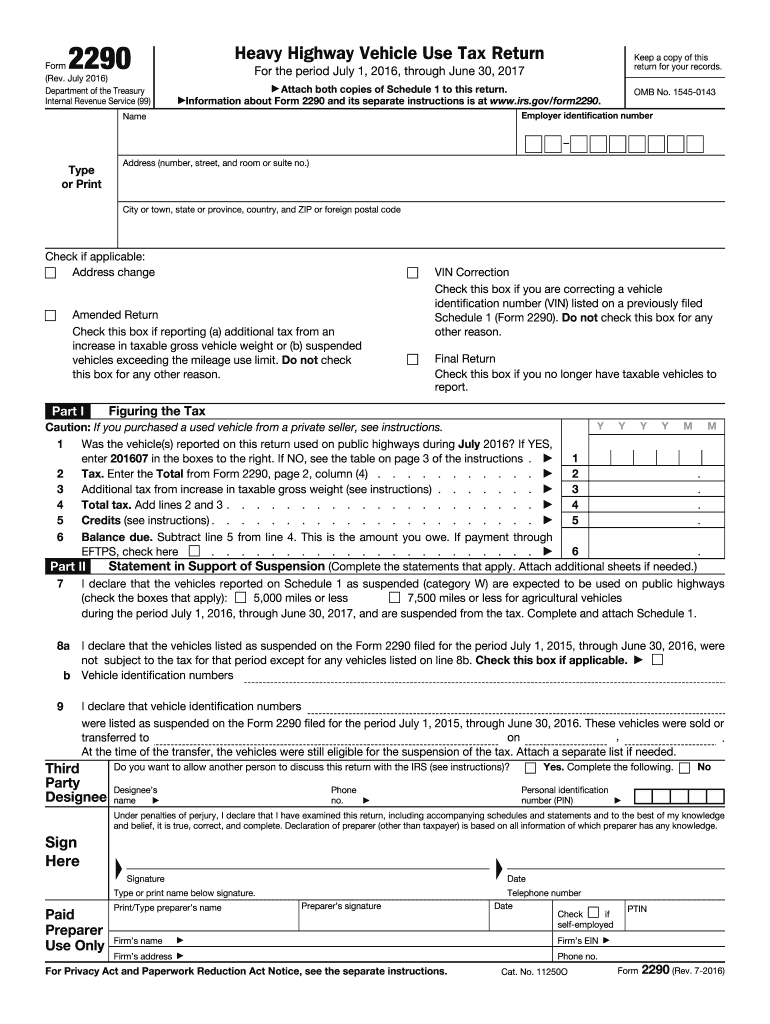
Hese vehicles were sold or , on transferred to . At the time of the transfer, the vehicles were still eligible for the suspension of the tax. Attach a separate list if needed. Third Party Designee Yes. Complete the following. Do you want to allow another person to discuss this return with the IRS (see instructions)? Designee s name Phone no. Personal identification number (PIN) No Under penalties of perjury, I declare that I have examined this return, including accompanyin.
Loading

Open form follow the instructions

Easily sign the form with your finger

Send filled & signed form or save
How to fill out the IRS 2290 online
Filing the IRS Form 2290 online can simplify your reporting of heavy highway vehicle use tax. This guide provides step-by-step instructions to help you accurately complete the form and ensure compliance with tax regulations.
Follow the steps to complete the IRS 2290 form online.
- Click ‘Get Form’ button to obtain the form and open it in the editor.
- Fill in your employer identification number, name, and address in the designated fields. Ensure all information is typed or printed clearly.
- Indicate whether there are any relevant changes by checking the appropriate boxes for address changes, VIN corrections, amended returns, or final returns.
- Determine if the vehicle(s) were used on public highways during the specified tax period. If ‘Yes’, enter '201607' in the boxes provided.
- Calculate the tax by entering the total amount from page 2, column (4) into the designated field. Include any additional tax from increases in gross vehicle weight as indicated.
- Subtract any credits from the total tax and determine the balance due. Make sure to check the box if making payment through EFTPS.
- Complete the statement in support of suspension as necessary, checking the relevant boxes to declare expected use of suspended vehicles.
- Decide whether to designate a third party to discuss this return with the IRS and provide the necessary information if applicable.
- Sign and date the form, ensuring that all entries are accurate and complete before submission.
- Save your completed form, and consider downloading, printing, or sharing a copy for your records.
Complete your IRS 2290 filing online today for a hassle-free experience.
Experience a faster way to fill out and sign forms on the web. Access the most extensive library of templates available.
Related content
This July 2025 revision is for the tax period beginning on July 1, 2025, and ending on...
Aug 6, 2012 — You must file Form 2290 and Schedule 1 for the tax period beginning on...
Dec 21, 2011 — 2290, Heavy Highway Vehicle Use Tax Return. For more information, see the...
Get answers to your most pressing questions about US Legal Forms API.
What is the IRS form 2290 used for?
The IRS Form 2290 is primarily used for reporting and paying the Heavy Highway Vehicle Use Tax. This tax applies to certain vehicles that operate on public highways. By filing this form, you help maintain roadways, while also ensuring that your vehicle complies with federal regulations.
How do I check my 2290 status?
To check your IRS 2290 status, visit the IRS status page or use the e-filing platform you submitted through. If you filed using uslegalforms, you can access your filing status directly in your account. Regularly checking your status helps you stay updated and ensures timely compliance.
How do I get a copy of my IRS form 2290?
You can obtain a copy of your IRS 2290 by logging into your e-filing account where you submitted your form. If you used uslegalforms, your completed IRS 2290 is available in your account history for easy access. Otherwise, you may request a copy directly from the IRS if you filed via mail.
How do I know when my 2290 is due?
Your IRS 2290 is due by the last day of the month following the month in which you first used your vehicle. Typically, the deadline is also based on your reporting period. To stay informed, you can utilize calendar reminders or consult uslegalforms for tools that help track IRS 2290 deadlines accurately.
How long does it take for Form 2290 to be approved?
The approval process for Form 2290 generally takes about 24 to 48 hours after submission. However, during peak periods, this timeline may extend slightly. Promptly e-filing through a reliable service like uslegalforms can help ensure faster processing and approval of your IRS 2290.
How do I get proof of 2290?
To obtain proof of your IRS 2290 filings, you must receive a stamped Schedule 1 from the IRS. After e-filing your IRS 2290, this document serves as your proof. You can download it directly from the IRS e-filing portal, or if you used a service like uslegalforms, you may access it through your account on their platform.
How to calculate tax on 2290?
Calculating your IRS 2290 tax involves knowing the weight of your vehicle and the number of months the vehicle was in operation during the tax year. You can find the tax rates on the IRS website, which can help you with the calculations based on vehicle weight. It's important to ensure accuracy to avoid potential penalties. For detailed help, consider using tools offered by US Legal Forms to simplify the tax calculation process.
How long does it take to get a 2290 online?
Filing Form 2290 online can be a quick and efficient process. Many users can complete their application in just a few minutes with the right tools. Once submitted, you often receive immediate confirmation from the IRS, making it a swift option compared to traditional methods. US Legal Forms offers streamlined services to help you file efficiently and receive your approval without unnecessary delays.
How do I contact the IRS about my 2290?
To contact the IRS regarding your IRS 2290 questions, you can call their Business and Specialty Tax Line at 1-800-829-4933. Make sure to have your information ready, such as your employer identification number and vehicle details. You can also reach out through the IRS website for more resources and help with your inquiries. If you need further assistance, consider using platforms like US Legal Forms for guidance.
What is 2290 heavy haul tax?
The IRS 2290 heavy haul tax applies to vehicles over 55,000 pounds that are used on public highways. This tax helps fund road maintenance and infrastructure improvements. If your vehicle qualifies, you must file Form 2290 annually. US Legal Forms simplifies this process by providing user-friendly tools and guidance for filing your heavy haul tax.
Use professional pre-built templates to fill in and sign documents online faster. Get access to thousands of forms.
If you believe that this page should be taken down, please follow our DMCA take down process here.
This form is available in several versions. Select the version you need from the drop-down list below.