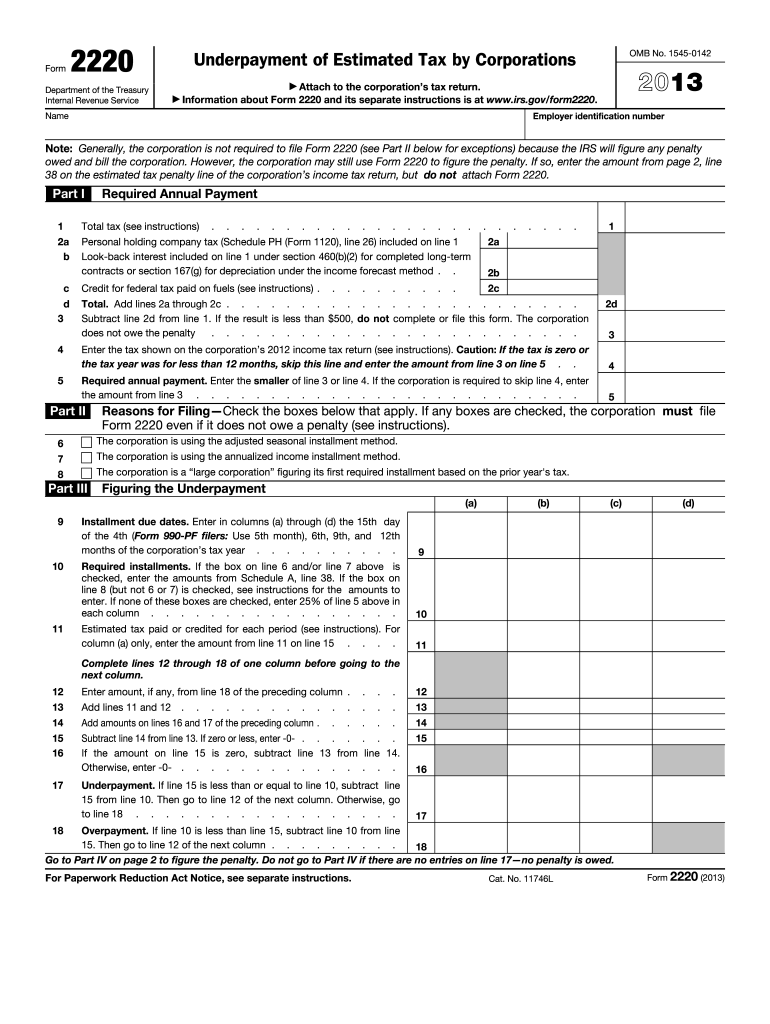
Nt, if any, from line 18 of the preceding column . . . . 12 13 Add lines 11 and 12 . . . 13 14 15 16 Add amounts on lines 16 and 17 of the preceding column Subtract line 14 from line 13. If zero or less, enter -0- . If the amount on line 15 is zero, subtract line Otherwise, enter -0- . . . . . . . . . 17 Underpayment. If line 15 is less than or equal to line 10, subtract line 15 from line 10. Then go to line 12 of the next column. Otherwise, go to line 18 . . . . . . . . . . . . .
Loading

Open form follow the instructions

Easily sign the form with your finger

Send filled & signed form or save
How to fill out the IRS 2220 online
Filling out the IRS 2220 form is essential for corporations to report and calculate any underpayment of estimated tax. This guide provides clear, step-by-step instructions to complete the form online, ensuring that you understand each section and field.
Follow the steps to successfully complete the IRS 2220 online.
- Click the ‘Get Form’ button to obtain the IRS 2220 form and open it in your preferred editor.
- Begin by entering the corporation's name and employer identification number at the top of the form.
- In Part I, calculate the required annual payment. Start with the total tax, including any additional taxes that need to be added or subtracted as detailed in the instructions.
- Proceed to line 4 in Part I, where you will enter the tax shown on the corporation’s previous income tax return. If applicable, skip to line 5.
- In line 5, enter the smaller of line 3 or line 4 as the required annual payment, proceeding based on whether the corporation is subject to skipping line 4.
- In Part II, indicate whether the corporation is using the adjusted seasonal installment method or the annualized income installment method by checking the appropriate boxes.
- For Part III, input the installment due dates and required installments in the correct columns, using the calculations provided based on the corporation’s tax year.
- Complete the underpayment calculation if applicable, and proceed to discuss any penalties in Part IV. Make sure to follow the precise instructions for calculating each component.
- Once all relevant information is entered in the appropriate fields and sections, review the form for accuracy.
- Finally, save your changes, download, print, or share the form as needed.
Start filling out the IRS 2220 online today to manage your corporation's tax obligations effectively.
Experience a faster way to fill out and sign forms on the web. Access the most extensive library of templates available.
Related content
Nov 26, 2024 — Information about Form 2220, Underpayment of Estimated Tax By...
The IRS will figure any penalty owed and bill the corporation. If the corporation does not...
Jan 31, 2012 — If Form 2220 is attached, check the box worksheet to figure the tax...
Get answers to your most pressing questions about US Legal Forms API.
What is IRS Form 2220?
IRS Form 2220 is a form used by individuals and businesses to report underpayment of estimated tax. This form helps calculate penalties if your payments fall short of IRS requirements. Completing Form 2220 provides clarity about your tax situation and guides you through any necessary corrections. Using resources like US Legal Forms can simplify this process and make tax compliance easier.
Why am I getting an underpayment penalty if I'm getting a refund?
Receiving a refund does not necessarily exempt you from underpayment penalties. If your refund results from tax credits or withholding but you underpaid during the year, the penalty still applies. This situation can be confusing, but understanding your tax obligations is crucial. By using IRS Form 2220, you can assess your payment history and determine if penalties are warranted or if you can contest them.
How can I avoid IRS underpayment?
To avoid IRS underpayment, regularly review and adjust your estimated tax payments throughout the year. Keeping track of your income changes is critical, as is making timely payments based on accurate calculations. Consulting tax professionals or using platforms like US Legal Forms can simplify your tax planning process. Remember, employing IRS Form 2220 will ensure you stay compliant and informed.
What causes an IRS underpayment penalty?
An IRS underpayment penalty arises from not paying enough taxes during the year and can be caused by various factors. Common reasons include underestimating your income, experiencing unexpected income changes, or failing to adjust your payments as needed. Moreover, lacking adequate tax planning can lead to this penalty. IRS Form 2220 is a vital tool to help you address and potentially mitigate this issue.
How do I get my underpayment penalty waived?
To waive your underpayment penalty, you need to demonstrate reasonable cause for not meeting your tax obligations. You can file IRS Form 2220 to request a penalty waiver. It’s essential to provide documentation supporting your claims and clearly explain your situation to increase your chances of approval. Taking proactive steps can help improve your outcome.
Who qualifies for the IRS forgiveness program?
Individuals and businesses that meet specific criteria set by the IRS qualify for the forgiveness program. Generally, you must show that your underpayment was due to circumstances beyond your control. If you have made a good faith effort to comply with tax laws, you may have a stronger case for forgiveness. Utilizing IRS Form 2220 can help you understand your eligibility better.
Is form 2220 required?
Form 2220 is required for taxpayers who owe an underpayment penalty and need to calculate it. If your estimated tax payments fall short of the IRS guidelines, filing this form becomes essential to clarify your situation. Additionally, knowing when and how to submit Form 2220 can prevent future tax complications. US Legal Forms can provide templates and instructions to ensure you meet all necessary requirements efficiently.
What triggers an IRS audit on an S Corp?
An IRS audit on an S Corporation may be triggered by discrepancies in income reporting, unusual deductions, or patterns of excessive losses. Factors that bring attention to an S Corp can include significant expenses relative to revenue, prompting further examination. Staying informed about IRS regulations and completing required forms, like IRS 2220 when applicable, can help S Corps prepare for compliance. Services from US Legal Forms can offer resources to facilitate this understanding.
What qualifies as a large corporation?
A large corporation typically has a gross receipts threshold that exceeds $10 million, according to IRS guidelines. These businesses may face different tax obligations, including specific forms like 2220 for underpayment considerations. Identifying your corporation’s status can help you understand your tax responsibilities better. Utilizing resources from US Legal Forms may assist in determining your classification and the associated tax implications.
What is form 2220 used for?
Form 2220 is used to calculate the underpayment of estimated tax for individuals and corporations. It simplifies the process of determining any penalties owed due to underpayment of taxes. Completing this form allows taxpayers to assess whether they are exempt from underpayment penalties. For guidance on filling out Form 2220, consider using US Legal Forms to access reliable resources.
Use professional pre-built templates to fill in and sign documents online faster. Get access to thousands of forms.
If you believe that this page should be taken down, please follow our DMCA take down process here.
This form is available in several versions. Select the version you need from the drop-down list below.