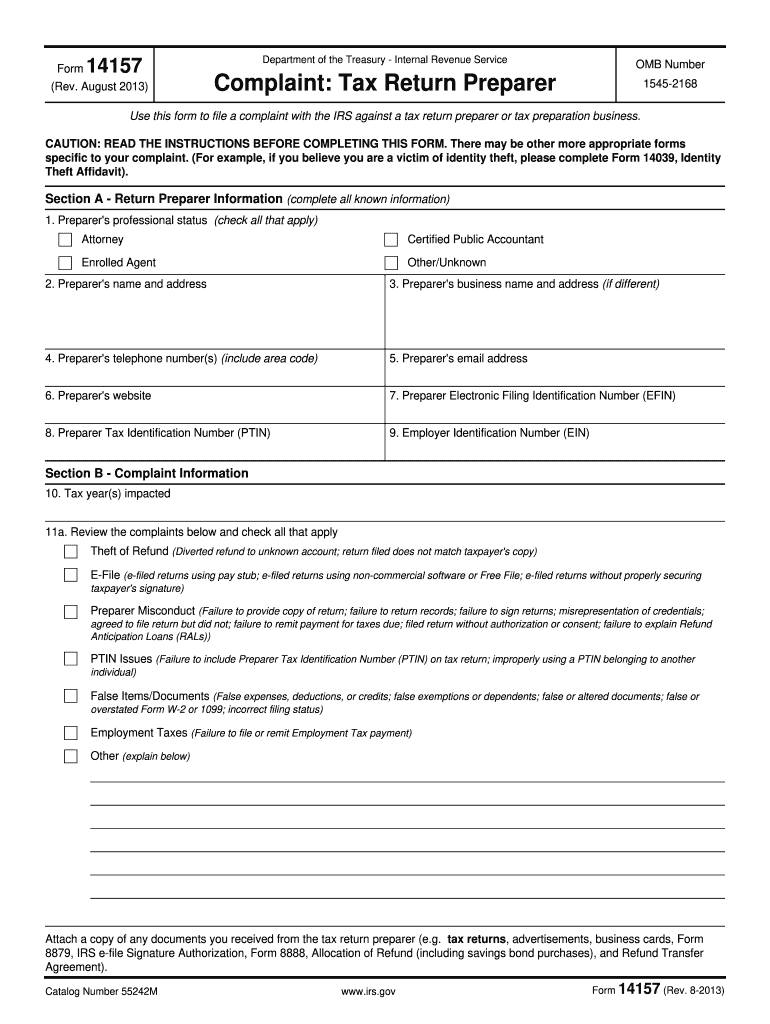
T a tax return preparer or tax preparation business. CAUTION: READ THE INSTRUCTIONS BEFORE COMPLETING THIS FORM. There may be other more appropriate forms specific to your complaint. (For example, if you believe you are a victim of identity theft, please complete Form 14039, Identity Theft Affidavit). Section A - Return Preparer Information (complete all known information) 1. Preparer's professional status (check all that apply) Attorney Certified Public Accountant Enrolled Agent Other/Unkno.
Loading

Open form follow the instructions

Easily sign the form with your finger

Send filled & signed form or save
How to fill out the IRS 14157 online
Filing a complaint against a tax return preparer can be a crucial step in addressing potential misconduct. The IRS 14157 form provides a clear process for users to report concerns about tax return preparers and preparation businesses. Below is a comprehensive guide to assist you in filling out this form online with confidence.
Follow the steps to complete the IRS 14157 online form effectively.
- Press the ‘Get Form’ button to acquire the IRS 14157 form and access it in your editor.
- In Section A, provide all known information about the return preparer. Indicate the preparer's professional status by checking all applicable boxes (e.g., Attorney, Certified Public Accountant, Enrolled Agent). Include the preparer's name, address, telephone number, email, website, Electronic Filing Identification Number (EFIN), Preparer Tax Identification Number (PTIN), and Employer Identification Number (EIN) if available.
- In Section B, specify the tax year(s) impacted by the complaint and check all relevant misconduct allegations, such as theft of refund or e-filing issues. Be sure to provide detailed facts about your complaint in question 11b and attach any relevant documents.
- Proceed to Section C, where you can enter the taxpayer’s information. This includes their name, mailing address, telephone number, email address, and signature. Note that this information assists the IRS in contacting you for additional details if needed.
- If you are not the taxpayer, move to Section D to fill out your information, including your name, address, and relationship to the preparer. Remember, this section is not mandatory but can be helpful.
- Once all sections are completed, review the form for accuracy. Finally, you can save changes, download, print, or share the completed document as needed.
Complete your complaints online using the IRS 14157 form to ensure your concerns are properly reported.
Experience a faster way to fill out and sign forms on the web. Access the most extensive library of templates available.
Related content
Use Form 14157 to file a complaint against a tax return preparer or tax preparation...
Mar 7, 2022 — Taxpayers can report tax preparer misconduct directly to the IRS using IRS...
Jan 19, 2017 — IRS. You can report abusive tax preparers and suspected tax fraud to the...
Get answers to your most pressing questions about US Legal Forms API.
How do I get the IRS data retrieval tool?
The IRS data retrieval tool is available during the FAFSA application process and helps you import tax information directly from the IRS. Start by visiting the FAFSA website and following the prompts to use the tool. Understanding IRS 14157 can also guide you through ensuring your information is accurately reported for financial aid purposes.
What flags the IRS to audit you?
Several factors might signal the IRS to audit your return, including discrepancies in reported income and inconsistencies in deductions or credits. High-earning individuals or those who file complex returns, especially those involving business income, often face a higher likelihood of audits. Familiarizing yourself with IRS 14157 can help you avoid common pitfalls.
How do I trigger an IRS audit?
You cannot intentionally trigger an IRS audit; however, certain behaviors can increase your chances. Filing returns with significant discrepancies, claiming excessive deductions, or reporting unusually high income can raise flags. It's wise to approach your tax submissions with accuracy in mind, bearing in mind IRS 14157 guidelines.
How do I get the IRS to audit someone?
To initiate an audit against someone, you must typically report suspected tax fraud to the IRS. You can submit Form 3949-A, giving details about the alleged infractions. While this process seems straightforward, understanding IRS procedures related to IRS 14157 can be beneficial to ensure your report is adequately documented.
How do I get an IRS tax clearance certificate?
To secure an IRS tax clearance certificate, you need to ensure your tax account is in good standing. You can request the certificate by completing Form 12277 or by contacting the IRS directly. Engaging the services offered by uslegalforms can simplify this process, especially if you're navigating the complexities related to IRS 14157.
At what point will the IRS audit you?
The IRS usually audits returns after they've been filed and processed, and audits can occur up to three years after the filing date. Higher-risk returns, such as those with significant deductions or income discrepancies, may trigger an audit sooner. Knowing this can help you understand the importance of the IRS 14157, which focuses on accurate tax reporting.
How do I get through to IRS customer service?
Reaching IRS customer service can be challenging, but patience is key. Begin by calling the IRS number specifically for your issue, and be prepared for potential hold times. Having your tax information and the IRS 14157 details handy can facilitate the process and ensure you provide any relevant information quickly.
How long does it take to trigger an audit?
Typically, the IRS can trigger an audit for various reasons, but there is no set time frame. Factors such as unusual deductions or discrepancies in reported income may prompt the IRS to look more closely at your return. When dealing with IRS matters, such as understanding IRS 14157, it's crucial to maintain accurate records and transparency.
What is the IRS default phone number?
The default phone number for the IRS is 800-829-1040, which connects you to their customer service for individuals. This number can assist you with various tax-related questions and concerns, including issues associated with IRS 14157. Keep this number accessible for whenever you may need assistance.
Is this a real IRS phone number 800-829-0922?
Yes, the number 800-829-0922 is a legitimate IRS phone line for individual inquiries. This number caters to taxpayers seeking assistance and tax-related information. If you require help with IRS 14157 matters, don't hesitate to call this verified number for reliable support.
Use professional pre-built templates to fill in and sign documents online faster. Get access to thousands of forms.
If you believe that this page should be taken down, please follow our DMCA take down process here.
This form is available in several versions. Select the version you need from the drop-down list below.