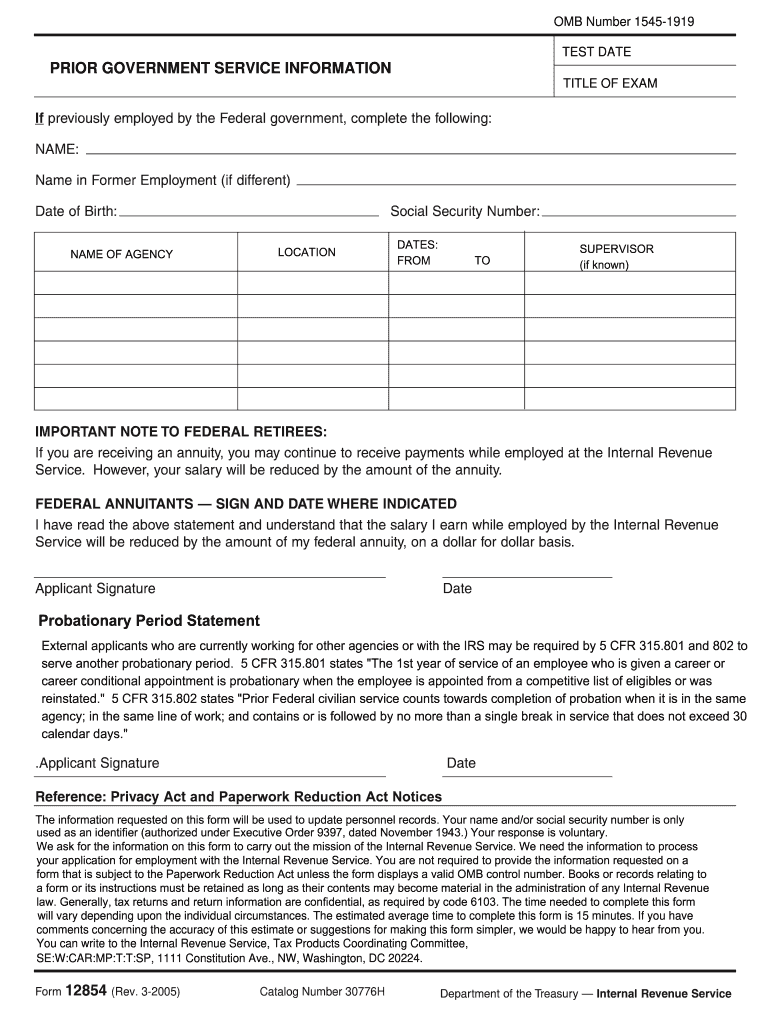
Overnment, complete the following: NAME: Name in Former Employment (if different) Date of Birth: Social Security Number: LOCATION NAME OF AGENCY DATES: FROM TO SUPERVISOR (if known) IMPORTANT NOTE TO FEDERAL RETIREES: If you are receiving an annuity, you may continue to receive payments while employed at the Internal Revenue Service. However, your salary will be reduced by the amount of the annuity. FEDERAL ANNUITANTS SIGN AND DATE WHERE INDICATED I have read the above statement and un.
Loading

Open form follow the instructions

Easily sign the form with your finger

Send filled & signed form or save
How to fill out the IRS 12854 online
The IRS 12854 form is essential for updating personnel records, particularly for individuals with prior government service. This guide provides comprehensive, step-by-step instructions for filling out this form online, ensuring a smooth completion process for all users.
Follow the steps to successfully complete the IRS 12854 form online.
- Click ‘Get Form’ button to obtain the form and open it in the editor.
- In the ‘Prior Government Service Information’ section, enter your full name, including any former names if applicable.
- Fill in your date of birth in the specified field. Make sure to enter it in the format requested on the form.
- Provide your Social Security Number in the designated area accurately.
- Indicate the location where you were employed by entering the city and state.
- In the ‘Name of Agency’ field, specify the agency where you previously worked.
- Fill in the dates of your employment by entering the start date in the ‘From’ field and the end date in the ‘To’ field.
- If known, name your supervisor in the field provided.
- Read the important note to federal retirees regarding annuity payments, then sign and date where indicated to acknowledge your understanding.
- If applicable, complete the ‘Probationary Period Statement’ section, signing and dating it as required.
- Finally, review all the information you provided to ensure accuracy before proceeding to save, download, print, or share the form as needed.
Complete your IRS 12854 form online today for a seamless application experience.
Experience a faster way to fill out and sign forms on the web. Access the most extensive library of templates available.
Related content
Nov 19, 2020 — Form 12854, Government Service Information, requests information from...
If you made $54,000 or less in 2007, you're one of the 95+ million taxpayers who are...
Feb 28, 2017 — (State of incorporation). (I.R.S. employer identification no.) One State...
Get answers to your most pressing questions about US Legal Forms API.
How do I get IRS hardship?
To apply for IRS hardship, you usually need to fill out Form 433 and provide documentation of your financial situation. This form illustrates your income, expenses, and assets to demonstrate your need. Remember, with IRS 12854, understanding these requirements can help ease your financial burden.
How long does it take to get a TCC code from IRS?
The time frame to obtain your TCC code from the IRS usually ranges from 4 to 6 weeks. Timeliness is crucial, especially as your deadlines approach. To navigate the process surrounding IRS 12854, uslegalforms can provide resources and support to ensure you stay informed during the wait.
How long does it take to get your TCC?
Receiving your TCC can take several weeks, depending on the backlog at the IRS. Ensure you apply early to minimize delays. With IRS 12854 in mind, starting your application soon can help avoid rush filing later on.
How will I receive my TCC code?
The IRS typically sends your TCC code via mail after processing your application. Make sure your contact details are accurate to avoid delays. If you're concerned about updates related to IRS 12854, consider using uslegalforms for assistance in tracking and managing your code status.
How do I access my IRS portal?
To access your IRS portal, visit the official IRS website and choose the appropriate login option. You'll need to verify your identity, so be prepared with documents like your Social Security number and tax info. Once inside the portal, you can manage your IRS 12854 filings and view essential documents.
How do I get through the IRS agent?
Connecting with an IRS agent can be challenging, but it is manageable. Make sure to call during off-peak hours and have your information ready for reference. When discussing IRS 12854-related matters, be specific about your needs, as this can expedite assistance.
What if I don't get my TCC code in time?
If you do not receive your TCC code in time, you should still file your 1099 forms to meet deadlines. The IRS accepts filings without a TCC, but it may cause processing delays. To avoid issues, seek help from uslegalforms, which can guide you through the TCC application and help you manage your IRS 12854 concerns effectively.
Can you file 1099 without TCC number?
You can file a 1099 form without a Transmitter Control Code (TCC) number; however, it's not advisable. The TCC number streamlines the filing process and shows the IRS that you adhere to their standards. As you engage with IRS 12854, remember that having a TCC is beneficial for accurate filing.
What is the IRS payment tracer form?
The IRS payment tracer form is Form 3911, which allows taxpayers to trace their refund or stimulus payments. By completing this form, you can request assistance from the IRS in determining the status of your payment. IRS 12854 can provide additional details to help you navigate this process effectively.
How do I trace my stimulus payment?
To trace your stimulus payment, you can start by using the IRS Get My Payment tool available on their website. If you're still having trouble, consider filling out Form 3911 to formally request a trace. For detailed instructions and key insights, IRS 12854 offers helpful resources that cater to this process.
Use professional pre-built templates to fill in and sign documents online faster. Get access to thousands of forms.
If you believe that this page should be taken down, please follow our DMCA take down process here.