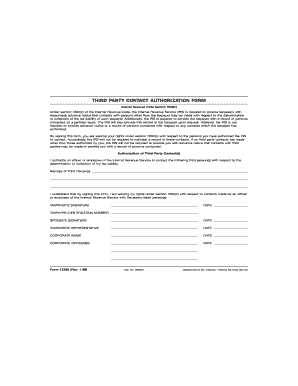
TLS have you transmitted all R text files for this cycle update Date I. R.S. SPECIFICATIONS TO BE REMOVED BEFORE PRINTING INSTRUCTIONS TO PRINTERS FORM 12180 PAGE 1 of 2 Page 2 is blank MARGINS TOP 13mm 1 2 CENTER SIDES. PAPER WHITE WRITING SUB. 20. FLAT SIZE 216mm 81 2 279mm 11 PERFORATE NONE Action Signature O. K. to print PRINTS HEAD TO HEAD INK BLACK DO NOT PRINT DO NOT PRINT DO NOT PRINT DO NOT PRINT Revised proofs requested THIRD PARTY CONTACT AUTHORIZATION FORM Internal Revenue Code Secti.
Open form follow the instructions
Easily sign the form with your finger
Send filled & signed form or save
How to fill out the IRS 12180 online
The IRS 12180 is a form for authorizing third-party contact regarding your tax liability. This guide provides clear and detailed instructions on how to complete the form online, ensuring you understand each section and field.
Follow the steps to complete the IRS 12180 form online.
- Click ‘Get Form’ button to obtain the form and open it in the editor.
- In the first section, provide the names of the third party or parties you authorize the IRS to contact. Ensure that the names are accurate and clearly stated.
- Next, review the authorization statement regarding your rights under section 7602(c). Acknowledge that by signing the form, you waive these rights concerning the listed third party contacts.
- In the appropriate fields, enter your name, taxpayer identification number, and date of signature. If applicable, also provide your spouse’s signature and date.
- If you have a representative, include their details in the designated area along with the corporate name if applicable.
- Once all sections are completed accurately, review the form thoroughly to ensure there are no errors. Save the changes to your document.
- Finally, download, print, or share the completed form as needed. Ensure you keep a copy for your records.
Complete your IRS documents online promptly and efficiently.
Experience a faster way to fill out and sign forms on the web. Access the most extensive library of templates available.
Related content
Apr 7, 2021 — Form 12180, Third-Party Contact Authorization Form, may be used to...
Generally, you will owe both income and self-employment taxes on any self-employment...
Jul 29, 2021 — In fiscal year 2020, our U.S. income before income taxes was $24.1...
Get answers to your most pressing questions about US Legal Forms API.
Who is the responsible party when applying for a trust in the EIN?
The responsible party when applying for an EIN for a trust is typically the trustee of the trust. This individual must provide their personal identification information, including their SSN or ITIN. Utilizing IRS 12180 can clarify the responsibilities involved and ensure the application is submitted correctly.
How do I fill out IRS Where's My Refund?
To use the IRS Where's My Refund tool, gather your SSN, filing status, and the exact refund amount you expect. Input this information into the online tool to track the status of your refund. Additionally, IRS 12180 can help you understand this process and provide helpful tips for resolving any issues.
How to fill out IRS EIN application?
To fill out the IRS EIN application, ensure that you have all necessary information beforehand. Begin with the legal name of your business, entity type, and your personal information as the responsible party. Following the guidelines in IRS 12180 can make this process simpler and more efficient.
Why did I get reference number 101 when applying for an EIN?
Receiving reference number 101 during your EIN application often indicates that additional information is needed or that there was an error in your submission. This number serves as a prompt for you to check your application details thoroughly. IRS 12180 provides resources to help you resolve such issues effectively.
How do I fill out a letter to the IRS?
When addressing a letter to the IRS, start with your name and address, followed by the IRS address. Clearly state the purpose of your letter, mention any relevant reference numbers, and include your EIN if applicable. Using IRS 12180, you can find specific guidelines on how to structure your correspondence to the agency.
What IRS form do I fill out?
To apply for an EIN, you will need to fill out Form SS-4, which is the Application for Employer Identification Number. You can submit it online, by mail, or via fax. Utilizing IRS 12180 can help guide you through this process, ensuring you complete the correct form.
What is the correct format of EIN?
The correct format for an EIN is a nine-digit number represented as XX-XXXXXXX. This formatting helps the IRS and other agencies recognize and process the number correctly. Remember, IRS 12180 documentation requires this specific format when filing your tax-related forms.
What information is needed for EIN?
When applying for an EIN, you will need basic information about your business structure, such as the legal name, address, and type of entity. You will also need the Social Security Number (SSN) or Individual Taxpayer Identification Number (ITIN) of the responsible party. Ensuring you have this information ready will streamline the application process through IRS 12180.
How do I get my IRS online?
You can access your IRS account online by visiting the IRS website and using their 'Get Your Tax Record' tool. Here, you will need to verify your identity with information including your Social Security number and tax filing status. Once verified, you can view your tax account information, payment history, and obtain transcripts. For a more seamless experience, consider using US Legal Forms for additional support.
How do I apply for the fresh start program?
Applying for the IRS Fresh Start Program involves completing specific forms, such as the Offer in Compromise or the Installment Agreement Request. You will need to provide detailed financial documentation that supports your application. The process can be complex, so accessing resources from platforms like US Legal Forms can simplify your application and increase your chances of success.
Use professional pre-built templates to fill in and sign documents online faster. Get access to thousands of forms.
If you believe that this page should be taken down, please follow our DMCA take down process here.