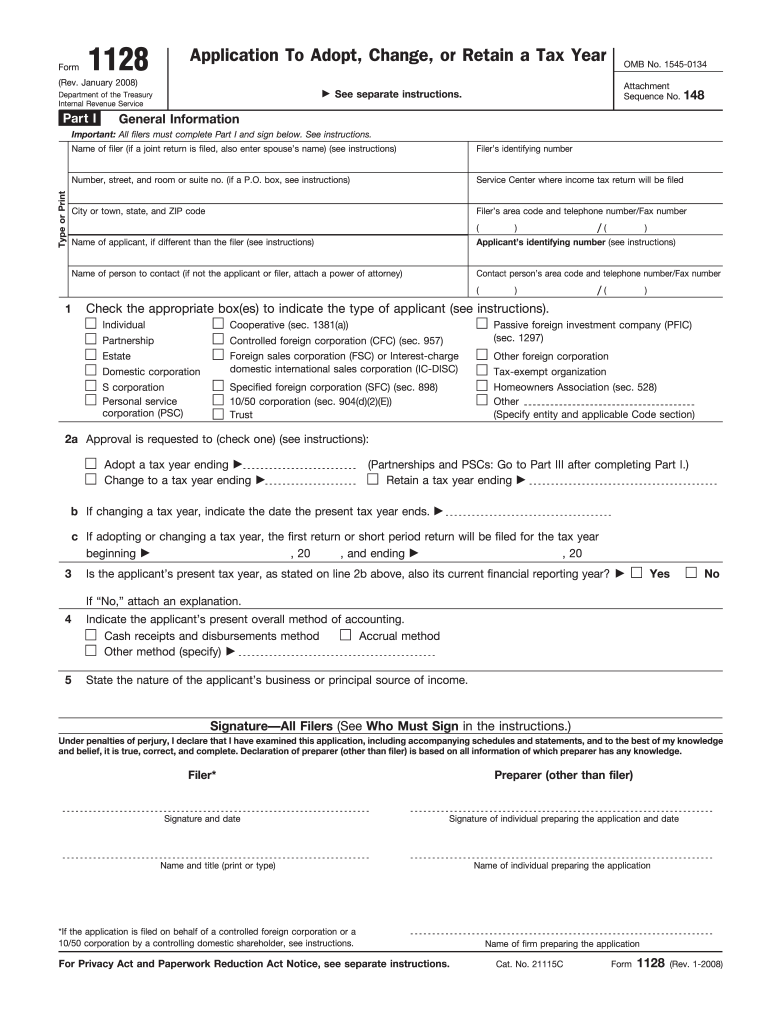
Uctions. Name of individual preparing the application Name of firm preparing the application Cat. No. 21115C Form 1128 (Rev. 1-2008) Form 1128 (Rev. 1-2008) Part II Page 2 Automatic Approval Request (see instructions) Identify the revenue procedure under which this automatic approval request is filed Section A Corporations (Other Than S Corporations or Personal Service Corporations) (Rev. Proc. 2006-45, or its successor) 1 Is the applicant a corporation (including a homeow.
Loading

Open form follow the instructions

Easily sign the form with your finger

Send filled & signed form or save
How to fill out the IRS 1128 online
Filling out the IRS Form 1128 is an essential step for individuals and organizations seeking approval to adopt, change, or retain a tax year. This guide provides a supportive walkthrough to ensure that users, regardless of their legal experience, can successfully complete the application process online.
Follow the steps to fill out the IRS Form 1128 online.
- Click ‘Get Form’ button to access the form and begin filling it out.
- In Part I, provide your name and identifying number. If submitting jointly, include your partner’s name.
- Fill in your address details, including number, street, and suite number or P.O. box if applicable.
- Indicate the Service Center where you will file your income tax return, along with your city, state, and ZIP code.
- Enter your area code and telephone or fax number.
- If applicable, provide the applicant's identifying number and the name of the contact person, if different from the applicant.
- Check the appropriate box to indicate the type of applicant you are, with options including individual, partnership, or corporation.
- In line 2a, indicate whether you are adopting, changing, or retaining a tax year and provide the ending date.
- If applicable, answer whether the applicant’s current tax year corresponds with their financial reporting year.
- Select the overall method of accounting being used by the applicant.
- Describe the nature of the applicant's business or primary income source.
- Review and sign the declaration statement, confirming the veracity of the information provided.
- Complete any additional sections relevant to your application type and proceed according to the instructions specific to your applicant category.
- At the end of the form, save the changes made, and download, print, or automatically share the completed document as required.
Take the first step towards compliance by completing your IRS 1128 application online today.
Experience a faster way to fill out and sign forms on the web. Access the most extensive library of templates available.
Related content
Jan 28, 2025 — File Form 1128 to request a change in tax year. Partnerships, S...
Parent restrictions. Collection is open for research; material must be requested at least...
Jan 31, 2012 — Form 1128, Application To Adopt, be imposed for negligence, substantial...
Get answers to your most pressing questions about US Legal Forms API.
Can I change the fiscal year of an estate?
You can change the fiscal year of an estate using the IRS 1128 form, provided you meet certain criteria. The process typically requires careful planning and documentation to align with IRS regulations. Using a service like UsLegalForms can guide you through the complexities of this change, ensuring compliance. Remember, the estate's new fiscal year must adhere to the timelines set by the IRS and respect the necessary guidelines.
What is the 3 year rule for the IRS?
The 3 year rule refers to the time frame within which the IRS expects taxpayers to maintain their chosen tax year. Under the IRS 1128 guidelines, if you change your fiscal year, you must wait three years before making another change. This rule ensures stability and predictability for both taxpayers and the IRS. Understanding this rule is essential for anyone considering a change in their tax reporting period.
What is the 1128 automatic approval?
The IRS 1128 automatic approval allows businesses to change their tax year without needing explicit consent from the IRS. By filing Form 1128, eligible tax entities can automatically adopt a new fiscal year. This option simplifies the process, making it more accessible for many businesses. When done correctly, automatic approval saves both time and resources.
What is the IRS revenue ruling for HOA?
The IRS revenue ruling for homeowners associations provides guidelines on tax treatment and compliance obligations for HOAs. This ruling outlines how to handle assessments, fees, and potential deductions available to associations. Familiarity with IRS 1128 promotes a clear understanding of these regulations and their implications.
What is a federal estate tax return closing letter?
A federal estate tax return closing letter is a notification from the IRS indicating that an estate tax return has been accepted and the estate's tax liability is settled. This letter provides finality for the estate and beneficiaries. If you're involved in estate planning, recognizing the importance of IRS 1128 will aid in ensuring all tax matters are addressed correctly.
What is the IRS ruling on HOA?
The IRS ruling on homeowners associations states that they are typically classified as non-profit organizations. This classification allows HOAs certain tax advantages, but they must still comply with relevant regulations. Knowledge of IRS 1128 helps HOA leaders make informed decisions about tax elections and compliance.
What are the tax rules for HOA?
Homeowners associations must adhere to specific tax rules, including treating dues and fees as taxable income. Furthermore, associations can deduct qualified expenses related to property management. Understanding the implications of IRS 1128 allows HOAs to navigate their tax reporting correctly and maintain compliance.
What triggers a short tax year?
A short tax year occurs when a business's tax period is less than 12 months. This can happen when a new entity is formed or existing businesses change their tax year. It's crucial to understand how IRS 1128 applies in these situations, as filing correctly can impact your tax liabilities.
What is a form 1128?
Form 1128 is an application to adopt, change, or retain a tax year for your business. It allows partnerships, corporations, and other entities to request a change in their tax period as determined by IRS regulations. Completing the form accurately ensures compliance and can help align your tax reporting with financial practices.
What is the difference between form 1128 and 8716?
Form 1128 is used to apply for a change in tax year while form 8716 allows a corporation to elect to adopt a tax year. Both forms relate to tax regulations, but they serve different purposes. If your business is navigating these forms, consulting the details associated with IRS 1128 may provide essential insights.
Use professional pre-built templates to fill in and sign documents online faster. Get access to thousands of forms.
If you believe that this page should be taken down, please follow our DMCA take down process here.
This form is available in several versions. Select the version you need from the drop-down list below.