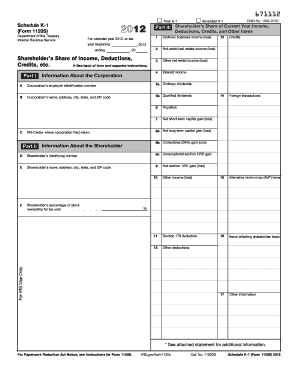
Get Irs 1120s - Schedule K-1 2012
How it works
-

Open form follow the instructions
-

Easily sign the form with your finger
-

Send filled & signed form or save
How to fill out the IRS 1120S - Schedule K-1 online
The IRS 1120S - Schedule K-1 is a critical document for reporting income, deductions, and credits for shareholders of S corporations. This guide will walk you through a clear and straightforward process to fill out this form online, ensuring you understand each section and field.
Follow the steps to complete the IRS 1120S - Schedule K-1 online
- Click ‘Get Form’ button to obtain the form and open it in the editor.
- Identify the first section, which includes the basic information about the S corporation. Fill in the name, address, and employer identification number (EIN) of the corporation.
- In the next section, report information specific to the shareholder. Enter the shareholder’s name, address, and their identifying number.
- Proceed to the income section, where you will report the shareholder’s share of income, deductions, and credits. Each line has specific instructions, so ensure the amounts correspond to the correct categories.
- Complete the final section by reviewing the information entered. Ensure accuracy in all fields to avoid errors during submission.
- After finishing, you can save changes, download the form for your records, print it, or share it as needed.
Start completing your IRS 1120S - Schedule K-1 online today!
Get form
Related links form
Schedule K-1 is generated by the entity that is required to report income, such as S Corporations or partnerships. These organizations calculate the earnings, losses, and credits that need to be distributed among partners or shareholders. Each generated K-1 aids individuals in reporting their portion on their personal tax returns accurately. If you need further assistance in filing, uslegalforms has resources to simplify the process for you.