Loading
Form preview
  • US Legal Forms
  • Other Templates
  • Tax Forms
  • Executive Department Treasury IRS Forms
  • Irs 1099-s 2013

Get Irs 1099-s 2013

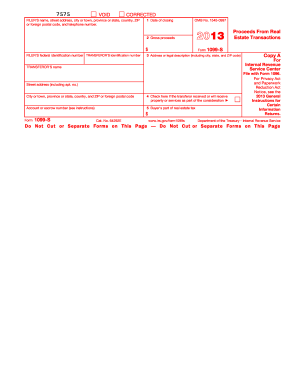
Sible for closing a real estate transaction must report the real estate proceeds to the Internal Revenue Service and must furnish this statement to you. To determine if you have to report the sale or exchange of your main home on your tax return, see the instructions for Schedule D (Form 1040). If the real estate was not your main home, report the transaction on Form 4797, Form 6252, and/or the Schedule D for the appropriate income tax form. If box 4 is checked and you received or will receive l.

This website is not affiliated with IRS

How it works

  1. Open form

    Open form follow the instructions

  2. Easily sign form

    Easily sign the form with your finger

  3. Share form

    Send filled & signed form or save

How to fill out the IRS 1099-S online

Filling out the IRS 1099-S form online can streamline the process of reporting real estate transactions. This guide provides clear instructions to help users navigate each section of the form and ensure accurate reporting.

Follow the steps to complete the IRS 1099-S form online.

  1. Click ‘Get Form’ button to obtain the IRS 1099-S form and open it in your preferred digital editor.
  2. Enter the filer's name, address, and telephone number in the designated fields. Ensure all information is accurately filled to avoid processing issues.
  3. In Box 1, input the date of closing the real estate transaction.
  4. In Box 2, report the gross proceeds from the transaction. This typically reflects the total sales price, including cash and any notes payable.
  5. Box 3 requires the address or legal description of the property being transferred. Be precise to ensure correct identification.
  6. If applicable, check Box 4 if the transferor received or will receive property or services as part of the transaction's consideration.
  7. In Box 5, provide the buyer's portion of real estate tax, if relevant to your transaction.
  8. Review all entries for accuracy and completeness before proceeding. Once verified, users can save changes, download, or print the form for their records.

Complete the IRS 1099-S form now to ensure accurate reporting of your real estate transactions online.

Get form

Experience a faster way to fill out and sign forms on the web. Access the most extensive library of templates available.

Related content

About Form 1099-S, Proceeds from Real Estate...
Jun 5, 2025 — About Form 1099-S, Proceeds from Real Estate Transactions. More In Forms...
Learn more
1099s - Finance & Accounting - University of...
A 1099 issuance will be sent to all independent contractors or individuals who receive...
Learn more
2017 Publication 523
Jan 30, 2018 — If you received Form 1099-S, Proceeds From Real Estate. Transactions, the...
Learn more

Related links form

IRS W-4 2010 IRS W-4 1999 IRS W-4 1990 IRS W-4(SP) 2018

Questions & Answers

Get answers to your most pressing questions about US Legal Forms API.

Contact support

Recording the sale of property begins with completing the IRS 1099-S if required. Then, utilize Schedule D and Form 8949 to compute any capital gains or losses from the sale. Keeping accurate records will simplify the reporting process and protect you during an audit.

When reporting the sale of a timeshare, begin by completing IRS Form 1099-S if it applies. List the details on Schedule D to report capital gains or losses. Proper documentation helps clarify your reporting and meets IRS standards.

To report the sale of a timeshare, you will need to fill out the IRS 1099-S if the transaction involves a significant amount. On your tax return, specify the sale on Schedule D and use Form 8949 to detail the transaction. Accurate reporting will help ensure you meet IRS requirements and avoid additional scrutiny.

In TurboTax, enter your IRS 1099-S information directly into the income section. Follow the prompts carefully to list the required details about the property sale. TurboTax will guide you through calculating any capital gains or losses associated with the transaction.

Typically, you do not report IRS 1099-SA distributions as income if they go towards qualified medical expenses. However, if you use them differently, you must include these distributions as taxable income on your return. Understand how the funds were used to avoid unexpected liabilities.

If your HSA contributions show as income, it may indicate that you made excess contributions that are subject to tax. Generally, contributions reported on the IRS 1099-SA are nontaxable if they are used for eligible medical expenses. Review your contributions and expenses to clarify any discrepancies.

Yes, income reported on an IRS 1099-S must be reported on your tax return. This form usually involves the sale of real estate, and failing to report this income could lead to penalties. It's crucial to ensure that you correctly include these figures to maintain compliance.

Yes, forms like the IRS 1099 generally report income you received during the tax year. This income could include earnings from freelance work, rental income, or interest on investments. Always verify the specific type of 1099, as this determines how it affects your overall tax obligations.

To report your IRS 1099-S income on your tax return, you will typically enter the information on Schedule D for capital gains. If you sold property, you also want to fill out Form 8949 to outline the details of the sale. Ensuring accurate reporting helps you avoid potential issues with the IRS.

The IRS 1099-SA form reports distributions from your Health Savings Account (HSA). These distributions are not treated as taxable income if used for qualified medical expenses. However, if you don't use the funds as intended, you may face taxes and penalties.

Get This Form Now!

Use professional pre-built templates to fill in and sign documents online faster. Get access to thousands of forms.
If you believe that this page should be taken down, please follow our DMCA take down processhere.
Get IRS 1099-S
  • Adoption
  • Bankruptcy
  • Contractors
  • Divorce
  • Home Sales
  • Employment
  • Identity Theft
  • Incorporation
  • Landlord Tenant
  • Living Trust
  • Name Change
  • Personal Planning
  • Small Business
  • Wills & Estates
  • Packages A-Z
  • Affidavits
  • Bankruptcy
  • Bill of Sale
  • Corporate - LLC
  • Divorce
  • Employment
  • Identity Theft
  • Internet Technology
  • Landlord Tenant
  • Living Wills
  • Name Change
  • Power of Attorney
  • Real Estate
  • Small Estates
  • Wills
  • All Forms
  • Forms A-Z
  • Other Templates
  • Legal Hub
  • About Us
  • Help Portal
  • Legal Resources
  • Blog
  • Affiliates
  • Contact Us
  • Delete My Account
  • Site Map
  • Industries
  • Forms in Spanish
  • Localized Forms
  • State-specific Forms
  • Forms Kit
  • Real Estate Handbook
  • All Guides
  • Notarize
  • Incorporation services
  • For Consumers
  • For Small Business
  • For Attorneys
  • USLegal
  • FormsPass
  • pdfFiller
  • signNow
  • altaFlow
  • DocHub
  • Instapage
Form Packages
  • Adoption
  • Bankruptcy
  • Contractors
  • Divorce
  • Home Sales
  • Employment
  • Identity Theft
  • Incorporation
  • Landlord Tenant
  • Living Trust
  • Name Change
  • Personal Planning
  • Small Business
  • Wills & Estates
  • Packages A-Z
Form Categories
  • Affidavits
  • Bankruptcy
  • Bill of Sale
  • Corporate - LLC
  • Divorce
  • Employment
  • Identity Theft
  • Internet Technology
  • Landlord Tenant
  • Living Wills
  • Name Change
  • Power of Attorney
  • Real Estate
  • Small Estates
  • Wills
  • All Forms
  • Forms A-Z
  • Other Templates
Customer Service
  • Legal Hub
  • About Us
  • Help Portal
  • Legal Resources
  • Blog
  • Affiliates
  • Contact Us
  • Delete My Account
  • Site Map
  • Industries
  • Forms in Spanish
  • Localized Forms
  • State-specific Forms
  • Forms Kit
Legal Guides
  • Real Estate Handbook
  • All Guides
Prepared for you
  • Notarize
  • Incorporation services
Our Customers
  • For Consumers
  • For Small Business
  • For Attorneys
Our Sites
  • USLegal
  • FormsPass
  • pdfFiller
  • signNow
  • altaFlow
  • DocHub
  • Instapage
Social Media
Call us now toll free:
+1 833 426 79 33
As seen in:
© Copyright 1999-2026 airSlate Legal Forms, Inc. 17 Station Street, Suite 303, Brookline, MA 02445
  • Your Privacy Choices
  • Terms of Service
  • Privacy Notice
  • Content Takedown Policy
  • Bug Bounty Program
IRS 1099-S
This form is available in several versions.
Select the version you need from the drop-down list below.
2021 IRS 1099-S
Select form
  • 2021 IRS 1099-S
  • 2020 IRS 1099-S
  • 2018 IRS 1099-S
  • 2017 IRS 1099-S
  • 2016 IRS 1099-S
  • 2015 IRS 1099-S
  • 2014 IRS 1099-S
  • 2013 IRS 1099-S
  • 2012 IRS 1099-S
  • 2011 IRS 1099-S
  • 2010 IRS 1099-S
  • 1099 Form 2019
Select form