Loading
Get Irs 1099-patr 2013
This website is not affiliated with IRS
How it works
-

Open form follow the instructions
-

Easily sign the form with your finger
-

Send filled & signed form or save
How to fill out the IRS 1099-PATR online
This guide provides a comprehensive overview of how to complete the IRS 1099-PATR form online. Whether you are a financial professional or an individual taxpayer, the instructions are designed to help you navigate each section effectively.
Follow the steps to fill out the IRS 1099-PATR correctly.
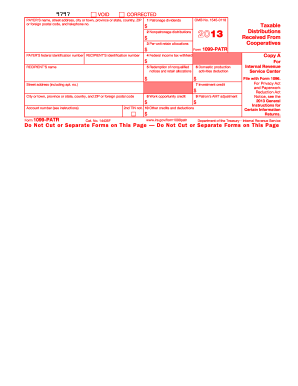
- Click ‘Get Form’ button to download the IRS 1099-PATR form and open it in your preferred online editor.
- Begin by providing the payer's information. This includes the payer's name, address, and telephone number in the designated fields to ensure accurate contact and identification details.
- Enter the payer's federal identification number and the recipient's identification number in the appropriate fields. Be mindful of accuracy to avoid potential issues.
- Fill out the income sections: Input amounts for patronage dividends in Box 1, nonpatronage distributions in Box 2, and per-unit retain allocations in Box 3. Make sure to only report applicable and taxable amounts.
- In Box 4, record any federal income tax withheld, if applicable. This is crucial for correct reporting and tax calculation.
- For any amounts received based on nonqualified allocations (Box 5), make sure to accurately document these figures as they may impact your tax return.
- Input any deductions in Box 6 related to domestic production activities, ensuring you meet the necessary criteria to claim these amounts.
- If there are investment credits reported in Box 7, be certain to use the relevant form to ascertain the credit amount properly.
- Continue with Box 8 to report any work opportunity credits received through the cooperative. Review the expiration of credits to ensure timely claims.
- Complete Box 9 for any alternative minimum tax adjustments, and Box 10 for other credits or deductions you may be eligible for. Ensure each entry is supported by the corresponding documentation.
- Once all fields are filled, save your changes. You may also download, print, or share the completed form as needed for your records or filing purposes.
Complete your IRS 1099-PATR form online today to ensure accurate tax reporting.
Get form
Experience a faster way to fill out and sign forms on the web. Access the most extensive library of templates available.
Related links form
You can enter your 1099-MISC information on your Form 1040, particularly under the section for miscellaneous income. This helps you accurately reflect all forms of income received, including non-employee compensation and other payments listed on your 1099-MISC. Clarity in these entries aids in a smooth tax filing experience.
Get This Form Now!
Use professional pre-built templates to fill in and sign documents online faster. Get access to thousands of forms.