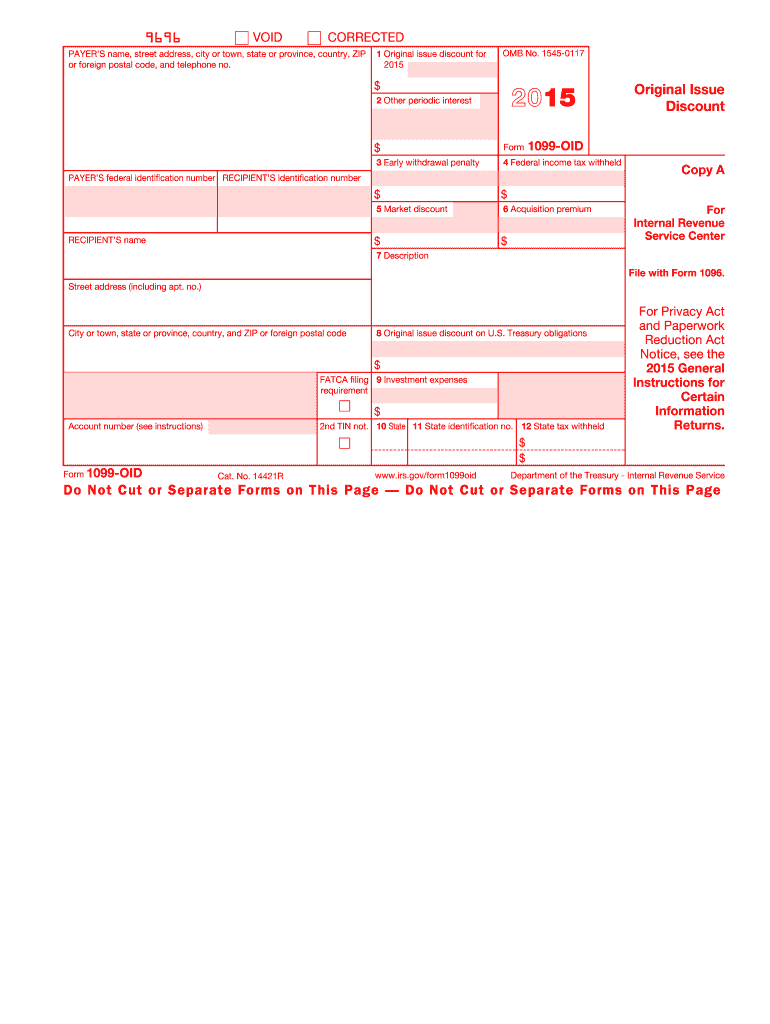
And ZIP or foreign postal code 8 Original issue discount on U.S. Treasury obligations $ FATCA filing 9 Investment expenses requirement $ Account number (see instructions) 10 State 11 State identification no. 12 State tax withheld $ $ Form 1099-OID www.irs.gov/form1099oid Department of the Treasury - Internal Revenue Service CORRECTED (if checked) PAYER S name, street address, city or town, state or province, country, ZIP or foreign postal code, and telephone no. 1 Original issue dis.
Loading

Open form follow the instructions

Easily sign the form with your finger

Send filled & signed form or save
How to fill out the IRS 1099-OID online
Filling out the IRS 1099-OID form online can seem daunting, but with clear guidance, you can accomplish it with confidence. This guide provides step-by-step instructions to help you accurately complete each section of the form.
Follow the steps to fill out the IRS 1099-OID online.
- Click 'Get Form' button to obtain the form and open it in the editor.
- Complete the payer’s information, which includes the name, address, and telephone number of the payer. Ensure that the federal identification number is accurately entered.
- Fill out the recipient’s information, including their name and identification number. Double-check for accuracy to avoid issues with filing.
- In Box 1, enter the original issue discount for the applicable tax year. This is the amount that must be reported as interest income.
- Box 2 requires you to input any other periodic interest earned during the year. Ensure that this amount is distinct from the original issue discount.
- If applicable, complete Box 3 with the early withdrawal penalty amount associated with any obligations.
- Provide information in Box 4 for any federal income tax withheld. This amount needs to be factored in when filing your income tax return.
- Box 5 is used for the market discount amount. If it applies, make sure to enter the correct figure.
- In Box 6, enter the acquisition premium. This is relevant for the calculation of interest income.
- For Box 7, include a description or identification number of the obligation, which may include details such as a CUSIP number.
- Box 8 relates to original issue discount on U.S. Treasury obligations. Ensure to input this amount accurately.
- Lastly, complete Boxes 9 to 12 which involve investment expenses and state tax withholding if applicable.
- After filling out all relevant fields, save your changes, download the completed form, and print or share it as necessary.
Begin your document preparation now by completing the IRS 1099-OID online.
Experience a faster way to fill out and sign forms on the web. Access the most extensive library of templates available.
Related content
Jun 6, 2025 — Information about Form 1099-OID, including recent updates, related forms...
Record owner's Identifying number. 1 Total original issue discount 2 Ratable monthly...
This type of interest should be shown in box 9 of Form 1099-INT. See Form 6251...
Get answers to your most pressing questions about US Legal Forms API.
What is the tax form for debt forgiveness?
The tax form commonly used for debt forgiveness is IRS Form 1099-C. This form reports canceled debts that are considered taxable income. If you receive a Form 1099-C, it's important to recognize that this income must be reported on your tax return, just as with amounts reported on IRS 1099-OID.
What is the IRS Form 1099-OID?
IRS Form 1099-OID is a tax form used to report Original Issue Discount on debt instruments. It provides details about the amount of discount income earned during the tax year, which you must report on your income tax return. Accurate completion of this form is crucial to ensure that you meet IRS regulations and avoid future issues related to your taxation.
What is the penalty for 1099-OID?
The penalty for failing to report income from a 1099-OID can vary depending on the situation, but it often includes fines and interest on unpaid taxes. The IRS takes unreported income seriously, and failing to comply can lead to audits and further legal complications. To avoid penalties, make sure to report all amounts accurately using IRS 1099-OID, and consider enlisting the help of tax professionals if needed.
What is an OID used for?
An OID is used primarily to report interest income from financial instruments sold at a discount, such as bonds and notes. This allows investors to recognize the income received over the life of the instrument, rather than just upon sale or maturity. Understanding OID is crucial for accurately reporting taxable income on IRS 1099-OID forms, ensuring compliance with tax regulations.
What is an example of an OID?
An example of an Original Issue Discount (OID) is a bond issued at a discount to its face value. For instance, if a bond has a face value of $1,000 but is sold at $950, the difference of $50 is considered the OID. When you receive the bond's interest payments, you'll need to report this OID income using IRS 1099-OID forms, making it vital to understand how it applies to your financial situation.
How do I treat a 1099-OID?
To treat a 1099-OID correctly, you must report the Original Issue Discount as interest income on your tax return. Be sure to gather all forms from your financial institutions, including IRS 1099-OID, to understand the income amounts. It's essential to report this income to avoid any discrepancies with the IRS, and consider consulting a tax professional if you have questions about your specific situation.
How do I report a 1099-OID on my tax return?
To report a 1099-OID on your tax return, you will use the information provided on the form to fill out either Form 1040 or 1040-SR. Make sure you enter the OID amounts correctly to avoid issues with the IRS. For assistance, platforms such as uslegalforms can provide guidance on completing your tax return correctly. This way, you can mitigate potential tax problems.
How do I report a 1099-OID on TurboTax?
To report a 1099-OID on TurboTax, you first input the information from your IRS 1099-OID. TurboTax offers a user-friendly interface that guides you through each step. By following its prompts, you can ensure that your OID is reported accurately. If you have any questions, consider additional resources like uslegalforms for support.
Can 1099s be filed electronically?
Yes, 1099s, including the IRS 1099-OID, can be filed electronically. The IRS encourages e-filing as it speeds up processing and minimizes errors. Use reliable services like uslegalforms to file your 1099 efficiently. This method not only simplifies the process but also provides instant confirmation.
How do I report OID on my tax return?
To report OID on your tax return, you will typically include it on your Form 1040 or 1040-SR. You'll need to reference the information from your IRS 1099-OID when filling out your tax forms. If you're unsure about the process, platforms like uslegalforms can guide you through the details. This ensures that you meet all IRS requirements accurately.
Use professional pre-built templates to fill in and sign documents online faster. Get access to thousands of forms.
If you believe that this page should be taken down, please follow our DMCA take down process here.
This form is available in several versions. Select the version you need from the drop-down list below.