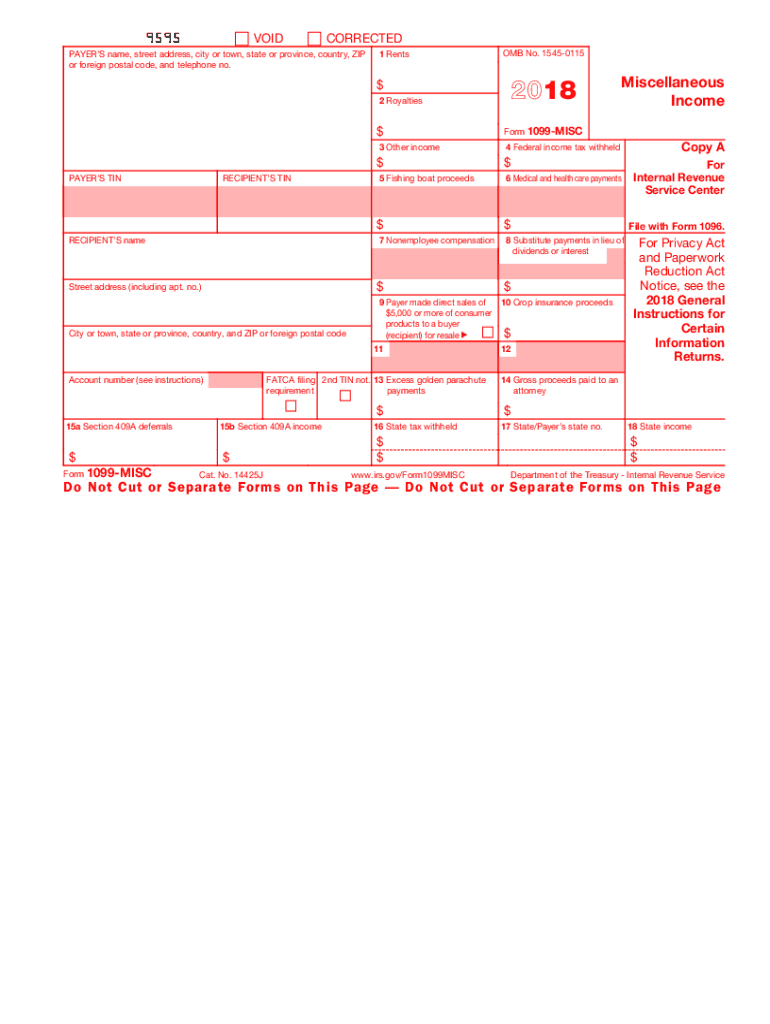
545-0115 2018 $ 2 Royalties Miscellaneous Income $ RECIPIENT S TIN 4 Federal income tax withheld $ PAYER S TIN Form 1099-MISC 3 Other income $ 5 Fishing boat proceeds 6 Medical and health care payments $ $ RECIPIENT S name 7 Nonemployee compensation 8 Substitute payments in lieu of dividends or interest Street address (including apt. no.) $ $ City or town, state or province, country, and ZIP or foreign postal code Copy 1 For State Tax Department 9 Payer made direct s.

Open form follow the instructions

Easily sign the form with your finger

Send filled & signed form or save
How to fill out the IRS 1099-MISC online
Filling out the IRS 1099-MISC form online can be a straightforward process if you follow the proper steps. This guide provides clear and concise instructions to help you accurately complete the form and ensure compliance with IRS requirements.
Follow the steps to accurately complete the IRS 1099-MISC online.
- Click ‘Get Form’ button to obtain the form and open it in the editor.
- Enter the payer’s name, street address, city or town, state, province, country, ZIP or foreign postal code, and telephone number in the designated fields.
- Provide the recipient's information, including their name, taxpayer identification number (TIN), and address.
- Fill in the appropriate boxes for the various types of income, such as rents (box 1), royalties (box 2), and other income (box 3), based on what you are reporting.
- If applicable, indicate any federal income tax withheld in box 4.
- Complete additional income fields such as fishing boat proceeds (box 5), medical and health care payments (box 6), nonemployee compensation (box 7), and others as necessary.
- If you made direct sales of consumer products or received crop insurance proceeds, provide the necessary details in boxes 9 and 10.
- If any state tax was withheld, enter the amounts in boxes 16, 17, and 18.
- Review the completed form carefully to ensure all information is accurate.
- Save your changes, download the form, and share or print it as needed.
Ensure your documents are complete and compliant by filling out the IRS 1099-MISC online today.
Experience a faster way to fill out and sign forms on the web. Access the most extensive library of templates available.
Related content
Feb 19, 2025 — File Form 1099-MISC for each person to whom you have paid during the...
To complete Form 1099-MISC, use: • The current General Instructions for Certain...
Mar 1, 2017 — Form 1099-K, Payment Card and. Third-Party Network Transactions;. Form...
Get answers to your most pressing questions about US Legal Forms API.
What box do I use for 1099-MISC?
The box you use on the IRS 1099-MISC depends on the type of income reported. For example, if you are reporting nonemployee compensation, you would use Box 7. Always verify which box applies to your situation by referring to IRS guidelines.
Where do I enter 1099-MISC on my tax return?
You should report the information from the IRS 1099-MISC on your tax return, usually on Schedule 1 or Schedule C, depending on your tax situation. Make sure to include the amounts listed, as failing to do so can trigger a notice from the IRS. Using a tax preparation service can also help guide you through this process.
Can you fill out 1099-MISC by hand?
Yes, you can fill out the IRS 1099-MISC by hand, but it's crucial to do so carefully. Ensure that all entries are clear and legible to avoid any confusion. However, using a software solution like UsLegalForms can streamline the process and reduce the chance of errors.
What boxes do I fill out for a 1099-MISC?
When completing the IRS 1099-MISC, you will need to fill out specific boxes that correspond to the payments made. Important boxes include Box 1 for rents, Box 3 for other income, and Box 7 for nonemployee compensation. It's essential to review IRS instructions to ensure you enter the right amounts in the correct boxes.
What are the box codes for 1099-MISC?
The IRS 1099-MISC includes several box codes, each representing different types of income. For example, Box 1 is for rents, Box 2 for royalties, and Box 3 for other income. Understanding these codes helps ensure you report your earnings correctly.
What is the proper way to fill out a 1099?
To fill out the IRS 1099-MISC, start by entering the payer's and recipient's information clearly. You need to include the correct amounts in the designated boxes based on the payment types. Finally, sign and date the form, if required, and make sure to provide copies to both the IRS and the recipient.
How will a 1099-MISC affect my tax return?
The IRS 1099-MISC plays a significant role in your tax return as it reports income you received that isn't directly related to wages. You must include the reported amounts on your tax return to ensure accurate reporting. Ignoring the information on the 1099-MISC may lead to discrepancies or issues with the IRS.
What is the filing requirement for 1099-MISC?
Filing a 1099-MISC is typically required by January 31st of the following year, with a copy sent to both the recipient and the IRS. Businesses that fail to file correctly may face penalties. Utilizing platforms like UsLegalForms can simplify the process and ensure that all aspects of compliance are covered.
What amount triggers a 1099-MISC?
The threshold for issuing a 1099-MISC is generally set at $600 for payments made in a calendar year. This applies to payments made for services, rents, prizes, or awards. Being aware of this threshold helps individuals and businesses comply with tax regulations while managing their finances efficiently.
Who should get a 1099-MISC form?
Anyone who pays an individual or unincorporated business $600 or more for services in a calendar year should issue a 1099-MISC. This includes businesses paying independent contractors, landlords receiving rent, and attorneys receiving legal fees. Knowing who qualifies can prevent misunderstandings regarding tax responsibilities.
Use professional pre-built templates to fill in and sign documents online faster. Get access to thousands of forms.
If you believe that this page should be taken down, please follow our DMCA take down process here.
This form is available in several versions. Select the version you need from the drop-down list below.