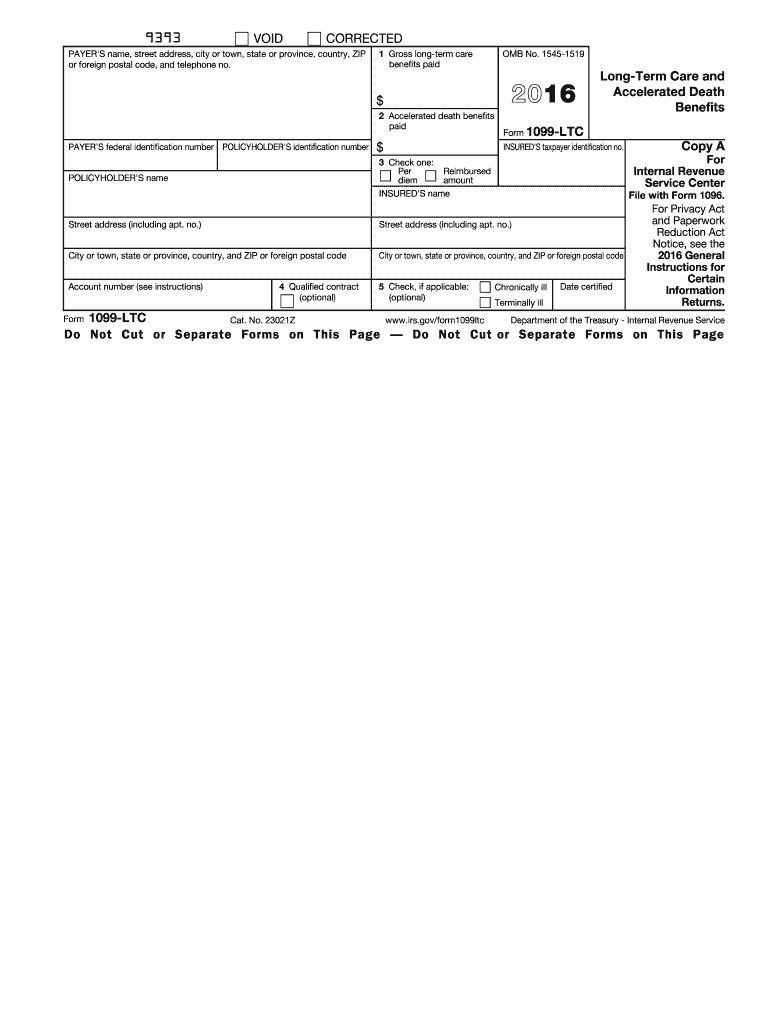
Death benefits paid PAYER S federal identification number POLICYHOLDER'S identification number $ POLICYHOLDER'S name 3 Check one: Per Reimbursed diem amount INSURED'S name OMB No. 1545-1519 2016 Long-Term Care and Accelerated Death Benefits Form 1099-LTC INSURED'S taxpayer identification no. For Internal Revenue Service Center File with Form 1096. Street address (including apt. no.) Street address (including apt. no.) City or town, state or province, country, and ZIP or foreign pos.

Open form follow the instructions

Easily sign the form with your finger

Send filled & signed form or save
How to fill out the IRS 1099-LTC online
Filling out the IRS 1099-LTC form is an essential step for those dealing with long-term care and accelerated death benefits. This guide offers clear and detailed instructions to assist you in completing your form accurately and efficiently online.
Follow the steps to complete your IRS 1099-LTC form online.
- Click ‘Get Form’ button to obtain and open the 1099-LTC form in your preferred online editor.
- Enter the payer's name, street address, city or town, state or province, country, ZIP or foreign postal code, and telephone number in the designated fields.
- In box 1, input the total gross long-term care benefits paid to you during the tax year.
- In box 2, indicate the total amount of accelerated death benefits that have been paid.
- Provide the payer's federal identification number and your own policyholder's identification number in the respective fields.
- Fill in the names of the insured and the policyholder, along with their addresses.
- Check box 3 to specify if the amounts in box 1 or 2 were paid on a per diem basis or as a reimbursement of actual expenses.
- If applicable, indicate in box 4 whether the benefits were from a qualified long-term care insurance contract.
- In box 5, check if the insured has been certified as chronically ill or terminally ill, and provide the date certified.
- Review all entries for accuracy before saving your changes and proceed to download, print, or share the completed form.
Complete your IRS 1099-LTC form online today for accurate and efficient tax reporting.
Experience a faster way to fill out and sign forms on the web. Access the most extensive library of templates available.
Related content
Jun 5, 2025 — File this form if you pay any long-term care benefits, including...
Oct 13, 2011 — Reimbursed basis means payments made for. 1099-LTC. actual expenses...
Jun 14, 2019 — We have audited the accompanying statements of net assets available for...
Get answers to your most pressing questions about US Legal Forms API.
Where do I enter a 1099s on my tax return?
When entering a 1099s on your tax return, you'll typically input the information in the income section. Make sure to categorize it based on the type of income being reported. Always double-check your entries to ensure compliance with IRS regulations, as this ensures your overall return is accurate.
Where do I report 1099-LTC on my tax return?
You should report the IRS 1099-LTC on your tax return in the section dealing with income. It is typically reported in the Medical Expenses portion of your return. By entering this information accurately, you can ensure that you benefit from any potential tax deductions associated with long-term care.
Where do I put 1099-LTC on TurboTax?
In TurboTax, you can find a designated area for entering your 1099-LTC under the 'Income' tab. Follow along with the prompts to add your long-term care benefits information. This setup allows you to efficiently track your income derived from the IRS 1099-LTC and ensures that you do not miss any potential deductions.
How do I enter 1099-K in TurboTax?
Entering a 1099-K in TurboTax is straightforward. Begin by selecting the income section, then choose 'Other Income.' You will find an option to enter your 1099-K information; just follow the prompts to ensure everything is input correctly. Using TurboTax helps simplify the process while keeping your income details organized.
How do I report a 1099-LTC on my tax return?
To report a 1099-LTC on your tax return, start by locating the income section of your return. You will enter any payments received for long-term care benefits under the appropriate categories. This accurate reporting of the IRS 1099-LTC details can be beneficial for any potential tax deductions that you may qualify for.
Where do I report 1099-K income on my tax return?
To report 1099-K income, you should include it on Schedule C if you are self-employed. Alternatively, you can report it on Line 1 of your Form 1040 if you are receiving this income as an individual. Always ensure that this income is properly reported when filing, as it may impact your overall tax responsibility.
Where to enter long-term care insurance on tax return?
You should report long-term care insurance on your tax return under the Medical Expenses section. The IRS 1099-LTC will guide you in determining any reimbursements or payments you need to account for. Properly entering this information can help you claim eligible deductions and improve your tax outcome.
Where do I enter 1099-LTC in Drake software?
To enter the IRS 1099-LTC in Drake software, you need to navigate to the income section. Here, you can find a specific field dedicated to long-term care benefits. Input the details from your 1099-LTC carefully, as this will ensure your tax return reflects accurate information and maximizes your benefits.
Are long-term care insurance payments taxable income?
Payments received from long-term care insurance may not be taxable if they are for qualifying expenses. However, any excess benefits over your qualified amounts could be subject to tax. To understand how IRS 1099-LTC applies to your specific situation, reviewing your claims and discussing them with a tax professional might be helpful.
How do I get a 1099 LTC?
You can obtain an IRS 1099-LTC from the insurance company that provided your long-term care benefits. They usually send it via mail at the beginning of the year. If you haven't received your 1099-LTC, reaching out to your insurance provider is the best course of action.
Use professional pre-built templates to fill in and sign documents online faster. Get access to thousands of forms.
If you believe that this page should be taken down, please follow our DMCA take down process here.
This form is available in several versions. Select the version you need from the drop-down list below.