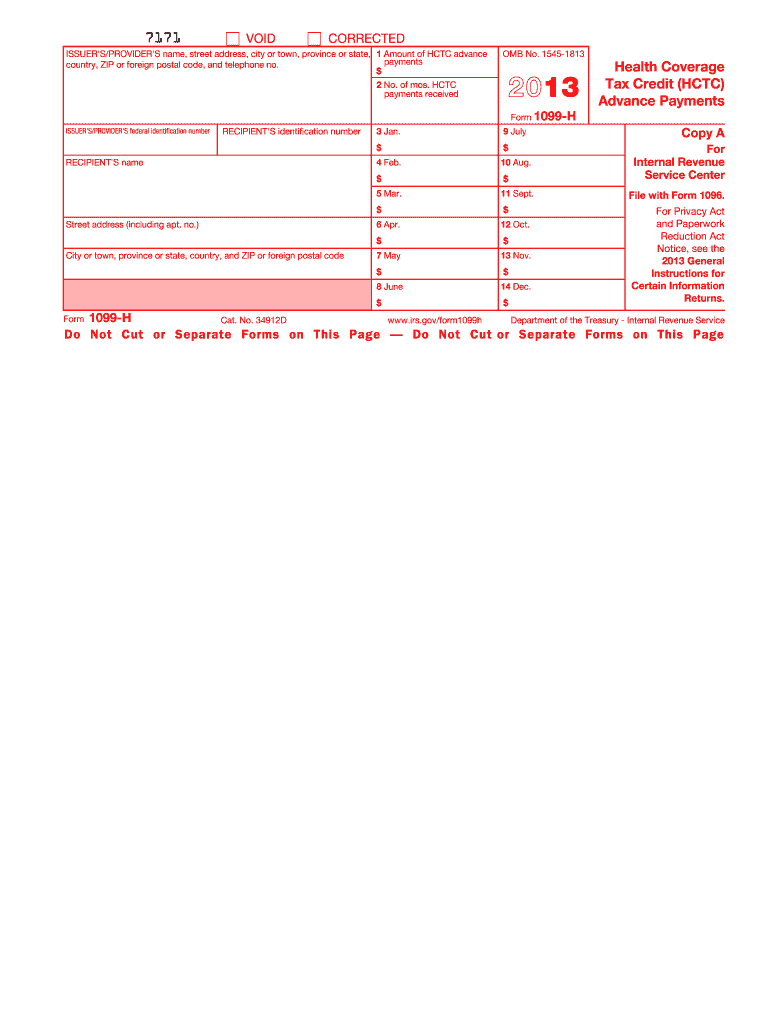
Ebsite. You can only file printed versions of Copy A that comply with Publication 1179. The HCTC Transaction Center, as an administrator of the Health Coverage Tax Credit (HCTC), will file the required returns and furnish statements to the recipients unless you elect to file and furnish information returns and statements on your own. Contact the HCTC Transaction Center for this purpose by calling 1-866-628-4282. 7171 VOID CORRECTED ISSUER'S/PROVIDER'S name, street address, city or town, pro.
Loading

Open form follow the instructions

Easily sign the form with your finger

Send filled & signed form or save
How to fill out the IRS 1099-H online
The IRS 1099-H form is used to report health coverage tax credit (HCTC) advance payments for health insurance costs. This guide provides clear and supportive steps for filling out the form online, making the process accessible for all users.
Follow the steps to fill out the form online.
- Click ‘Get Form’ button to obtain the form and open it in your preferred online editor.
- Enter the issuer's or provider's name, address, city, state, ZIP code, and telephone number in the appropriate fields.
- In Box 1, specify the total amount of HCTC advance payments you received during the tax year.
- In Box 2, indicate the total number of months you received HCTC payments.
- Complete Boxes 3 through 14 with the HCTC advance payment amounts for each month of the year, ensuring accuracy in your entries.
- Double-check all information for completion and correctness.
- Once you are satisfied with the filled form, you can save changes, download, print, or share the form as needed.
Complete your IRS 1099-H form online today to ensure accurate reporting.
Experience a faster way to fill out and sign forms on the web. Access the most extensive library of templates available.
Related content
Instructions for Recipient. This statement is provided to you because you received. Health...
Form 1095-B and 1099-HC are tax documents that show you had health insurance coverage...
Jan 2, 2018 — You or whoever enrolled you should have received Form(s) 1099-H showing...
Get answers to your most pressing questions about US Legal Forms API.
How do I get a copy of my 1099-HSA?
To get a copy of your IRS 1099-HSA, log into your online account at your HSA provider’s website. Most providers maintain an archive of tax documents for easy access. If needed, don’t hesitate to ask customer support for a copy if you encounter any issues.
What if I didn't get a 1099-SA for my HSA?
If you did not receive your IRS 1099-SA for your HSA, first check your online account with your HSA provider. They may have made the document available for download. If you still can’t find it, contact customer support immediately to request a reissue.
Do I need a 1099-HC form to file my taxes?
Yes, you may need a 1099-HC form to file your taxes, especially if you reside in Massachusetts. This document provides proof of health coverage, which can affect your tax filing status. Review your specific tax requirements or consult a tax professional to determine if you need it.
How can I get a copy of my 1099 online?
To get a copy of your IRS 1099 online, visit the website of the financial institution or service that issued it. Look for a section specifically for tax documents or forms; you can usually download or print your 1099 directly. If you're having difficulties, they often provide customer service options for further help.
How do I get my 1099-HSA online?
To get your IRS 1099-HSA online, log in to your HSA provider’s online portal. Most providers allow you to view and download tax forms directly from your account. If you have trouble finding it, consider reaching out to customer support for assistance.
Do you get a 1099 for an HSA account?
Yes, you will receive a 1099 for an HSA account, specifically the IRS 1099-SA. This form reports distributions made from your Health Savings Account. It is essential for accurately reporting these distributions when filing your taxes.
Can I get a copy of my 1099 online?
Yes, you can obtain a copy of your IRS 1099-H online. Many financial institutions and tax preparation services offer digital access to tax documents. Simply log into your account on their website and navigate to the tax documents section for easy access.
What is the code H on W2?
The code H on a W-2 refers to a specific benefit related to health care coverage or contributions made towards health insurance. This code points to employer-sponsored health insurance plans that meet certain federal criteria. A clear understanding of what the code H indicates can assist you in accurately reporting your income and corresponding health benefits. Platforms like USLegalForms can help clarify these codes for you.
What IRS code means refund sent?
The IRS doesn't explicitly use a single code to denote a refund sent, but various refund statuses can appear on different forms. Typically, once your taxes are processed, you'll receive confirmation regarding any refund, often communicated through tax software or mailed notices. Understanding your tax paperwork, including any IRS 1099-H forms, ensures clarity about your finances. For a thorough understanding of your tax situation, consider using USLegalForms.
What does IRS code H mean?
IRS code H signifies that the payments reported pertain specifically to health coverage under the Affordable Care Act. This designation helps taxpayers identify expenses related to qualifying health insurance and the related benefits or tax implications. Knowing what IRS code H means can simplify your understanding of your health coverage payments, especially when filling out your tax forms. You can find additional resources on platforms like USLegalForms.
Use professional pre-built templates to fill in and sign documents online faster. Get access to thousands of forms.
If you believe that this page should be taken down, please follow our DMCA take down process here.
This form is available in several versions. Select the version you need from the drop-down list below.