Loading
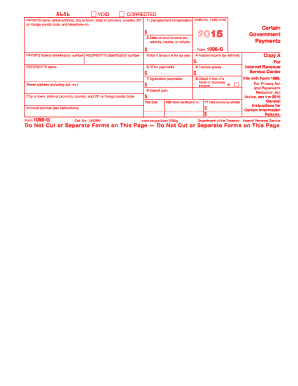
Get Irs 1099-g 2015
This website is not affiliated with IRS
How it works
-

Open form follow the instructions
-

Easily sign the form with your finger
-

Send filled & signed form or save
How to fill out the IRS 1099-G online
Filling out the IRS 1099-G form online is an essential step for reporting certain government payments, including unemployment compensation and state tax refunds. This guide will provide you with clear and concise instructions to help you complete the form correctly and efficiently.
Follow the steps to fill out the IRS 1099-G online.
- Click ‘Get Form’ button to obtain the form and open it in the editor.
- Enter the payer’s name, address, and telephone number in the appropriate fields. Make sure the information is accurate to avoid any issues.
- Fill in the payer's federal identification number and the recipient's identification number. This information is crucial for tax reporting.
- In box 1, report the total unemployment compensation you received. Combine amounts from all relevant forms to ensure proper reporting.
- Complete box 2 with the state or local income tax refunds, credits, or offsets you received. This is important for determining taxable income.
- Box 4 should include any federal income tax that was withheld. Ensure to report this amount as it may affect your overall tax liability.
- If you received reemployment trade adjustment assistance payments, fill in box 5 with the applicable amount.
- Complete boxes 6 and 7 with any taxable grants or agriculture payments you received, respectively.
- If applicable, check box 8 if box 2 is trade or business income. This indicates a specific tax situation.
- Enter the information regarding state income tax withheld in boxes 10a and 11. Be diligent to verify all state-related data.
- Before finalizing, review all entries for accuracy. Save your changes, and then download or print the completed form for your records. Be mindful of the deadline for submission.
Complete your IRS 1099-G form online today to ensure timely and accurate tax reporting.
Get form
Experience a faster way to fill out and sign forms on the web. Access the most extensive library of templates available.
To report a 1099-G to the IRS, include the income shown on the form when filing your tax return. This is typically done on your Form 1040 or 1040-SR. Ensure accuracy in reporting, as the IRS uses this information to verify your reported income.
Get This Form Now!
Use professional pre-built templates to fill in and sign documents online faster. Get access to thousands of forms.