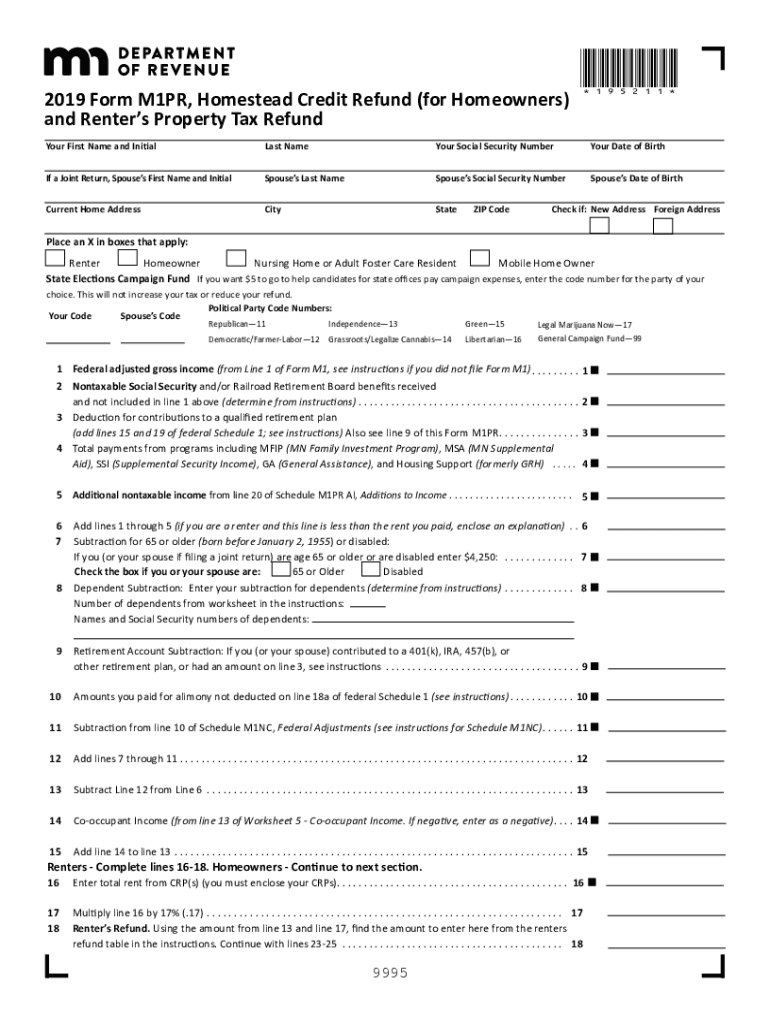
Ubtraction from line 10 of Schedule M1NC, Federal Adjustments (see instructions for Schedule M1NC) . . . . . 11 12 Add lines 7 through 11 . . . . . . . . . . . . . . . . . . . . . . . . . . . . . . . . . . . . . . . . . . . . . . . . . . . . . . . . . . . . . . . . . . . . . . . . 12 13 Subtract Line 12 from Line 6 . . . . . . . . . . . . . . . . . . . . . . . . . . . . . . . . .
Loading

Open form follow the instructions

Easily sign the form with your finger

Send filled & signed form or save
How to fill out the MN DoR M1PR online
This guide provides a user-friendly walkthrough for completing the Minnesota Department of Revenue's M1PR form, which is necessary for applying for the homestead credit refund. Follow these instructions to complete the form accurately and efficiently.
Follow the steps to complete the MN DoR M1PR form online.
- Press the ‘Get Form’ button to access the M1PR form and open it in your preferred document editor.
- Begin by filling out your personal information, including your first name, middle initial, last name, social security number, and date of birth. If applicable, include your spouse’s information as well.
- Input your current home address, including city, state, and ZIP code. Be sure to check any relevant boxes, such as for a new or foreign address.
- Indicate your status by marking the appropriate boxes for either renter, homeowner, nursing home/adult foster care resident, or mobile home owner.
- If you want to contribute to the state elections campaign fund, enter the code for your chosen political party.
- Fill in your federal adjusted gross income from the appropriate line of Form M1. Make sure to reference the instructions if you did not file Form M1.
- Complete any applicable lines for nontaxable Social Security benefits and contributions to retirement plans as specified.
- Continue by inputting deductions, such as those for dependents, alimony paid, and other allowable subtractions as directed in the form.
- For renters, complete the relevant calculations for total rent, refunds, and any additional requirements.
- If you are a homeowner, ensure you fill out the property tax details including the property ID number and county information.
- Total your applicable refunds and deductions as shown on the form, including any contributions to the Nongame Wildlife Fund.
- Lastly, sign the form and provide your daytime phone number. If you had a paid preparer assist you, make sure they sign as well.
- After reviewing all entered information for accuracy, save the changes, download, print, or share the completed form as needed.
Complete your MN DoR M1PR form online today for a streamlined process.
Experience a faster way to fill out and sign forms on the web. Access the most extensive library of templates available.
Related content
Results 1 - 10 of 200 - Description: The Minnesota Department of Revenue has certified the...
Minnesota Department of Revenue 2018 Forms and Instructions M1PR Homestead Credit Refund...
Results 1 - 10 of 200 — Property Tax Refund | Minnesota Department of Revenue ... Claim...
Get answers to your most pressing questions about US Legal Forms API.
What is the income limit for M1PR in Minnesota?
The income limit for the MN DoR M1PR varies based on your filing status and household size. Generally, the limit is adjusted annually, so it’s important to check the most current figures. If your income falls below this threshold, you may qualify for a refund. To ensure you have the latest information and assistance, consider utilizing platforms like US Legal Forms.
Can I file my M1PR Minnesota property tax refund through TurboTax?
Yes, you can file your MN DoR M1PR using TurboTax. The platform offers user-friendly guidance through the filing process, ensuring you complete the form accurately. Additionally, TurboTax helps you maximize your refund by considering all eligible deductions. If you prefer a more tailored approach, you might also explore options on platforms like US Legal Forms.
Do you need to file M1PR?
Filing the MN DoR M1PR is essential for qualifying for a property tax refund in Minnesota. If you meet specific criteria regarding your income and property ownership, you should file this form to receive your refund. Not filing could mean missing out on financial support. Therefore, it's wise to assess your eligibility and file the M1PR if applicable.
What is Minnesota form M1PR?
Minnesota form M1PR is a property tax refund application that allows residents to claim refunds based on their property tax payments. This form is essential for those who qualify under specific income limits. Familiarizing yourself with the MN DoR M1PR can help ensure that you accurately file for your refund. Accessing the form and understanding its requirements is the first step toward maximizing your benefits.
What is the income limit for the M1PR?
The income limit for the MN DoR M1PR is updated annually, so it is wise to check the current limits. Generally, it encompasses all sources of income, including wages and benefits. Meeting the income threshold is crucial for qualifying for a property tax refund. You can find the most recent limits on the Minnesota Department of Revenue's website.
Where do I get my M1PR form online?
You can obtain your MN DoR M1PR form online by visiting the Minnesota Department of Revenue's official website. They provide downloadable versions of the form for your convenience. Additionally, platforms like uslegalforms offer valuable resources and guidance to simplify the process of obtaining and filing your M1PR form. Accessing the form online makes it easy to start your application.
What is the difference between M1 and M1PR?
The M1 form is a general income tax return, while the M1PR is specifically for property tax refunds in Minnesota. When filing your taxes, it is important to recognize which form you need. Using the MN DoR M1PR allows you to claim a refund based on property taxes rather than income taxes. Understanding this difference helps streamline your tax filing process.
What info is needed for the MN Renters' refund?
To apply for the MN Renters' refund, you will need specific information about your rental payments and income. Gather your rental agreements, proof of residency, and documentation of your total household income. This information is crucial for accurately completing the MN DoR M1PR form and ensuring you receive your refund.
What happens after I submit the M1PR form?
After you submit the MN DoR M1PR form, your application will be processed by the Minnesota Department of Revenue. You can expect to receive a confirmation of your submission, followed by a review of your application. If additional information is needed, they will contact you directly, so stay alert to any correspondence.
What supporting documents do I need for a SARS refund?
For a SARS refund, you will require specific supporting documents to validate your claim. This typically includes proof of income, tax returns, and documentation related to your residency. Ensure that you have accurate records ready, as they will help streamline the process of your MN DoR M1PR filing.
Use professional pre-built templates to fill in and sign documents online faster. Get access to thousands of forms.
If you believe that this page should be taken down, please follow our DMCA take down process here.
This form is available in several versions. Select the version you need from the drop-down list below.