E: Withholding Agent TIN: Schedule of Payees (Enter business or individual name, not both.) Business name PRINT CLEARLY m FEIN m CA Corp no. m CA SOS file no. First name Initial Last name SSN or ITIN Address (apt./ste., room, PO box, or PMB no.) City (If you have a foreign address, see instructions.) Total income State m If backup withholding, check the box. . Business name ZIP code Amount of tax withheld .
Loading

Open form follow the instructions

Easily sign the form with your finger

Send filled & signed form or save
How to fill out the CA FTB 592 online
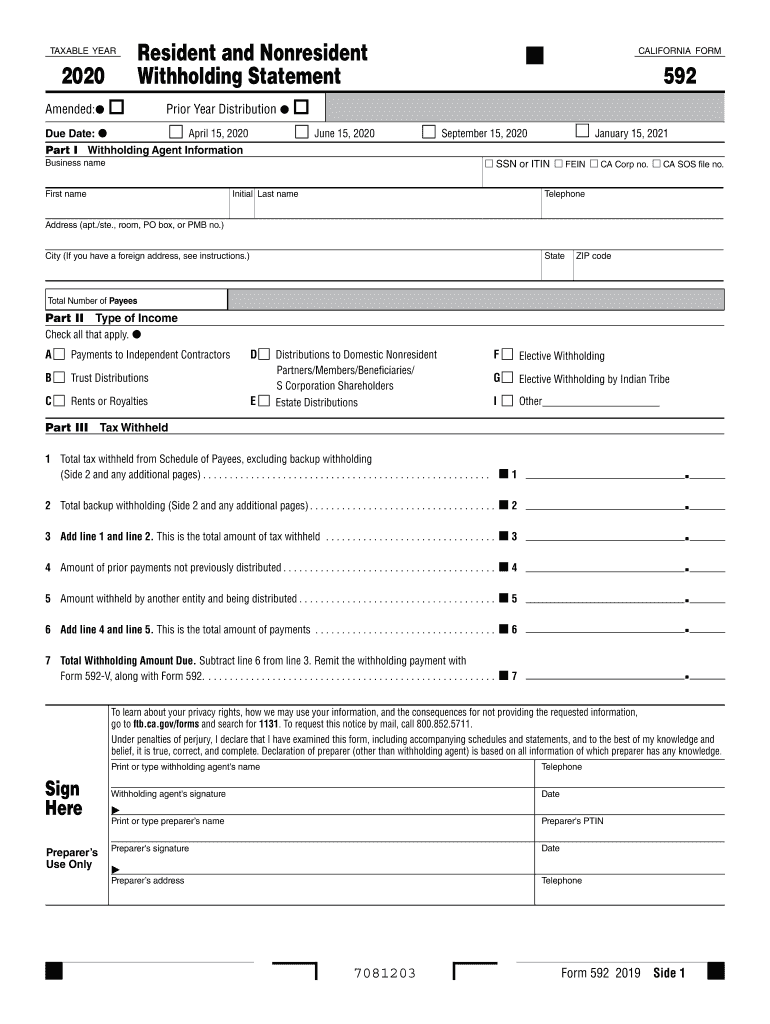
The CA FTB 592 is an essential form for reporting tax withheld from various payments made to individuals or entities. This guide will provide clear, step-by-step instructions to help users accurately fill out the form online.
Follow the steps to complete your CA FTB 592 online.
- Press the ‘Get Form’ button to access the CA FTB 592 online form and open it in the editor.
- In Part I, enter the withholding agent information. Provide your business name, first name, last name, telephone number, and address including city, state, and ZIP code. Be sure to check the applicable boxes for SSN, ITIN, FEIN, CA Corp no., or CA SOS file no.
- Part II requires you to select the type of income by checking all that apply, such as payments to independent contractors, trust distributions, rentals, and others.
- In Part III, list partners, members, beneficiaries, or S corporation shareholders if applicable. Ensure to include appropriate details for each individual or business.
- Complete the tax withheld section by entering the total tax withheld from the Schedule of Payees, the total backup withholding, and any prior payments not previously distributed. Be attentive in summing these amounts.
- Calculate the total withholding amount due by subtracting the total payments from the total tax withheld. This amount will need to be submitted with Form 592-V.
- Review all information entered for accuracy. Save your changes, and download the form as needed. You can also print or share the completed form as required.
Begin completing your CA FTB 592 online today and ensure all necessary information is filed correctly.
Experience a faster way to fill out and sign forms on the web. Access the most extensive library of templates available.
Related content
Tax withheld on California source payments is reported to the Franchise Tax Board (FTB)...
California Nonresident WithholdingNon-wage payments to nonresidents of ... The amount of...
CA 95051 ISSUED JUNE 1982 INTRODUCTION This databook contains data ..... 14 14 540 551 563...
Get answers to your most pressing questions about US Legal Forms API.
Who needs to file form 592?
Any entity making payments to nonresidents, such as individuals, partnerships, and corporations, needs to file Form 592. This includes payments for services, rents, and other forms of income that require withholding. Ensuring you file CA FTB 592 correctly helps you meet your tax obligations and avoids potential penalties.
When to use 592 vs 592 PTE?
You should use Form 592 when reporting withholding for nonresident individuals or entities, while Form 592 PTE is specifically for partnerships and LLCs. The choice between the two forms depends on the type of entity making the payment and the nature of the income. Understanding when to use CA FTB 592 or 592 PTE is essential for compliance and accurate reporting.
What is Form 592 CA FTB?
Form 592 CA FTB is the official document used to report and remit California withholding tax for payments made to nonresidents. It is essential for ensuring compliance with California tax laws and helps you accurately report any withholding amounts. Utilizing CA FTB 592 effectively can safeguard you from future tax issues.
What is the withholding rate for Form 592?
The withholding rate for Form 592 generally stands at 7% of the payment amount made to nonresidents. This rate applies to various types of income, including rents, royalties, and compensation. Being aware of the withholding rate for CA FTB 592 helps you calculate the correct amount to withhold and remit to the state.
When to file CA form 592?
You should file CA Form 592 when you make payments to nonresidents that require tax withholding. Typically, the form is due at the same time as your tax return, and you must submit it to the California Franchise Tax Board. Filing CA FTB 592 accurately and on time helps you avoid penalties and ensures you meet your tax obligations.
What is CA form 592-F?
CA Form 592-F is a crucial document that reports the California withholding tax for partnership, limited liability company, and other entities. It is specifically designed for use by pass-through entities to report the withholding amounts for their partners or members. Understanding CA form 592-F helps you navigate tax requirements effectively and ensures compliance with CA FTB 592.
Can Form 592 be filed electronically?
Yes, Form 592 can be filed electronically through various platforms, including the California Franchise Tax Board's online services. Electronic filing streamlines the process and ensures faster processing times. Utilizing solutions like uslegalforms can simplify the submission process, making it easier for you to stay compliant with your tax responsibilities.
How do I fill out my withholding form?
Filling out your withholding form involves providing personal information, including your name, address, and Social Security number. You will also need to indicate the number of allowances you wish to claim based on your circumstances. Utilizing the CA FTB 592 form can streamline this process, ensuring you meet all requirements and make accurate claims.
How do I change my tax withholding from 0 to 1?
To change your tax withholding from 0 to 1, you need to complete a new withholding form based on the CA FTB 592 guidelines. This involves filling out the relevant sections of the form to reflect your new allowance claim. Once completed, submit the updated form to your employer to adjust your payroll deductions accordingly.
What should I put for California tax withholding?
When determining your California tax withholding, you should consider your total income, filing status, and the number of allowances you wish to claim. For many individuals, using the CA FTB 592 form will help you calculate the appropriate amount to withhold. It's essential to ensure that you are not withholding too much or too little, as this can affect your tax refund or liability.
Use professional pre-built templates to fill in and sign documents online faster. Get access to thousands of forms.
If you believe that this page should be taken down, please follow our DMCA take down process here.
This form is available in several versions. Select the version you need from the drop-down list below.