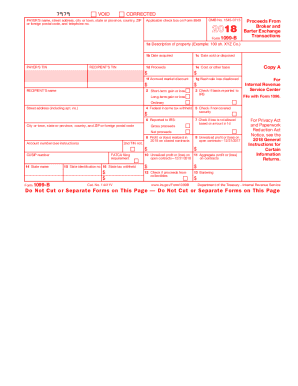
Artment of the Treasury - Internal Revenue Service Do Not Cut or Separate Forms on This Page Do Not Cut or Separate Forms on This Page VOID CORRECTED PAYER'S name, street address, city or town, state or province, country, ZIP or foreign postal code, and telephone no. Applicable check box on Form 8949 OMB No. 1545-0715 2018 Form 1099-B Proceeds From Broker and Barter Exchange Transactions 1a Description of property (Example: 100 sh. XYZ Co.) PAYER'S TIN RECIPIENT'S TIN 1b Date ac.
Open form follow the instructions
Easily sign the form with your finger
Send filled & signed form or save
How to fill out the IRS 1099-B online
Filling out Form 1099-B is an essential step for reporting proceeds from broker and barter exchange transactions. This guide offers a comprehensive walkthrough to help users complete the form accurately and efficiently online.
Follow the steps to fill out your IRS 1099-B form with ease.
- Click 'Get Form' button to obtain the form and open it in the editor.
- Enter the payer's name and address, including street, city, state, and zip code. Make sure to provide a valid telephone number for contact purposes.
- Input the payer’s Tax Identification Number (TIN) along with the recipient's TIN to ensure proper identification for tax purposes.
- In section 1a, describe the property involved in the transaction, using clear and concise language (for example, '100 sh. XYZ Co.').
- Fill in the date the property was acquired in box 1b, and the date it was sold or disposed of in box 1c.
- Report the proceeds from the sale in box 1d. Ensure this reflects cash received, net of commissions or transfer taxes.
- Enter the cost or other basis of the property sold in box 1e. This amount should reflect your investment in the property.
- Provide any accrued market discount in box 1f and detail wash sale losses disallowed in box 1g, if applicable.
- Indicate short-term or long-term gain or loss in box 2, as appropriate.
- Check box 3 if the basis has been reported to the IRS, and if applicable, denote any federal income tax withheld in box 4.
- Complete boxes 5 through 11 as required, depending on the type of transaction and whether it pertains to collectibles or bartering.
- After entering all required information, review the form for accuracy. Once confirmed, save your changes, download, print, or otherwise share the form as needed.
Start your IRS 1099-B form online today to ensure proper reporting of your financial transactions.
Experience a faster way to fill out and sign forms on the web. Access the most extensive library of templates available.
Related content
May 13, 2025 — A broker or barter exchange must file this form for each person: For...
Most 1099 forms a farm business will file should be sent to the recipient by January 31...
This is important tax information and is being furnished to the IRS. If you are required...
Get answers to your most pressing questions about US Legal Forms API.
How do I report a 1099-B on my tax return?
To report your IRS 1099-B on your tax return, gather your form and locate the area for reporting capital gains and losses, typically found on Form 8949 or Schedule D. Enter the information regarding each transaction as required. Be sure to review all entries carefully to avoid errors. If you need assistance, US Legal Forms can streamline the documentation process for you.
How to get a copy of 1099-B?
To obtain a copy of your IRS 1099-B, you should contact the financial institution or brokerage that issued it. They are required to provide you with a copy, usually available either electronically or by mail. If you do not receive it, you may need to request it directly from their customer service. Additionally, using US Legal Forms can help you generate a new 1099-B if needed.
Where do I report 1099-B on TurboTax?
You can report your IRS 1099-B in the ‘Income’ section of TurboTax, specifically under ‘Investment Income.’ Follow the prompts to add your 1099-B details so that TurboTax can accurately capture your capital gains and losses. This process helps you file your taxes correctly and on time. If you're unsure, US Legal Forms provides user-friendly templates to assist you.
How to report 1099-B on TurboTax?
To report your IRS 1099-B on TurboTax, start by entering the details from your 1099-B into the ‘Investments’ section. TurboTax offers prompts that guide you through the process to ensure accuracy. Make sure you verify the information on the form aligns with what is on your 1099-B. For seamless documentation, consider using US Legal Forms to prepare your 1099-B before reporting.
Where do I report Airbnb income on TurboTax?
To report your Airbnb income on TurboTax, you typically include it as self-employment income on Schedule C. While Airbnb provides a summary of your income, you may also need to refer to your IRS 1099-B if you have financial transactions related to property sales or exchanges. Make sure to report all sources of income accurately to avoid issues. For additional guidance, US Legal Forms can provide the necessary resources.
Do I have to report 1099-B on my taxes?
Yes, you are required to report IRS 1099-B on your tax return if you have any taxable income from the sale of stocks, bonds, or other securities. Reporting this information ensures accurate calculation of your capital gains or losses, which directly affects your tax liability. Keep in mind that using tools like US Legal Forms can simplify this reporting process for you.
Why do I have to send 1099-B to IRS?
You must send the IRS your 1099-B because it documents your capital gains and losses from securities transactions. The IRS requires this information to ensure accurate tax reporting and compliance. By sending your 1099-B, you help maintain transparency in your financial activities, which benefits you in the long run. Remember, US Legal Forms can assist you in generating your 1099-B correctly.
Why won't TurboTax import my 1099-B?
If TurboTax is not importing your IRS 1099-B, it may be due to issues with the file format or software compatibility. Ensure that your 1099-B is complete and in a format recognized by TurboTax. You can also try manually entering your 1099-B information into TurboTax, which guarantees that your data is recorded accurately. If problems persist, consider using US Legal Forms to generate a compliant 1099-B for better integration.
Where can I find my 1099 form online?
You can usually find your IRS 1099-B form on your brokerage's website or your financial institution's online portal. Many companies offer digital copies of tax documents for security and convenience. If you cannot locate it online, consider reaching out to customer support for guidance. For personalized help, uslegalforms provides resources to assist you in finding and understanding your 1099-B document online.
How do I get my 1099-B?
You typically receive your IRS 1099-B form from your brokerage or financial institution after the end of the tax year. It is essential to check your email or physical mail for this document, which outlines your transactions. If you have not received it, you can contact your broker or financial institution for assistance. Online platforms, like uslegalforms, can help you understand the process of obtaining and interpreting your 1099-B.
Use professional pre-built templates to fill in and sign documents online faster. Get access to thousands of forms.
If you believe that this page should be taken down, please follow our DMCA take down process here.
This form is available in several versions. Select the version you need from the drop-down list below.