Loading
Get Irs 1098-t 2009
This website is not affiliated with IRS
How it works
-

Open form follow the instructions
-

Easily sign the form with your finger
-

Send filled & signed form or save
How to fill out the IRS 1098-T online
Filling out the IRS 1098-T form online can seem daunting, but this guide will walk you through each section step by step, ensuring you can accurately complete your tuition statement. Designed for individuals with varying degrees of experience, this comprehensive guide provides clear instructions to assist you in the process.
Follow the steps to complete the IRS 1098-T online
- Click ‘Get Form’ button to obtain the form and open it in your chosen online document editor.
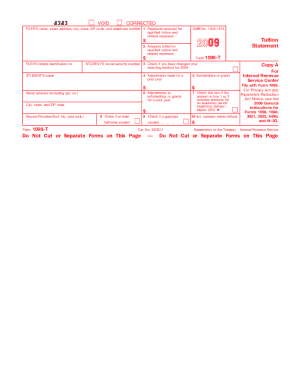
- Enter the name of the educational institution in the designated 'FILER’S name' field, along with their street address, city, state, ZIP code, and telephone number.
- In the 'Payments received for qualified tuition and related expenses' section, enter the total payments received from any source for qualified tuition and related expenses.
- In the 'Amounts billed for qualified tuition and related expenses' section, record the total amounts billed for qualified tuition and related expenses.
- Check the box in 'Check if you have changed your reporting method for 2009' if applicable.
- In the 'Adjustments made for a prior year' section, report any adjustments for qualified tuition and related expenses that were reported in a prior year.
- Enter the total scholarships or grants received in the 'Scholarships or grants' section.
- Indicate any adjustments to scholarships or grants for a prior year, if necessary.
- Check the box if the amounts in box 1 or 2 include amounts for an academic period beginning January-March 2010.
- Identify if the student is carrying at least a half-time workload and check the corresponding box.
- Check if the student is considered a graduate student by marking the appropriate box.
- In the 'Ins. contract reimb./refund' section, include any amount of reimbursements or refunds of qualified tuition and related expenses.
- Once all sections have been filled out accurately, save your changes, and you may download, print, or share the completed form as needed.
Complete your IRS 1098-T form online today to ensure you are prepared for tax season.
Get form
Experience a faster way to fill out and sign forms on the web. Access the most extensive library of templates available.
Related links form
To obtain your IRS 1098-T form, you should contact your school or educational institution directly. They typically provide the form electronically or by mail. The IRS does not issue this form directly to students; instead, the institution is responsible for its distribution.
Get This Form Now!
Use professional pre-built templates to fill in and sign documents online faster. Get access to thousands of forms.