Loading
Get Irs 1098-t 2016
This website is not affiliated with IRS
How it works
-

Open form follow the instructions
-

Easily sign the form with your finger
-

Send filled & signed form or save
How to fill out the IRS 1098-T online
The IRS 1098-T form is essential for reporting qualified tuition and related expenses for students. This guide will provide you with a clear understanding of how to accurately fill out this form online.
Follow the steps to complete the IRS 1098-T form online.
- Click ‘Get Form’ button to obtain the form and open it in the editor.
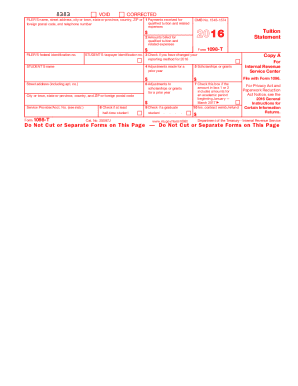
- Enter the filer's name, address, federal identification number, and telephone number in the appropriate fields. Ensure that this information is correct to avoid issues.
- In the student’s section, provide the student's name and taxpayer identification number. This typically includes a Social Security Number or an Individual Taxpayer Identification Number.
- Complete Box 1 by entering the total payments received for qualified tuition and related expenses. Deduct any reimbursements or refunds applicable for the reporting year.
- Check Box 3 if your educational institution has altered its reporting method for the year. This indicates to the IRS any changes in reporting tuition payments versus amounts billed.
- In Box 4, report any adjustments made for prior year tuition and related expenses. This information is necessary if you claim an education credit.
- Fill in Box 5 with the total amount of scholarships or grants awarded to the student during the year. This impacts the calculation of any education credits.
- If applicable, note any adjustments made to scholarships or grants from the previous year in Box 6.
- Indicate whether the amount in Box 1 or 2 includes amounts for an academic period starting January to March of the following year by checking Box 7.
- Confirm if the student is enrolled at least half-time by checking Box 8, and indicate if the student is a graduate student in Box 9.
- Input any amounts for insurance contract reimbursements or refunds in Box 10. This amount can affect the education credits being claimed.
- Review all entered information for accuracy. Once confirmed, you can save your changes, download the completed form for your records, or print it as needed.
Ensure your documentation is complete by filling out the IRS 1098-T form online today.
Get form
Experience a faster way to fill out and sign forms on the web. Access the most extensive library of templates available.
Entering the IRS 1098-T on your tax return requires careful attention to detail. You will start by finding the amounts listed on the 1098-T form, then transfer these amounts to the appropriate sections on your tax forms. If you're unsure about entering this information correctly, consider using uslegalforms, which provides reliable templates and guidance to assist with tax preparation.
Get This Form Now!
Use professional pre-built templates to fill in and sign documents online faster. Get access to thousands of forms.