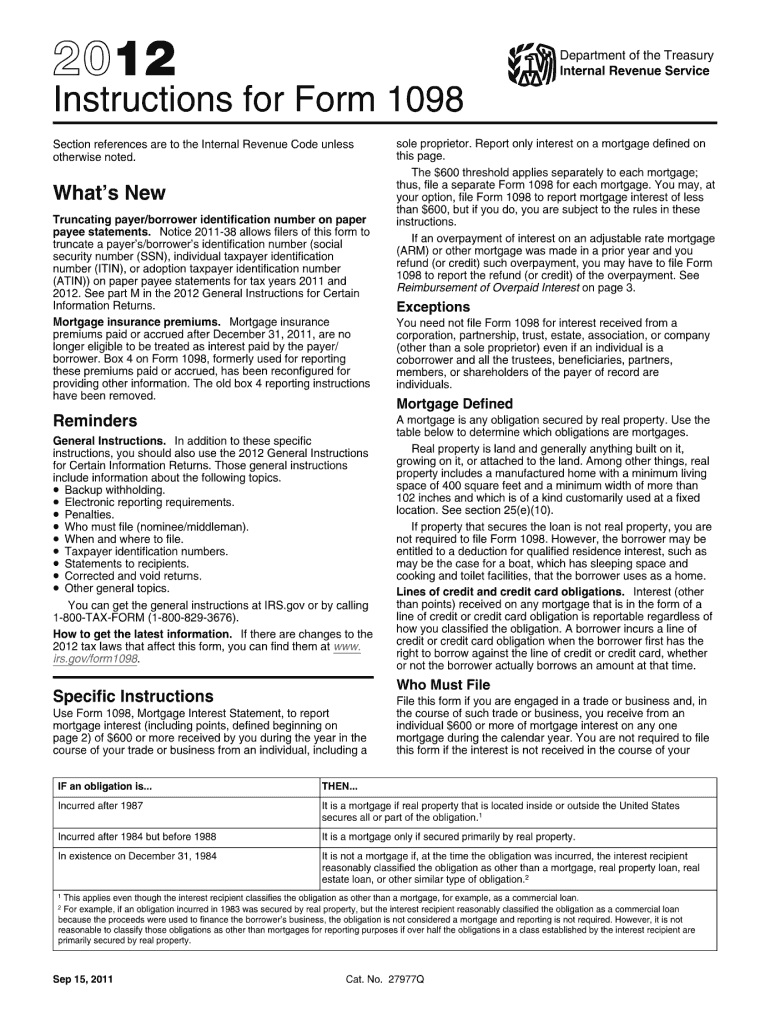
Vidual, including a sole proprietor. Report only interest on a mortgage defined later. Future Developments The $600 threshold applies separately to each mortgage; thus, file a separate Form 1098 for each mortgage. You may, at your option, file Form 1098 to report mortgage interest of less than $600, but if you do, you are subject to the rules in these instructions. For the latest information about developments related to Form 1098 and its instructions, such as legislation enacted after they w.
Loading

Open form follow the instructions

Easily sign the form with your finger

Send filled & signed form or save
How to fill out the IRS 1098 Instructions online
Filing the IRS 1098 form can seem daunting, but with a clear guide, you can efficiently complete it online. This guide provides a step-by-step approach to help you understand each section of the IRS 1098 Instructions and how to fill them out accurately.
Follow the steps to complete your IRS 1098 Instructions online.
- Click ‘Get Form’ button to obtain the form and open it in the online interface.
- Enter your name, address, and telephone number in the appropriate fields. Ensure the contact details are accurate to facilitate any necessary communications.
- Locate the boxes for entering mortgage interest received. In Box 1, input the total amount of interest received from the payer(s)/borrower(s) during the calendar year, excluding any points.
- In Box 2, report points paid on the purchase of the principal residence. Make sure these points are correctly categorized as defined in the form.
- For any refund of overpaid interest, enter the total amount in Box 3. This should only include refunds for the prior year's overpayments.
- In Box 4, report any mortgage insurance premiums of $600 or more that were received during the year. Ensure these meet the regulatory definitions outlined in the form.
- Enter any additional relevant information in Box 5, such as property address or relevant fees. This may include other items you wish to communicate to the payer.
- Ensure you enter the payer's name and address in the specified boxes. Be cautious and accurate to prevent any issues with filing.
- If necessary, provide an account number for any multiple accounts associated with the payer/borrower.
- After reviewing all entries for accuracy, proceed to save your changes. You can then download, print, or share the completed form as needed.
Complete your IRS 1098 form online today for a smooth filing experience.
Experience a faster way to fill out and sign forms on the web. Access the most extensive library of templates available.
Related content
Feb 23, 2023 — Use Form 1098, Mortgage Interest Statement, to report mortgage interest...
Who must file. • When and where to file. • Electronic reporting. • Corrected and...
Apr 15, 2015 — organization may use Form 1098-C to provide the required information. If...
Get answers to your most pressing questions about US Legal Forms API.
Where do I put my mortgage interest on my tax return?
Mortgage interest is reported on Schedule A of your tax return if you are itemizing deductions. You will directly enter the amount shown on your Form 1098 in the corresponding section for mortgage interest. To navigate this process smoothly, consult the IRS 1098 instructions, which provide essential tips for accurate reporting.
What happens if I don't file my 1098 mortgage interest statement?
If you do not file your 1098 mortgage interest statement, you may miss out on a valuable tax deduction, which could result in owing more taxes than necessary. Additionally, failing to report this information can raise flags with the IRS, leading to potential penalties. Following the IRS 1098 instructions can help you avoid these pitfalls and ensure compliance.
Does filing a 1098 increase the refund?
Filing a Form 1098 may increase your refund if it allows you to deduct mortgage interest or other eligible expenses. The more deductions you can claim, the lower your taxable income, which could lead to a higher refund. To fully benefit from this opportunity, it's wise to follow the IRS 1098 instructions to ensure you capture all allowable deductions.
Do I have to report 1098-T on my tax return?
Yes, if you receive a Form 1098-T regarding education expenses, you must report that information on your tax return. This form helps you claim education credits or deductions, so it's crucial for tax filing. For the best advice on handling both mortgage and education forms, refer to the relevant IRS 1098 instructions for accurate reporting.
Where do I enter 1098 mortgage interest on Turbotax?
In Turbotax, you can enter your 1098 mortgage interest in the section dedicated to deductions and credits. Look for the area related to mortgage interest, and input the amount shown on your Form 1098. Turbotax provides guidance throughout the process, but referring to the IRS 1098 instructions can also enhance your understanding and accuracy.
How much does 1098-T reduce taxes?
The amount that 1098-T can reduce your taxes varies based on your eligibility for education credits such as the American Opportunity Credit or Lifetime Learning Credit. Expenses reported on the 1098-T may lead to substantial tax deductions or credits, benefiting your financial situation. For specifics on these reductions, the IRS 1098 Instructions provide detailed explanations.
How does a 1098 mortgage interest affect my taxes?
The mortgage interest reported on Form 1098 can directly affect your taxes by qualifying you for itemized deductions. This deduction lowers your taxable income, which may lead to a lower tax liability. For the most accurate guidance, consult the IRS 1098 Instructions to ensure you claim this deduction appropriately.
How does a form 1098 affect my taxes?
Form 1098 can significantly affect your taxes by providing essential information related to mortgage interest, which may be deductible. This deduction can reduce your taxable income, potentially lowering your overall tax liability. Familiarizing yourself with the IRS 1098 Instructions ensures that you optimize your tax benefits.
How do I enter a 1098 on my tax return?
To enter a 1098 on your tax return, you usually report the information from the form on Schedule A for itemized deductions if it pertains to mortgage interest. For tuition or student loans, you may input the details on the designated sections of your tax form. Following the IRS 1098 Instructions can help you accurately complete your tax return.
How much will the IRS usually settle for?
The amount the IRS will settle for can vary based on your specific tax situation and negotiation. The IRS uses a formula to determine an acceptable offer in compromise, which relates to factors like your income and expenses. For clarity, it is best to consult IRS resources or the IRS 1098 Instructions, which can provide insights on how to communicate with them regarding settlements. Exploring all options is vital for achieving a favorable outcome.
Use professional pre-built templates to fill in and sign documents online faster. Get access to thousands of forms.
If you believe that this page should be taken down, please follow our DMCA take down process here.
This form is available in several versions. Select the version you need from the drop-down list below.