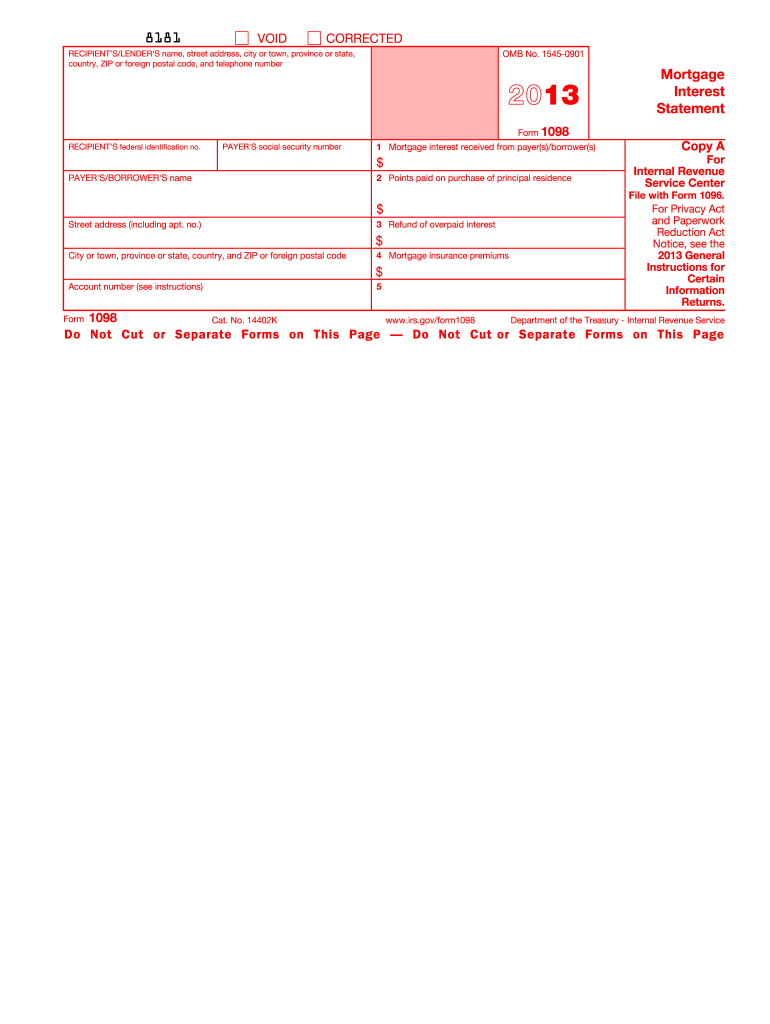
Uction for this mortgage interest or for these points or because you did not report this refund of interest on your return. Department of the Treasury - Internal Revenue Service Instructions for Payer/Borrower A person (including a financial institution, a governmental unit, and a cooperative housing corporation) who is engaged in a trade or business and, in the course of such trade or business, received from you at least $600 of mortgage interest (including certain points) on any one mortgag.
Loading

Open form follow the instructions

Easily sign the form with your finger

Send filled & signed form or save
How to fill out the IRS 1098 online
The IRS 1098 form is used to report mortgage interest received, and it is essential for both borrowers and lenders to accurately complete this form. This guide will provide you with a clear understanding of how to fill out the IRS 1098 online, ensuring that you meet all necessary requirements.
Follow the steps to accurately complete the IRS 1098 form online.
- Click ‘Get Form’ button to obtain the form and open it in the editor.
- Complete the recipient's/lender's information, including their name, street address, city or town, province or state, country, ZIP or foreign postal code, and telephone number.
- Enter the recipient's federal identification number.
- Provide the payer's social security number.
- Fill in box 1 with the total mortgage interest received from the payer(s)/borrower(s) during the year.
- In box 2, indicate any points paid on the purchase of the principal residence.
- If applicable, note any refunds for overpaid interest in box 3.
- Record mortgage insurance premiums in box 4.
- Fill in box 5 with any additional information such as the account number or any other relevant details.
- Review all entries for accuracy, then save changes. You can download, print, or share the completed form as needed.
Complete your IRS 1098 form online today to ensure timely and accurate filing.
Experience a faster way to fill out and sign forms on the web. Access the most extensive library of templates available.
Related content
Jun 6, 2025 — Use Form 1098 (Info Copy Only) to report mortgage interest of $600 or more...
Jun 6, 2025 — Eligible educational institutions file Form 1098-T for each student they...
Form 1098-T may serve as proof of payment IF payments received are recorded in Box 1. For...
Get answers to your most pressing questions about US Legal Forms API.
Do I have to add my 1098 on my taxes?
Yes, if you receive an IRS 1098 form, you must include the information on your tax return for an accurate filing. This information can impact your tax liability, and failing to include it can lead to complications. By filing correctly, you maximize your chances of receiving any credits or deductions for which you are eligible, making tax preparation smoother.
How do I claim my 1098 on my taxes?
You claim your IRS 1098 information on your tax return by entering the amounts reported on the form into the appropriate sections designated for tax credits or deductions. It’s important to refer to IRS guidelines for education-related credits, such as the American Opportunity Credit or Lifetime Learning Credit, while filing. If you need support, consider using uslegalforms to find guidance on the tax filing process.
How do I report 1098 on my tax return?
To report your IRS 1098 information on your tax return, begin by filling out the appropriate tax forms, like Form 1040 or 1040A. Include the amounts listed on your 1098-T or 1098-E as deductions or credits where applicable. Accurate reporting can help you gain access to education-related tax benefits.
What is a 1098 form for the IRS?
The IRS 1098 form is a tax document used to report various types of payments, including interest on student loans and qualified tuition payments. Different versions of the 1098 form exist, such as the 1098-E for student loans and the 1098-T for educational expenses. Understanding these forms enables you to accurately report your finances and utilize applicable tax benefits.
Where can I find my 1098 form online?
You can find your IRS 1098 form online through your educational institution's financial services or student account portal. Most colleges and universities provide access to tax documents in a secure online environment. If you have trouble locating your form, reaching out to your institution's financial aid office can also be helpful.
Can form 1098 be filed electronically?
Yes, you can file form 1098 electronically. Many tax software programs support the electronic submission of IRS 1098 forms, making the filing process more efficient. It’s essential to follow the specific instructions provided by the software to ensure compliance with IRS requirements. Electronic filing generally allows for faster processing and quicker refunds.
Does filing a 1098 increase the refund?
Filing an IRS 1098 can potentially increase your refund depending on your financial circumstances. For example, if you claim mortgage interest or education credits using the 1098 forms, these deductions may lower your taxable income and result in a higher refund. It’s important to accurately report the information from your forms to ensure you receive the full benefit. Using platforms like uslegalforms can help streamline this process.
How do I file a 1098 on my taxes?
To file an IRS 1098 on your taxes, first ensure you have the correct form, such as the 1098 for mortgage interest or the 1098-T for tuition payments. Input the relevant information on your tax return, making sure to attach any necessary supporting documents, if required. If you use tax software, it typically has fields specifically designed for entering this data. Doing this correctly ensures you maximize your potential tax benefits.
How does a 1098 affect my taxes?
An IRS 1098 can significantly affect your taxes by providing deductions or credits. For example, if you receive a 1098 related to mortgage interest, you can itemize that interest on your tax return, lowering your taxable income. Similarly, a 1098-T could help you claim education credits. Understanding how to properly use these forms can lead to potential savings.
How do I enter my 1098-T on my tax return?
To enter your 1098-T on your tax return, find the appropriate section for education credits, such as the American Opportunity Credit or Lifetime Learning Credit. Transfer the relevant information from your IRS 1098-T, especially the amounts in Box 1 for qualified tuition and fees, onto the tax software or form you are using. This entry can help reduce your taxable income and potentially increase your tax refund.
Use professional pre-built templates to fill in and sign documents online faster. Get access to thousands of forms.
If you believe that this page should be taken down, please follow our DMCA take down process here.
This form is available in several versions. Select the version you need from the drop-down list below.