Tax year ended tax year ended tax year ended (continued) Before carryback 20 General business credit (see instructions) 21 Net premium tax credit (see instructions) 22 Other credits. Identify . 23 Total credits. Add lines 20 through 22 24 Subtract line 23 from line 19 . 25 Self-employment tax (see instructions) 26 27 Additional Medicare Tax (see instructions) Net Investment Income Tax (see instructions) . . . . . . . . . Health care: individual responsibility (see i.

Open form follow the instructions

Easily sign the form with your finger

Send filled & signed form or save
How to fill out the IRS 1045 online
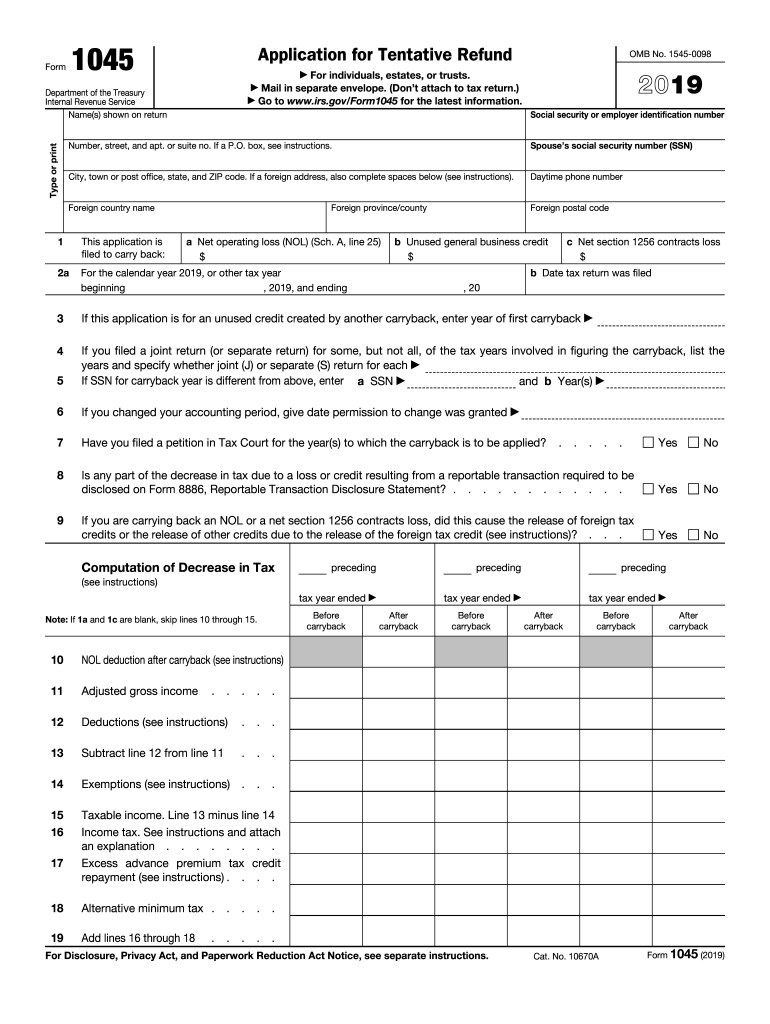
The IRS 1045 form is used to apply for a tentative refund due to a net operating loss (NOL) carryback for individuals, estates, or trusts. This guide provides clear, step-by-step instructions for users to successfully complete the form online.
Follow the steps to fill out the IRS 1045 online.
- Click ‘Get Form’ button to access the form and open it in the editor.
- Enter the name(s) shown on your tax return in the designated field at the top of the form. Make sure to type or print clearly.
- Complete section 1 by indicating the type of loss you are carrying back by selecting from options such as net operating loss (NOL), unused general business credit, or net section 1256 contracts loss.
- Fill in the appropriate boxes if you have filed joint returns or if there has been a change in your accounting period. Provide the necessary details based on your situation.
- Finally, review all sections for accuracy, then save your changes. You can download, print, or share the form as needed to ensure your application is submitted successfully.
Start filling out your IRS 1045 form online today to secure your potential refund.
Experience a faster way to fill out and sign forms on the web. Access the most extensive library of templates available.
Related content
Jan 21, 2025 — An individual, estate, or trust files Form 1045 to apply for a quick tax...
26 U.S. Code § 1045 - Rollover of gain from qualified small business stock to another...
Dec 6, 2017 — File Form 1045 with the Internal. Revenue Service Center for the place...
Get answers to your most pressing questions about US Legal Forms API.
Who must file the IRS form 8995?
Typically, any taxpayer who claims the qualified business income deduction must file IRS form 8995. This includes single filers, married couples, and business structures like S corporations and partnerships. Make sure to adhere to IRS regulations for accurate and timely tax reporting. If you find the process daunting, uslegalforms can assist you in navigating these requirements.
What is the IRS form 8995 A for?
The IRS form 8995 A is used to calculate the qualified business income deduction for taxpayers with more complicated tax situations. If your taxable income exceeds the thresholds for simpler calculations, this form offers additional guidance. Understanding this form is crucial for accurately determining your deduction and optimizing your tax filings. Referencing IRS 1045 increases your confidence in the process.
Who needs to file form 8995?
Any taxpayer who qualifies for the qualified business income deduction should consider filing form 8995. This includes individuals, estates, and trusts who receive income from eligible pass-through businesses. It's essential to ensure that your income meets IRS requirements for this form. Utilizing resources like uslegalforms can simplify the filing process.
Who qualifies for the qualified business income deduction?
Individuals who earn income from pass-through entities, such as partnerships, S corporations, or sole proprietorships may qualify for the qualified business income deduction. This deduction applies to those whose taxable income falls below certain thresholds. Always check the most recent IRS guidelines, as eligibility criteria can change. The IRS 1045 form can provide insights into your tax position and advantages.
How do I file an amendment to the IRS?
To file an amendment to the IRS, you need to complete the Form 1040X or IRS 1045, depending on your situation. Gather all necessary documentation, including your original tax return and any supporting documents for the changes you want to make. Once completed, submit your amendment to the appropriate IRS address. Ensuring accuracy in your submission can help avoid delays in processing.
How to calculate qualified business income for form 8995?
To calculate qualified business income for form 8995, start by determining your business's net income, not including capital gains or losses. Then, subtract any eligible deductions such as business expenses. This calculated amount represents your qualified business income, which is essential when claiming the qualified business income deduction. Remember, staying informed about IRS 1045 guidelines can also enhance your tax strategy.
What is the 1045 rule?
The IRS 1045 rule allows taxpayers to claim a quick refund of overpaid taxes by filing an application for a tentative refund. This process can expedite your receipt of funds, especially in situations involving net operating losses. By utilizing the IRS 1045 form, you can apply for a carryback of losses that can provide financial relief. It is crucial to understand this rule to ensure you can benefit from it effectively.
What is proof of federal finalization for your 1040X or 1045?
Proof of federal finalization for your 1040X or 1045 is essential to demonstrate that you have officially corrected your tax returns. When you file an amended return with the IRS, obtaining a confirmation or transcript that verifies the final acceptance of your corrected return is vital. This confirmation serves as your proof that the IRS has processed your changes. Using the IRS 1045 form helps streamline this process.
What is the IRS Code 1045?
The IRS Code 1045 pertains to the tax code section governing the carryback of net operating losses for refunds. This code outlines the eligibility requirements and procedures taxpayers must follow when using IRS Form 1045 to claim a quick refund. Familiarizing yourself with IRS Code 1045 can enhance your understanding of tax recovery options available to you.
What is IRS Letter 1045?
IRS Letter 1045 is a specific correspondence that the IRS sends when processing requests related to IRS 1045. This letter may contain information about your refund, any outstanding issues, or further steps you need to take. If you receive IRS Letter 1045, ensure to read it thoroughly to understand your tax situation clearly.
Use professional pre-built templates to fill in and sign documents online faster. Get access to thousands of forms.
If you believe that this page should be taken down, please follow our DMCA take down process here.
This form is available in several versions. Select the version you need from the drop-down list below.